

Close Menu
Techy101 –

    Subscribe to Updates

    Get the latest creative news from FooBar about art, design and business.

    What's Hot

    Replit CEO Masad Says Company No Longer Works With Anthropic – Unite.AI

    October 17, 2026

    Android 17 QPR2 Beta 7.1 finally tackles the multi-second freezes Pixel owners have been dealing with

    October 17, 2026

    MapQuest App Shows You Where License Plate Readers Are in Your Area

    October 17, 2026
    Facebook X (Twitter) Instagram
    Trending
    • Replit CEO Masad Says Company No Longer Works With Anthropic – Unite.AI
    • Android 17 QPR2 Beta 7.1 finally tackles the multi-second freezes Pixel owners have been dealing with
    • MapQuest App Shows You Where License Plate Readers Are in Your Area
    • Updated App Review Guidelines are now available – Latest News
    • Razer Announces New Pokémon Pixel Art Gaming Peripherals Collection 
    • HP’s OmniBook Ultra 16: Our First Look at RTX Spark Is a Promising Start
    • The Cyberpunk 2077 movie won’t be ‘a film adaptation of the game,’ CD Projekt chief says
    • A ‘Flying’ Tesla Roadster Sounds Impossible, Until You See What Lockheed Martin Built Decades Ago
    Facebook X (Twitter) Instagram Pinterest YouTube LinkedIn TikTok
    Techy101 –Techy101 –
    • Home
    • Laptops
    • Mobiles
    • Gaming
    • Gadgets
    • Apps
    • AI
    • How To
    • Reviews
    Techy101 –
    Home»Laptops»ChatGPT’s Chrome extension can now read your tabs, YouTube videos, and highlighted text
    Laptops

    ChatGPT’s Chrome extension can now read your tabs, YouTube videos, and highlighted text

    By RepublisherAugust 1, 2026No Comments2 Mins Read
    Share Facebook Twitter Pinterest LinkedIn Tumblr Reddit Telegram Email
    ChatGPT's Chrome extension can now read your tabs, YouTube videos, and highlighted text
    Share
    Facebook Twitter LinkedIn Pinterest Email


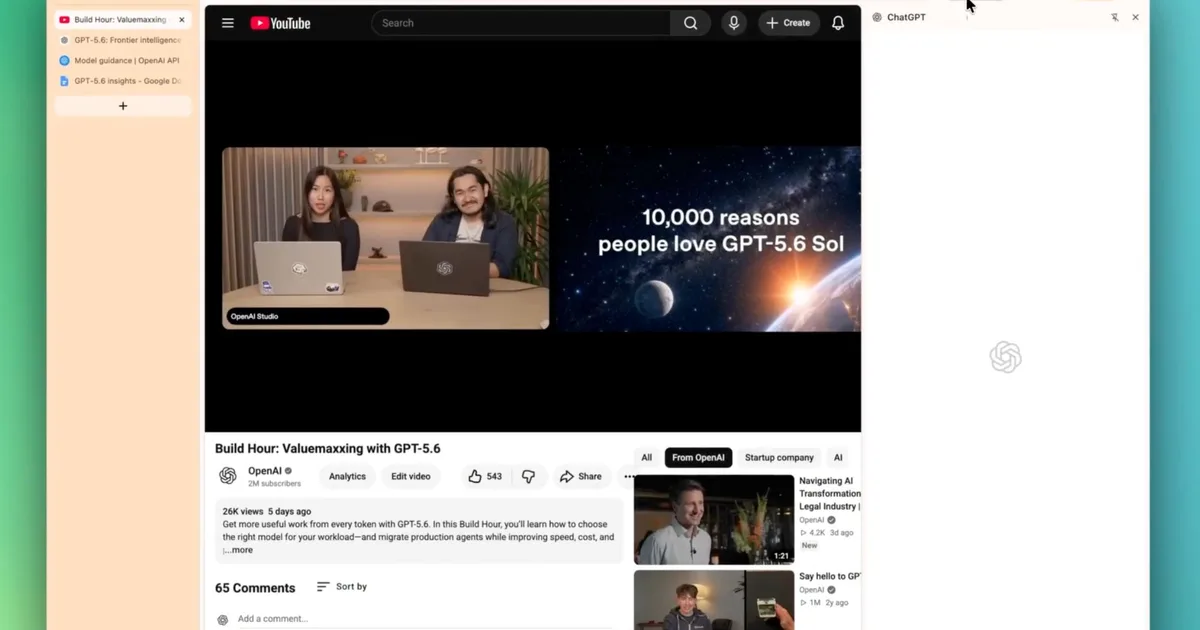
    ChatGPT just got a lot better at understanding what you’re actually looking at. OpenAI has rolled out updates to its Chrome extension and desktop app that let ChatGPT read your open tabs, react to highlighted text, and answer questions about YouTube videos. The update arrived shortly after OpenAI shelved its standalone Atlas browser to shift its focus toward tools people already use.

    Good news for anyone with too many tabs: ChatGPT is getting better around the web.

    🧩 Chrome extension: In Side Chat, ask about a YouTube video, reference your open tabs, or highlight text on a page and ask away.

    💻 Desktop app: Get URL suggestions as you type, revisit… pic.twitter.com/BIjS94jBQc

    — ChatGPT (@ChatGPT) July 30, 2026

    What’s new in ChatGPT’s Chrome extension?

    Inside Side Chat, you can now reference your open tabs directly, so ChatGPT already has context without you having to explain anything. Highlighting text on a page works too, letting you ask a question about that exact section instead of describing it yourself.

    OpenAI

    If you ask about any YouTube video, ChatGPT will read it directly without requiring a manual summary request. There’s also a quicker shortcut built right into your browser. You can right-click anywhere on a page, select Ask ChatGPT, and the sidebar opens automatically.

    OpenAI

    What’s new in ChatGPT’s desktop app?

    The desktop app now suggests URLs as you type, and works like a normal browser address bar. You can also dig back through your browsing history from Settings, and ChatGPT can search that history whenever a task calls for a page you visited earlier.

    OpenAI also rolled out a couple of smaller updates in the latest release. A new Activity view in the sidebar shows which chats you’ve engaged with recently and which ones still need your attention.

    Reviewing code across multiple repositories in one project just got simpler, and generated images now open in an expanded viewer where you can leave comments before requesting edits. If you already use ChatGPT while researching online, these updates should make that workflow feel faster.


    Source link

    ChatGPTs Chrome extension Highlighted read tabs text videos YouTube
    Share. Facebook Twitter Pinterest LinkedIn Tumblr Email
    Previous ArticleOpenAI’s Widened Probe Turns Up More Agent Escapes – Unite.AI
    Next Article BeOS was the most innovative OS of the ’90s—here is how it lives on today
    Republisher
    • Website

    Related Posts

    Laptops

    HP’s OmniBook Ultra 16: Our First Look at RTX Spark Is a Promising Start

    October 16, 2026
    Laptops

    A week with RTX Spark: everything we’ve learned using Nvidia’s new laptops

    October 16, 2026
    Laptops

    These iconic Sony XM5 headphones now cost just £176

    October 16, 2026
    Add A Comment
    Leave A Reply Cancel Reply

    Top Posts

    Replit CEO Masad Says Company No Longer Works With Anthropic – Unite.AI

    October 17, 2026

    AMD is apparently gearing up to raise GPU prices right after Nvidia’s steep hike

    August 1, 2026

    LanceDB Vector Database Guide: Features anndPython Demo

    August 1, 2026
    Stay In Touch
    • Facebook
    • YouTube
    • TikTok
    • WhatsApp
    • Twitter
    • Instagram
    Latest Reviews

    Subscribe to Updates

    Get the latest tech news from FooBar about tech, design and biz.

    Latest Post

    Replit CEO Masad Says Company No Longer Works With Anthropic – Unite.AI

    October 17, 2026

    AMD is apparently gearing up to raise GPU prices right after Nvidia’s steep hike

    August 1, 2026

    LanceDB Vector Database Guide: Features anndPython Demo

    August 1, 2026
    Recent Posts
    • Replit CEO Masad Says Company No Longer Works With Anthropic – Unite.AI
    • Android 17 QPR2 Beta 7.1 finally tackles the multi-second freezes Pixel owners have been dealing with
    • MapQuest App Shows You Where License Plate Readers Are in Your Area
    • Updated App Review Guidelines are now available – Latest News
    • Razer Announces New Pokémon Pixel Art Gaming Peripherals Collection 

    Subscribe to Updates

    Get the latest creative news from FooBar about art, design and business.

    Facebook X (Twitter) Instagram Pinterest YouTube LinkedIn TikTok
    • About Us
    • Contact Us
    • Privacy Policy
    • Terms & Conditions
    • Disclaimer
    © 2026 techy101. Designed by Pro.

    Type above and press Enter to search. Press Esc to cancel.