


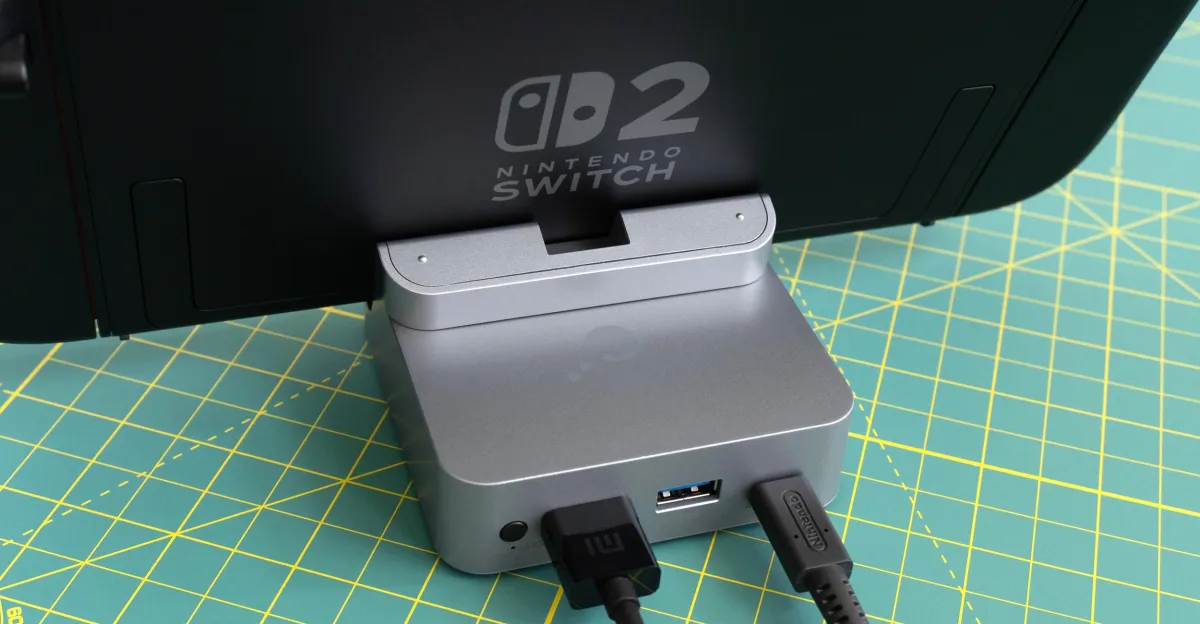
Nintendo didn’t design its Switch dock with travel in mind. Genki’s Covert Dock is a much smaller alternative my family has been using to connect our Switch to hotel TVs for years, but I’ve come to realize I much prefer having a stand for the console when using it this way. So when it came time to replace the Genki because Nintendo broke compatibility with the Switch 2, GuliKit’s updated travel dock seemed like a better fit for my needs. Like Nintendo’s, it provides a convenient place to perch the console while playing on a TV. It’s not perfect, but its few tradeoffs are easy to overlook given GuliKit’s solution is less than half the price of Genki’s.
When I first unboxed the GuliKit Dock for Switch 2, it felt like a bait and switch. Although it looks like it’s milled from a block of aluminum like my MacBook, the dock is actually an all-plastic affair that’s convincingly finished to look like metal. Picking it up for the first time was akin to grabbing an empty soda can you think is full. It’s surprisingly light, and while I was initially disappointed, I soon realized that was probably a good thing since I’m an over-packer who frequently deals with overweight baggage.
The dock’s design — essentially a square puck with rounded corners — is larger than the Genki dock I used to travel with, but it’s by no means bulky or cumbersome. It’s wide enough to securely support the Switch when it’s docked (I actually wouldn’t want it any smaller), and it positions the console at a slight backwards angle that helps ensure it won’t fall off and face-plant even if accidentally bumped.
A magnetic cover protects the USB-C connector when it’s not in use, but while the Switch is connected, the cover can be attached to the top of the dock where it doubles as a slightly taller backrest for the console. It’s a good idea, but one let down by relatively weak magnets. It doesn’t take much force to dislodge the cover, and I’ve already had it pop off on its own while buried in my backpack. Attaching the cover with a hinge held shut by a single strong magnet would have worked better, I think.
On the underside of the dock are four rubber feet preventing it from sliding around and a three-position sliding switch that’s supposed to extend the USB-C connector to accommodate your console when it’s in a protective case. On the dock I tested, moving that switch to different positions only served to slightly change the angle of the USB-C connector by a few degrees, which doesn’t seem all that useful.
On the back of the dock is a 4K/60Hz HDMI port, a USB-A port for charging accessories like a controller, and a USB-C port for connecting an adapter with up to 100W of power delivery. Having to supply your own power adapter is the biggest downside to choosing GuliKit’s dock over Genki’s that has one built-in and is designed to plug straight into an outlet. That could make GuliKit’s dock less appealing to some, but it’s not an issue for me given I already travel with multiple adapters that deliver the 60W the Switch 2 needs for its dock mode.
Alongside the multiple ports on the back is also a small button that turns off dock mode and video output so the accessory only functions as a charger. GuliKit positions this feature as a way to charge and play the Switch in handheld mode without actually having to hold it. While the ergonomics of that approach seem less than ideal to me, disabling the dock mode does have the benefit of making the Switch charge a little faster if you’re in a rush to top off its battery.
If you’re looking for the smallest possible way to connect your Switch 2 to a TV, you’re probably better off grabbing Genki’s or Jsaux’s accessories that incorporate a power adapter into their designs so all you need to provide is an HDMI and USB-C cable. GuliKit’s solution is slightly bulkier, but I really like that it replicates most of the functionality offered by the bundled Nintendo dock with a much smaller footprint. And it’s not just useful for traveling. If you want to connect your Switch 2 to TVs in multiple rooms around your home and don’t need an ethernet port, at $29.99 GuliKit’s is a much cheaper alternative to Nintendo’s $124.99 dock set, even when factoring in the added cost of an HDMI cable and 60W adapter.
Photography by Andrew Liszewski / The Verge