


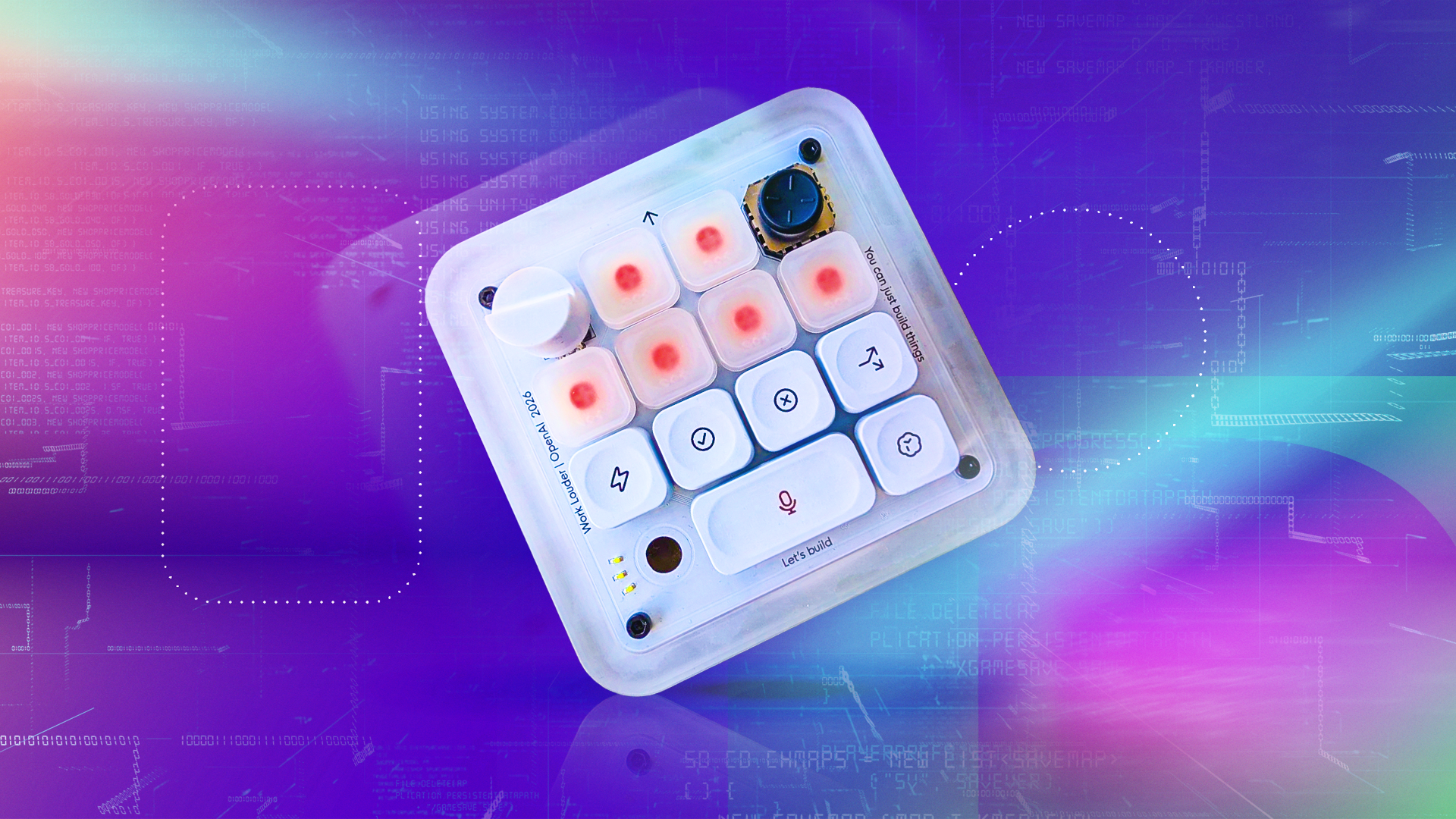
I’ve been using the Codex Micro keypad from ChatGPT-maker OpenAI and Work Louder for a month to vibe code, and, pardon the pun, but the vibes are bad.
The Codex Micro is a 12-key square keypad built for hard-core, professional coders, particularly those who use OpenAI’s program, Codex, designed to help monitor and control AI agents. Admittedly, I’m not the target audience for this device, but if AI is going to make everyone a vibe coder, I assumed I could figure it out with little trouble.
But for a novice like me, this keypad only minimally helped me vibe code different website frames and other projects.
As I was using it, I kept returning to two conflicting thoughts: This is just a mechanical keypad. An expensive one at that, costing $230 before taxes and shipping. That’s 11 months of a ChatGPT Plus subscription, more than 30 lattes or two regular standard Apple Magic Keyboards.
Who would choose to spend their disposable income on this? Shockingly, to me, apparently lots of people wanted to; it sold out in about 12 hours, with no plans to extend the limited run.
Despite its limited target audience and high price tag, the Codex Micro was popular, or at least, popular enough to be ridiculed online. In order to get my hands on one, I had to borrow one from CNET’s sister site, PCMag.
Even if people only bought it to hate on it or say they had a piece of AI memorabilia, those sales are good signs for OpenAI’s future hardware ambitions. In that sense, the Codex Micro is more than an overpriced keypad; it’s a trial balloon, too. And we can learn a lot from this initial device.
Note the blue-lit agent key in the top left corner. That means my agent is working on a project.Katelyn Chedraoui/CNET
Getting started with the Codex Micro keypad
It’s a sturdy little thing; I was surprised by how heavy it was in my hand. I used the “clicky” model, which makes a satisfying noise every time you tap a key. There’s also a silent version for less ASMR-inclined coders. You can connect the keypad via USB-C or Bluetooth, whatever works best for your desk setup.
There are six agent keys, which are your main keys. A knob (upper left) helps you navigate around the window, and the joystick (upper right) can launch workflows. The other six keys are customizable, but the defaults include a microphone key to tap into ChatGPT Voice Mode, a lightning bolt to switch to fast mode and a fork to split your current window into a new chat. You’ll have to remap new keys to monitor more than six agents at once.
You can connect and charge the keypad with a USB-C cord.Katelyn Chedraoui/CNET
It’s either cringe or hilarious, but the full 32-key cap set includes “yeet” and “yolo” key caps you can swap in and remap for specific tasks. I think it’s funny, but I didn’t have the tools to swap the key caps, and I didn’t want to risk damaging the device without them. For $230, OpenAI and Work Louder could’ve included a keycap puller.
The first thing you’re going to do once your keypad is paired with your computer is open your ChatGPT desktop app. Tap the keyboard icon next to your profile picture, and you can customize how the keypad works. I switched the knob to scroll through my conversation history, instead of the default, which confines it to the prompting bar.
Vibe coding with the Codex Micro
The novelty quickly wore off after a few tasks. You can assign specific AI agents to keys on the device, so you can keep an eye on their progress when you don’t have Codex open on your computer. The agent keys blink different colors – white for waiting, blue for thinking, green for success, amber for needing human assistance – so you can visually keep track of each bot’s progress. You can program multistep automations to the other keys if you have specific, repetitive workflows.
“Let’s build” is one of OpenAI’s taglines for Codex.Katelyn Chedraoui/CNET
Using the keypad to authorize approvals was a big perk for me. For more complex coding tasks – like vibe coding website frames, as I mostly did – the AI checks in with you along the way. You have to grant the program access to download packages and use file folders. Rather than toggling back to the desktop app every time Codex needed the green light from me, I read the pop-up notification and tapped the check-mark button on the keypad. It helped keep me relatively on task as the AI ran in the background.
I vibe coded a weekly planner, a project management site and a health insurance plan picker. I liked using the keys to keep track of projects and use voice-to-text commands with the microphone key.
Despite all this, the device is ultimately just a keyboard. It couldn’t help me troubleshoot problems, debug code or figure out why a page broke. The Codex Micro solved a problem that I could’ve lived with, rather than giving me a true productivity boost or coding edge.
This is what the bottom of the Codex Micro keypad looks like.Katelyn Chedraoui/CNET
Is this the future of AI hardware?
I can’t stress enough how nuts it is that this luxury device could be a sign of what’s to come. To extract the full value of the device, you need to be a power Codex user and have the time and patience to integrate it fully into your setup. Depending on your ChatGPT subscription, you may already be paying between $20 to $200 per month to use Codex.
I truly can’t imagine that this $230 device offers enough value to justify the additional expense for most developers, which is why it’s more likely a novelty item or marketing gimmick than a serious piece of hardware.
If I’m being generous, OpenAI does earn some points for avoiding what seems to be the usual “AI hardware” device, which is some version of a pendant or wearable that records everything around it. I certainly didn’t have to worry that the Codex Micro would automatically scan every person I passed by and use facial recognition on them, as Meta’s smart glasses are reportedly gearing up to do. But man, what a low bar.
AI is infiltrating our lives in unprecedented ways, powered by data centers eating up our land, energy and water. Generative tools like chatbots, coders and agents are rapidly changing the workforce, leaving many of us worried we will one day have our jobs replaced by autonomous bots. Questions around AI’s legality, ethics and creativity persist.
All AI hardware companies, not just OpenAI, are facing an uphill battle to convince us we even need these devices. And the Codex Micro certainly isn’t making a convincing argument. It’s an overpriced luxury device with minimal benefits. If this is the future of AI hardware, count me out.
(Disclosure: Ziff Davis, CNET’s parent company, in 2025 filed a lawsuit against OpenAI, alleging it infringed Ziff Davis copyrights in training and operating its AI systems.)
Codex Micro specs
ConnectionBluetooth, USB-CCompatibilityMac, Windows, Linux (maintained by community)LightingRBGMaterial and finishCNC PC and aluminum. Sandblasted anodized bottom. PBT & PC keycaps. Rubber joystick cap. POM / POK switches.Keyboard13x mechanical switches. 1x touch sensor. 1x rotary encoder. 1x planar joystick.Keyset32x custom icons. 11x solid color caps.SoftwareChatGPT Codex. Work Louder Input.IncludedCreator Micro. USB-C to USB-C cable. Codex icon keyset (30x1U, 1x2U)
Katelyn Chedraoui
See full bio