


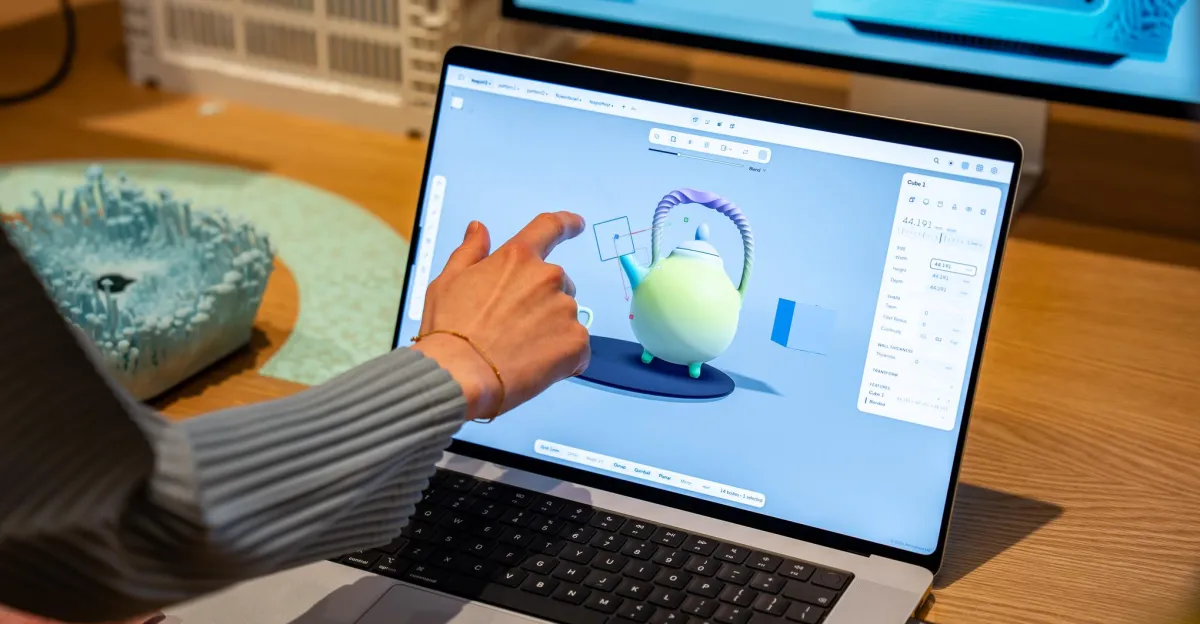
Apple’s long-awaited touchscreen MacBook Pro is finally here. I got to try this MacBook that, according to the last two Apple CEOs, shouldn’t exist. The most surprising thing is how normal it is.
The MacBook Pro with PROLED XDR Display (what a name) has one of the nicest screens I’ve seen on a laptop. The current Mini LED MacBook Pros are great, but the OLED has those even inkier blacks. It also gets super bright, with incredibly rich colors and infinite contrast. Apple calls it a “reference-caliber display,” which is a very Apple-y marketing term, but it walks the walk by being the first laptop display with support for Apple CMF 2026 color modes.
But Apple didn’t spend 16 years saying it wouldn’t put an OLED in a laptop. The hallmark feature — the thing Apple was never going to do until it did — was the touchscreen. How would Apple prove that touchscreens on laptops aren’t “ergonomically terrible”? What magic would it bring to this input method that makes us go, “Ah-ha! Apple took its time, but it really figured it out”?
And it’s just a touchscreen.
We’re just normal touchscreen laptops. Just innocent touchscreen laptops.
Of course, I’m glad Apple is finally doing this. There’s no harm in accommodating people’s natural urge to reach out and touch something on a screen. But there’s also no magic. You can poke and swipe at the screen. Hooray! Some UI elements in macOS 27 Golden Gate and certain apps either magnify or expand a little when you tap them. It’s cool and all, but it doesn’t exactly look like it’ll reinvent how we use laptops. (Better luck in future macOS updates, I guess?)
Over a decade ago, touchscreen laptops were supposed to be revolutionary. Microsoft gave Windows 8 a whole new touch-optimized UI. Laptops started flipping and folding and getting all weird and fun. Then, Windows 8 crashed and burned, and convertible laptops became just another product segment as opposed to redefining how a laptop looks and works. Apple waited it all out, realized no one cared that much, added a touchscreen with some minor UI improvements, and went, “Okay, enjoy macOS with some swiping.”
This demo from a pro photographer used bracketed exposures and a vibe coded app to composite the images into one interactive photo. The taps and swipes on the screen were a natural way to collage the imagery, but a mouse or trackpad works too.
It’s kind of boring, but maybe a winning move. It finally rips off the Band-Aid for Apple and sets the table for touchscreens to one day come to much more attainable laptops, like the MacBook Air and Neo. Apple still has lots of touch-based devices for people who want to prioritize that. But this is just normal now: You have a laptop with a keyboard, trackpad, and a touchable screen for whenever you want to poke at it.
It’s all very strategic, as is usually the case with Apple. But it’s hard not to wonder that it could have done more. Looking at the touchscreen settings menu, I saw that most touch gestures just map to things you can already do on the trackpad. At Apple’s event, I sat in on briefings that included professionals who recently started using the touchscreen MacBook Pro. Touching the screen wasn’t redefining their workflows or how they practice their craft — they still defaulted to keyboard and trackpad functions. The touchscreen was just a bonus. When I asked a few of them if they wished the MacBook Pro included Apple Pencil support, nearly all of them said sure, that’d be cool, too. Because the more options, the better. Apple took over a decade to come around to the touchscreen. Don’t hold your breath for Pencil support or a 360-degree hinge.
This is fine.
The new OLED and lighter chassis are just as important as the touchscreen in making the new MacBook Pro feel special. The Dynamic Island is a nice upgrade over the notch. And bringing back the illuminated Apple logo is just fun! It’s actually what got the biggest reaction from the crowd during John Ternus’ incredibly brief presentation. This new MacBook Pro looks great as a whole, but there’s more magic in that lid logo than the touchscreen.
Before the event, I wondered how Apple could make a touchscreen laptop better. And, well, it just made a touchscreen laptop.
Photography by Antonio G. Di Benedetto / The Verge
Follow topics and authors from this story to see more like this in your personalized homepage feed and to receive email updates.
- AnalysisClose
Analysis
Posts from this topic will be added to your daily email digest and your homepage feed.
FollowFollow
See All Analysis
- AppleClose
Apple
Posts from this topic will be added to your daily email digest and your homepage feed.
FollowFollow
See All Apple
- Apple Event 2026Close
Apple Event 2026
Posts from this topic will be added to your daily email digest and your homepage feed.
FollowFollow
See All Apple Event 2026
- GadgetsClose
Gadgets
Posts from this topic will be added to your daily email digest and your homepage feed.
FollowFollow
See All Gadgets
- Hands-onClose
Hands-on
Posts from this topic will be added to your daily email digest and your homepage feed.
FollowFollow
See All Hands-on
- LaptopsClose
Laptops
Posts from this topic will be added to your daily email digest and your homepage feed.
FollowFollow
See All Laptops
- macOSClose
macOS
Posts from this topic will be added to your daily email digest and your homepage feed.
FollowFollow
See All macOS
- ReportClose
Report
Posts from this topic will be added to your daily email digest and your homepage feed.
FollowFollow
See All Report
- ReviewsClose
Reviews
Posts from this topic will be added to your daily email digest and your homepage feed.
FollowFollow
See All Reviews
- TechClose
Tech
Posts from this topic will be added to your daily email digest and your homepage feed.
FollowFollow
See All Tech