


Last week, I powered on a 26-year-old copy of Pokémon Pinball, one of the best Game Boy games ever made. My save file was no more. The Charmander I’d caught for my daughter, the high scores we’d set together… gone. Before flash memory, Nintendo cartridges used tiny watch batteries to save their games, and those batteries were never meant to last this long.
But it’s not a huge deal, because I saved my family’s save file months ago. I backed it up with an Epilogue Operator, a device that connects your real Nintendo cartridges to Windows PCs, MacBooks, even a Steam Machine.
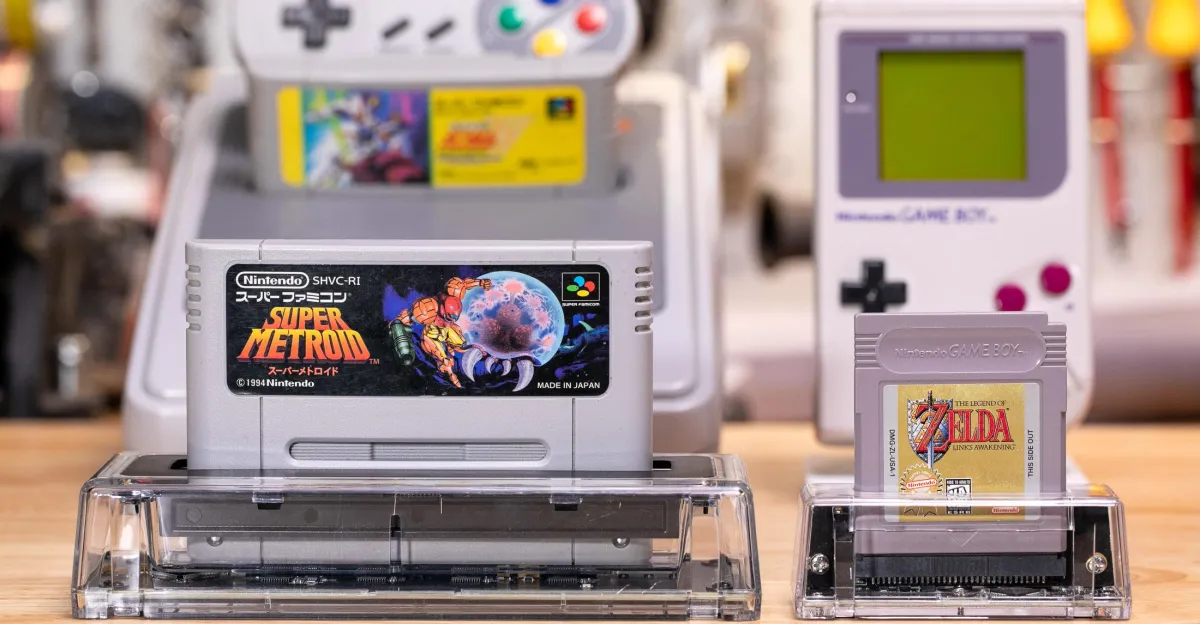
The $50 GB Operator is a transparent trapezoidal cartridge reader that reads and writes to real Game Boy, Game Boy Color and Game Boy Advance cartridges over a USB-C cable; the company’s new $60 SN Operator does the same for Super Nintendo and Japanese Super Famicom titles. Epilogue’s also got a N64 version coming.
They’re not just for backups! As you can see in my embedded video, these gadgets can play your carts, too. My Xbox Ally now takes Super Nintendo cartridges, my Steam Deck plays Game Boy carts, and my phone is a Game Boy Camera, because I attached an Epilogue Operator to each one. (Double-sided magnet rings and Mechanism mounts helped.)
Technically, the SN Operator and GB Operator are just cartridge readers, there are no original Nintendo chips or FPGAs inside. When you play a game, your computer saves the ROM to your computer and plays it in an emulator.
But Epilogue’s Playback software makes that easy — just plug in the reader, plug in the cart, hit play — and it casts a convincing illusion that you’re playing your games on actual carts. Plug one in, and your game pops up on screen. Whenever you save in the game, Epilogue should automatically save back to your cartridge as well. Whenever you yank a cart, the game instantly winks out.
The SN Operator, with a big slot to fit an SNES or Super Famicom cartridge (and spring-loaded door covers up top).
The GB Operator, about a quarter of the size of the SN Operator.
That last one’s a bit of a double-edged sword, because Epilogue’s Operators can be touchy about cartridge detection. They aren’t as forgiving as an actual Super Nintendo or Game Boy if your carts are slightly dirty or damaged. I’ve got Japanese copies of Bahamut Lagoon and Sailor Moon R that’ll quit mid-session if I nudge them wrong.
But I love that I can write savegames to my cartridges: I can play a game on my PC, move the cartridge over to my Steam Deck, then pop it into an actual original Game Boy or Super Nintendo and pick up where I left off. If you don’t need to automatically write saves, you can even switch to an emulator core that offers RetroAchievements, plus optional creature comforts like saving anywhere in a game with save states, or the ability to rewind time and try that tricky jump once more.
Super Nintendo on an Xbox Ally? Yep.
Want to hear something especially nerdy? My family recently played Super Metroid on the Super Famicom Classic Edition that Nintendo released in 2017, and there’s actually a way to pull your savegames off of those emulator consoles, too. I converted and wrote that savegame to my actual Japanese Super Metroid cartridge, and now I’m playing that save on 30-year-old original Nintendo hardware. (Speaking of: did you know a Japanese copy of Super Metroid is downright affordable and entirely in English?)
(I attached the SN Operator with a Mechanism mount and some right-angle USB-C adapters.
I never had a Super Nintendo growing up, and I don’t have a working Super Scope light gun or SNES Mouse now. But the SN Operator is also helping me play amazing games like Metal Combat: Falcon’s Revenge and Mario Paint and share them with my kids, no crusty old peripherals necessary. There’s an option to let your PC mouse cursor emulate a light gun or mouse, and it was simple to map those to my Steam Controller’s gyroscope aiming.
While you can do most if not all of these things by pairing emulators with other hardware, including the Open Source Cartridge Reader and a variety of Game Boy readers, Epilogue’s hardware is surprisingly high-quality considering its low cost, with attractive minimalist circuit boards clearly visible through classy polycarbonate. You know how we love our transparent gadgets around here.
Here’s the back of the GB Operator. Photo by Sean Hollister / The Verge
And Epilogue isn’t just riding on the coattails of emulator developers, either. While the hardware’s proprietary, the Romanian company contributes some money and some code to open source emulators. Co-founder Petru Sebastian Toader also tells me he built his software’s excellent new CRT filter himself, the company’s working on online multiplayer, and every single SN Operator has its clockspeed factory-calibrated using satellites so they can dump certain SNES games without errors.
Epilogue’s also teamed up with the developers of Delta Emulator so you can plug real carts into your phone, and even built its own Flashback app if you want to turn your phone into a Game Boy Camera.
The Operator’s 3D trapezoidal prism shape doesn’t exactly lend itself to portability, but I stuck a magnet ring to it just right.
With all these amazing features, I just think Epilogue should be a little bit more upfront on its product pages about the compromises you need to make.
You should know the limitations: the Operators don’t work with multi-game flashcarts, they don’t work with the Super Game Boy, and their heavily marketed “Counterfeit cartridge detection” has been very hit or miss in my tests, to the point I wouldn’t really trust it. The company advertises that it can turn your Game Boy Camera into a webcam, but it’s more of an OBS screen recording hack than I would have guessed.
The GB Operator.
And if you, like me, have original Game Boy cartridges with original batteries, it may be too late to save some of your saves by now. It’s far too late to pull Pokémon off second-gen games like Pokémon Gold, Silver and even Crystal, whose real-time clocks drained their backup batteries and might not have lasted more than a decade.
As for first-gen Game Boy games, I pulled a Charmander off an original Pokémon Red cart last year, but even those carts are reaching their battery’s end of life. I have a 30-year-old copy of The Legend of Zelda: Link’s Awakening whose battery was working last month. Last week, I found its save, too, was gone. Thankfully, the GB Operator backed up my progress a few months ago.
Now I just need to install a new battery, flash my save, and I’ll be back in business.
Follow topics and authors from this story to see more like this in your personalized homepage feed and to receive email updates.
- GadgetsClose
Gadgets
Posts from this topic will be added to your daily email digest and your homepage feed.
FollowFollow
See All Gadgets
- GamingClose
Gaming
Posts from this topic will be added to your daily email digest and your homepage feed.
FollowFollow
See All Gaming
- NintendoClose
Nintendo
Posts from this topic will be added to your daily email digest and your homepage feed.
FollowFollow
See All Nintendo
- ReviewsClose
Reviews
Posts from this topic will be added to your daily email digest and your homepage feed.
FollowFollow
See All Reviews
- TechClose
Tech
Posts from this topic will be added to your daily email digest and your homepage feed.
FollowFollow
See All Tech