


Yash Wate / Android Authority
Add Android Authority on Google:
Like everyone else, I install a bunch of apps after setting up a new Android phone. Some of these are essentials like Bitwarden and Ente Auth, while others are productivity apps I can’t live without.
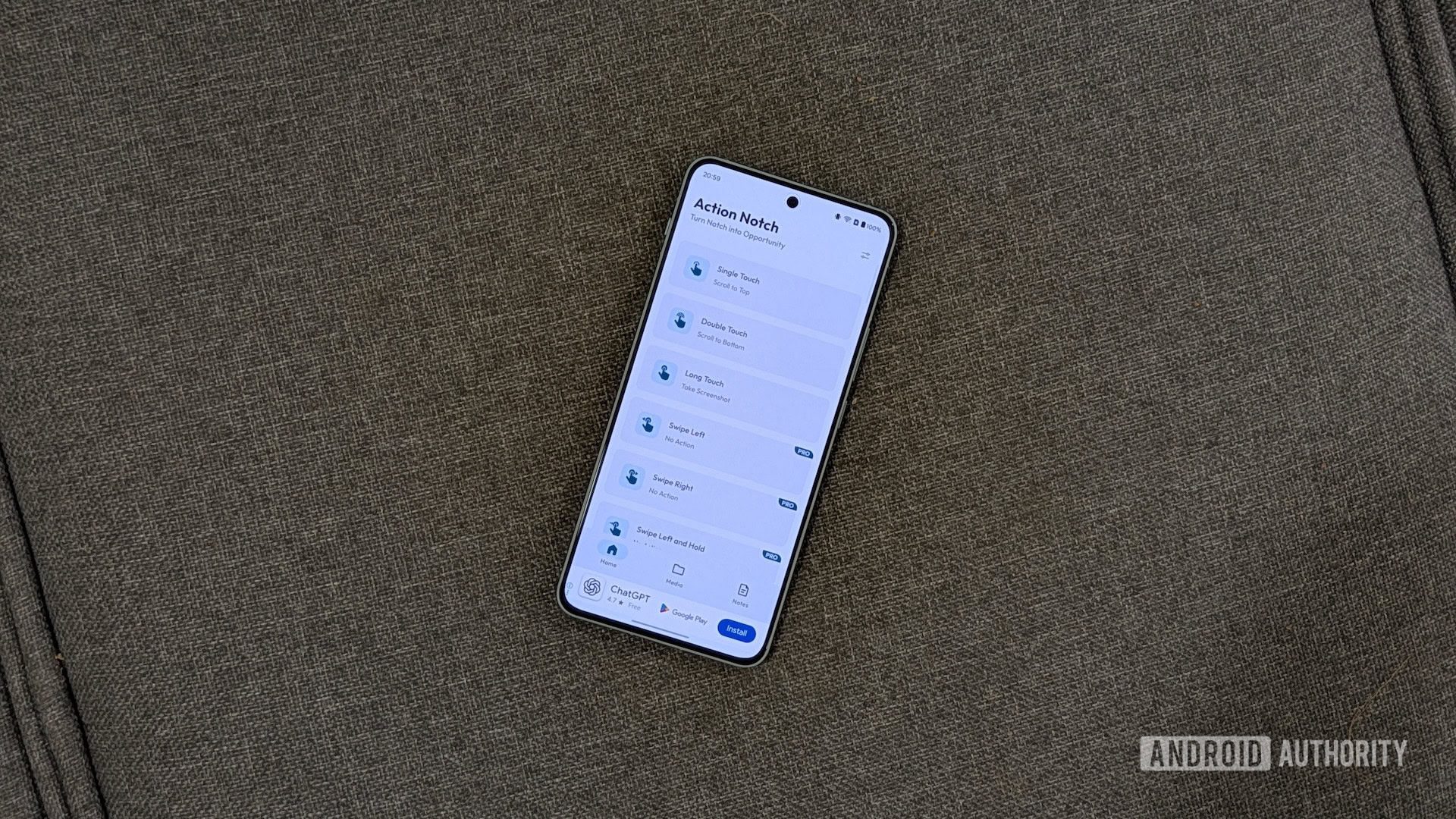
It doesn’t end there, though. I also use a few utility apps that are among the first apps to go on my phone. On Pixel phones, it’s the Essentials app, which unlocks a ton of new functionality. And for all the other Android phones I test, I can’t live without Action Notch — a free Android app that helps me get the most out of my phone’s notch.
What will you use Action Notch for?
0 votes
Scroll to Top
NaN%
Scroll to Bottom
NaN%
Take Screenshot
NaN%
Toggle Flashlight
NaN%
Open Power Menu
NaN%
Something else (tell us in the comments)
NaN%
Action Notch breathes life into a phone’s notch
Yash Wate / Android Authority
Almost all Android phones today feature a camera cutout — also called a notch — on the screen for a front-facing camera. Action Notch turns this notch into a virtual button, allowing you to interact with it using tap or swipe gestures to perform various everyday actions efficiently. For instance, you can set up Action Notch such that tapping your phone’s notch once takes a screenshot.
However, that’s not all. Action Notch supports multiple gestures, such as double-tap and long-tap, so you aren’t restricted to just one gesture. Similarly, there are over 50 supported actions to choose from, ranging from something as basic as toggling a flashlight to a slightly more advanced action like running an automated task you created in Tasker or MacroDroid.
You can unlock even more gestures and actions by upgrading to the pro version of Action Notch. This also gives you access to a really useful feature called rule-based actions, which lets you make a single gesture behave differently in different scenarios. For example, you can make the single-tap gesture take a screenshot in one app and toggle the flashlight elsewhere.
How I use Action Notch to use my phone more efficiently
Yash Wate / Android Authority
I’ve been using Action Notch for many years and have explored multiple use cases over time. My current Action Notch setup involves three gestures: Single Touch, Double Touch, and Long Touch — all of which are available on the free version of the app. Here’s how I’ve configured them:
Single Touch: Although my primary phone is an Android, I also use an iPhone. As a result, I miss a few iPhone features when I’m using an Android phone, and vice versa. One such feature is the ability to scroll to the top of a page by tapping the top of the screen. The Action Notch app lets me achieve similar functionality on any Android phone, thanks to the Scroll to Top gesture. I’ve set up the Single Touch gesture for this action. This way, no matter which app I’m using, I can tap my phone’s notch to go to the top of the page.
Double Touch: Just like Scroll to Top, Action Notch has another scroll action called Scroll to Bottom. As the name suggests, this action automatically takes you to the bottom of the page. I’ve set up the Double Touch gesture to Scroll to Bottom. This way, I can easily navigate long conversations in chat apps, find relevant comments or messages in forums or apps like Reddit, or scroll to the bottom of single-page websites to find the footer and navigation buttons.
Long Touch: I take lots of screenshots on my phone every day. And the typical way to do it, which involves pressing the power and volume keys together, feels like finger gymnastics. To avoid this, I set up the Action Notch’s Long Touch gesture to the Take Screenshot action. This allows me to take a screenshot by simply long-tapping on my phone’s notch or camera cutout. And given that I need to take multiple screenshots, it makes my job much easier.
Besides these three actions, I have a few other favorites that I’ve used in the past. In-App Shortcuts is one such action that provides a bunch of app shortcuts for quick access. Some of my favorites include Drive scan, Song Search (in the Google app), and WhatsApp Chat. Another Action Notch feature I find really useful is Run Automation. I’ve used it to run some of my MacroDroid automations that don’t have an automatic trigger.
It’s easy to set up and customize Action Notch
Action Notch requires a one-time setup, and it’s pretty straightforward. First, download and install the Action Notch app from the Play Store. Then, open the app and follow the on-screen instructions to grant it the requested permissions.
You’ll now see a list of all the available gestures. Let’s say you want to configure the Single Touch gesture to toggle a flashlight. Tap Single Touch, scroll down to the Device Controls section, and select Toggle Flashlight on the overlay card. Follow the same steps to configure other gestures.
Once set up, the Action Notch app runs in the background, listening for the configured gestures. As soon as it identifies a gesture, it triggers the associated action.
In addition to configuring gestures, you can customize Action Notch’s behavior. For instance, it’s set to work on the notch by default, but you can configure it to use the entire status bar instead. Likewise, there’s an option to customize the notch position on the screen, as well as enable/disable haptics, turn off battery optimization, and more. You can access Action Notch settings by tapping the slider icon in the top-right corner and selecting Settings.
I always enable the Disable on Call and Disable on Lock Screen options. Both are pretty self-explanatory and help avoid accidental triggers. I also like to configure the blacklist feature, which essentially blocks Action Notch inside specified apps to prevent it from listening for configured gestures and triggering actions. I blacklist the games I play, as well as apps like Kindle that feature top-bar menus, so I can use them comfortably without worrying about triggering any of my configured gestures.
Action Notch is almost perfect
Yash Wate / Android Authority
The Action Notch app simplifies performing various everyday actions on my Android phone. And while it isn’t the only app that turns a phone’s notch into a virtual button, I like it for two reasons. First, its free plan offers access to three gestures, and second, it supports plenty of useful actions.
However, Action Notch isn’t perfect, either; the free version of the app has ads across the UI. Now, there’s no denying that ads help cover operational costs for free apps. But lately the frequency of full-screen ads on Action Notch has gone through the roof, making both navigating the interface and configuring the free gestures harder.
But even with those complaints, Action Notch remains one of my most-used Android apps. It’s one of those apps I truly can’t live without, and if it’s not on your Android phone yet, now’s the time to change that.
Thank you for being part of our community. Read our Comment Policy before posting.