


In this article, we’re discussing laptops built on the Intel Wildcat Lake hardware platform (Intel Core Series 3), Intel’s most affordable and efficient modern mobile platform available in 2026.
Wildcat Lake is the entry-level alternative to the Intel Panther Lake (Core Ultra Series 3) platforms. It drops the Ultra moniker from the CPU names, but otherwise the hardware uses the same hybrid core design implemented with Panther Lake, but with fewer CPU and GPU cores overall.
Thus, the hardware is meant for casual use and light multitasking, and not for heavier use. At the same time, it promises excellent efficiency and all-day battery life, although your mileage will vary based on the actual battery size in the desired product.
For now, only a handful of notebooks running on Wilcat Lake Intel hardware are available, and they are either entry-level ultraportable designs such as the Dell XPS 13, or mainstream budget laptops like the Lenovo IdeaPad Slim 3, HP Omnibook 3, or Asus Vivobook 15 series. We’ll update the article as new models become available in stores.
Intel Wildcat Lake hardware and specs explained
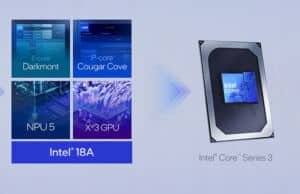
The Wildcat Lake SOC package consists of two tiles. The first is the Compute tile, which includes the CPU, NPU, memory controller, and the iGPU, and is built on Intel’s 18A node. The second is the Platform controller tile and integrates the I/O and connectivity.
While the CPU roster for Widlcat Lake includes a handful of different SKUs, the CPUs that are the most widely integrated in actual products are the following:
- Core 7 350 – 6x CPU Cores (2x P-Cores at 4.8 GHz, 4x LPE Cores at 3.6 GHz), 2x Xe3 GPU cores at 2.6 GHz, 38 TOPS total;
- Core 5 320 – 6x CPU Cores (2x P-Cores at 4.6 GHz, 4x LPE Cores at 3.4 GHz), 2x Xe3 GPU cores at 2.5 GHz, 36 TOPS total;
- Core 3 304 – 5x CPU Cores (1x P-Cores at 4.3GHz, 4x LPE Cores at 3.2 GHz), 1x Xe3 GPU core at 2.3 GHz, 24 TOPS total;
These Core 7 and Core 5 options are nearly identical, with only minor Turbo CPU speed advantages for the Core 7. Keep that in mind when deciding between the two, as the Core 5 configurations are most likely more affordable.
Both are configurable at 10-35W TDP, support up to 48 GB LPDDR5x or 64 GB DDR5 memory, and integrate an NPU 5. However, expect most configurations to ship with 8-16 GB of memory.
The actual CPU cores are similar to those implemented with Panther Lake, with Intel’s latest Cougar Cove P-Cores and Darkmon LPE-cores. There are no LP Cores whatsoever with this hardware, though.
Intel didn’t compromise on the IO either. The platform supports 6x PCIe gen4 lanes, 2x Thunderbolt 4 connections, two USB 3.2 connections, as well as WiFi 7 and Bluetooth 6. There are no PCIe gen5 lanes, unlike with Panther Lake.
Furthermore, the platform meets the Copilot+ AI PC certification, with almost 40 TOPS of processing that can ensure local AI processing functionality.
Now, as far as performance goes, Intel compares the Wildcat Lake Core 7 350 against older CPUs from a few years ago, such as the Core i7-1185G7 Tiger Lake or the Core 7 150U Raptor Lake. We’ll discuss what to expect against more modern options further down, though.
In the meantime, here’s a specs comparison of these WildCat Lake chips against Meteor Lake, Lunar Lake, and Panther Lake entry-level options. You’ll need to learn to read between the numbers, as the actual CPU and GPU cores differ between generations, with an impact on performance and efficiency. Wildcat Lake and Panther Lake feature the same latest-gen Cougar Cove/Darkmont cores, while the previous platforms implement older cores.
Core 7 350
Core 5 320
Core Ultra 7 355
Core Ultra 5 325
Core Ultra 256V
Core Ultra 7 155U
Platform
Wildcat Lake
Wildcat Lake
Panther Lake
Panther Lake
Lunar Lake V
Meteor Lake H
Lithography
Intel 18A
Intel 18A
TSMC N3B
Intel 7
Design TDP
10-35 W
12-55 W
8-37 W
12-57 W
Cores/Threads
2P+4LPE/6T
4P+4LPE/8
4P+4LPe/8
4P+4LPe/8
2P+8E+2LPe/14
P-Cores max Turbo
4.8 GHz
4.6 GHz
4.7 GHz
4.5 GHz
4.8 GHz
4.8 GHz
E-Cores max Turbo
–
–
–
–
–
3.8 GHz
LPE-Cores max Turbo
3.6 GHz
3.4 GHz
3.5 GHz
3.4 GHz
2.2 GHz
2.1 GHz
Graphics
Intel Graphics,
2 Xe-3 Cores,
up to 2.6 GHz,
20 GPU TOPS
Intel Graphics,
2 Xe-3 Cores,
up to 2.5 GHz,
20 GPU TOPS
Intel Arc 140T,
4 Xe-2 Cores,
up to 2.5 GHz,
40 GPU TOPS
Intel Graphics,
4 Xe-3 Cores,
up to 2.5 GHz,
40 GPU TOPS
Intel Arc 140V,
8 Xe-2 Cores,
up to 1.95 GHz,
64 GPU TOPS
Intel Arc,
4 Xe-LPG Cores,
up to 1.9 GHz,
11 GPU TOPS
Cache
6 MB Smart cache
12 MB Smart cache
12 MB Smart cache
12 MB Smart cache
Memory support
LPDDR5x-7467,
up to 48GB
DDR5-6400,
up to 64 GB
LPDDR5x-7467,
DDR5-6400,
up to 128 GB
LPDDR5x-8533,
up to 32 GB onboard
LPDDR5x-7467,
DDR5-5600,
up to 96 GB
AI Engine
NPU – 16 TOPS
Total – 36 TOPS
NPU – 17 TOPS
Total – 38 TOPS
NPU – 47 TOPS
Total – 87 TOPS
NPU – 47 TOPS
Total – 87 TOPS
NPU – 47 TOPS
Total – 115 TOPS
NPU – 11 TOPS
Total – 22 TOPS
Wildcat Lake Performance – Core 7 350, Core 5 320 vs. Lunar Lake Core Ultra 7 256V, AMD Krackan Ryzen AI 5 340
Here’s a brief analysis of the performance you should expect from the Wildcat Lake hardware we’ve tested so far (with updates to follow), next to Panther Lake, Lunar Lake, Meteor Lake, and AMD Gorgon Point implementations.
Lenovo IdeaPad Slim 3,
Wildcat Lake
Intel Core 7 350,
~30W Performance mode
Dell XPS 13,
Wildcat Lake
Intel Core 5 320,
~20W Performance mode
Dell 14s,
Panther Lake
Intel Core Ultra 7 355,
~35W mode
Asus Zenbook S14,
Lunar Lake
Intel Core Ultra 7 258V,
~24W mode
Lenovo Yoga Book 9,
Meteor Lake
Intel Core Ultra 7 155U,
~25W mode
Lenovo Yoga 2-in-1,
Gorgon Point
AMD Ryzen AI 5 430,
~28W mode
3DMark – Fire Strike
3452 (G – 3655, P – 17625, C – 1315)
3332 (G – 3466, P – 15021, C – 1292)
6555 (G – 7512, P – 21722, C – 2196)
8993 (G – 9984, P – 21713, C – 3429)
4960 (G – 5370, P – 19672, C – 1832)
4182 (G – 4552, P – 15305, C – 1531)
3DMark – Time Spy
1582 (Graphics – 1405, CPU – 5422)
1513 (Graphics – 1388, CPU – 5061)
3115 (Graphics – 2862, CPU – 8056)
4443 (Graphics – 4155, CPU – 7323)
1904 (Graphics – 1696, CPU – 6302)
1740 (Graphics – 1586, CPU – 5008)
CineBench R23 (best run)
8045 cb – multi core,
2042 cb – single core
7205 cb – multi core,
1988 cb – single core
11022 cb – multi core,
1965 cb – single core
9930 cb – multi core,
1855 cb – single core
9322 – multi core,
1670 cb – single core
8152 cb – multi core,
1805 cb – single core
Blender 4.3 – Classroom scene – CPU Compute
12m 10s
12m 57s
8m 20s
11m 43s
11m 35s
10m 52s
The differences are tiny between the Wildcat Core 7 and Core 5 options, although their overall performance will vary between units based on the applied power settings – larger devices run the hardware at higher power and score higher.
Nonetheless, this platform is not meant for demanding sustained loads, as it’s significantly slower than the last few other Intel mobile platforms. However, the overall capabilities are fairly close to those delivered by the AMD Gorgon Point Ryzen AI 5 implemented in a handful of similar budget mainstream notebooks. And the Wildcat platform runs more efficiently on battery power.
List of all laptops built on Intel Wildcat Lake hardware (Core Series 300)
This section lists all the available notebooks built on Intel Wildcat Lake Core Series 3 hardware.
You’ll mostly find two types of devices, as already mentioned earlier: a few compact and lightweight ultrabooks, and a handful of entry to mid-level business and mainstream notebooks. Most of these are meant for casual daily use and tend to sell quite affordably, at least by today’s standards.
Hopefully we’ll see other competitive ultrabooks launched in the near future, alongside the XPS 13, Framework Laptop 12, and the Swift Air 14. And maybe even some passively cooled, fanless options that could truly rival the MacBook Neo?
Now, as far as the devices that stand out from the crowd, I’ll just mention the following:
- Dell XPS 13 – starts at $699 for a premium lightweight package and can be further configured with Intel Core Ultra 7 Panther Lake hardware if needed;
- Dell 14s – the more mainstream, but still lightweight and affordable, option from Dell; runs at higher power and offers better IO and larger battery than the XPS 13;
- Framework Laptop 12 – a compact 2-in-1 format with upgradeable components and IO, solid inputs, and good runtimes; starts at $549 for the DIY version without RAM/SSD
- Asus ExpertBook Air – only available in China so far, a more affordable iteration of the ExpertBook Ultra, with still a premium chassis, OLED display, and big battery.
And here’s the full list of Wildcat Lake laptops.
Model
Format, Features, Weight
Screen
Hardware and particularities
Battery
Acer Swift Air 14
ultrabook,
all-metal build,
1.2 kg / 2.62 lbs
14″ IPS, matte
2K 120Hz,
350 nits, 75% DCI-P3
180-hinge
Intel Core 5 320,
max 16 GB LPDDR5x RAM, 1x M.2 SSD
dual-fan dual-heatpipe cooling
70 Wh
Acer Swift Air 16
portable laptop,
all-metal build,
1.5 kg / 3.3 lbs
16″ OLED, touch
up to 3K 120Hz,
500 nits, 100% DCI-P3
180-hinge
up to Intel Core 7 350,
max 16 GB LPDDR5x RAM, 1x M.2 SSD
dual-fan dual-heatpipe cooling
70 Wh
Asus ExpertBook Air
premium business laptop.
metal build,
1.3 kg / 2.82 lbs
14″ OLED, anti glare
3K 120Hz,
500 nits, 100% DCI-P3
140-hinge
up to Intel Core 7 350,
max 32 GB LPDDR5x RAM, 1x M.2 SSD
70 Wh
Asus ExpertBook B3 14
business laptop,
metal build,
1.45 kg / 3.2 lbs
14″ IPS, matte
up to 2.5K 60Hz,
400 nits, 75% DCI-P3
180-hinge
up to Intel Core 7 350,
max 32 GB LPDDR5x RAM, 1x M.2 SSD
70 Wh
Asus ExpertBook P3 16
business laptop,
metal build,
1.8 kg / 4 lbs
16″ IPS, matte
up to 2.5K 60Hz,
400 nits, 75% DCI-P3
180-hinge
up to Intel Core 7 350,
max 32 GB LPDDR5x RAM, 1x M.2 SSD
70 Wh
Asus Vivobook S14
portable laptop,
all-metal build,
1.2 kg / 2.65 lbs
14″ IPS, matte
2K 60Hz,
300 nits, 75% DCI-P3
180-hinge
up to Intel Core 7 350,
max 32 GB LPDDR5x RAM, 1x M.2 SSD
52 Wh
Asus Vivobook 15
mainstream laptop,
part-metal build,
1.7 kg / 3.75 lbs
15.6″ IPS, matte
2K 60Hz,
250 nits, 45% NTSC
up to Intel Core 7 350,
max 32 GB DDR5 RAM, 1x DIMM, 1x M.2 SSD
42 Wh
Asus Vivobook 17
mainstream laptop,
part-metal build,
2.1 kg / 4.65 lbs
17.3″ IPS, matte
2K 60Hz,
250 nits, 45% NTSC
up to Intel Core 7 350,
max 32 GB DDR5 RAM, 1x DIMM, 1x M.2 SSD
50 Wh
Chuwi UniBook
portable laptop,
part-metal build,
1.24 kg / 2.72 lbs
14″ IPS, matte
2K 60Hz,
300 nits, 45% DCI-P3
Core Ultra 3 304,
max 16 GB LPDDR5x RAM, 1x M.2 SSD
53 Wh
Dell XPS 13
ultrabook,
premium metal build,
from 1 kg / 2.2 lbs
13.5″ IPS touch
2.5K 120Hz,
500+ nits, 100% DCI-P3
Core Ultra 5 320,
max 16 GB LPDDR5x RAM, 1x M.2 SSD,
regular full keyboard and touchpad,
USB-C only IO, 4x speakers
52Wh
Dell 14S
ultrabook,
metal build,
from 1.15 kg / 2.55 lbs
14″ IPS matte non-touch
2K 60Hz or 2.8K 120Hz,
up to 450 nits, 75% DCI-P3
up to Core Ultra 7 350,
max 16 GB LPDDR5x RAM, 1x M.2 SSD,
multiple color options
61Wh
Framework Laptop 12
ultrabook, 2-in-1,
TPU plastic build,
from 1.3 kg / 2.85 lbs
12.2″ IPS, glossy
2K 60Hz,
400 nits, 50% NTSC
up to Core Ultra 7 350,
max 64GB LPDDR5x RAM, 1x DIMM, 1x M.2 SSD
upgradeable design, DIY or preconfigured versions,
multiple colors
50Wh
HP Omnibook 3
mainstream laptop,
part metal build,
from 1.4 kg / 3.1 lbs
14″ IPS, matte
2K 60Hz,
300 nits, 45% DCI-P3
up to Core Ultra 7 350,
max 16 GB LPDDR5x RAM, 1x M.2 SSD
41Wh
HP ProBook 4 G2i
business laptop,
metal build,
from 1.7 kg / 3.75 lbs
14″ IPS, matte
2K 60Hz,
400 nits, 75% DCI-P3
up to Core Ultra 7 350,
max 16 GB LPDDR5x RAM, 1x M.2 SSD
56Wh
Lenovo IdeaPad Slim 3 13
portable laptop,
part metal build,
from 1.2 kg / 2.65 lbs
14″ IPS, touch
2K 60Hz,
400 nits, 75% DCI-P3
up to Core Ultra 7 350,
max 16 GB LPDDR5x RAM, 1x M.2 SSD
55 Wh
Lenovo IdeaPad Slim 3 14
mainstream laptop,
part metal build,
from 1.4 kg / 3.1 lbs
14″ IPS, matte
2K 60Hz,
400 nits, 45% DCI-P3
up to Core Ultra 7 350,
max 32 GB DDR5 RAM, 1x DIMM, 1x M.2 SSD
50 Wh
Lenovo IdeaPad Slim 3 15
mainstream laptop,
part metal build,
from 1.6 kg / 3.5 lbs
15.3″ IPS, matte
2K 60Hz,
400 nits, 45% DCI-P3
up to Core Ultra 7 350,
max 32 GB DDR5 RAM, 1x DIMM, 1x M.2 SSD
50 Wh
Lenovo IdeaPad Slim 3 16
mainstream laptop,
part metal build,
from 1.68 kg / 3.7 lbs
16″ IPS, matte
2K 60Hz,
400 nits, 45% DCI-P3
up to Core Ultra 7 350,
max 32 GB DDR5 RAM, 1x DIMM, 1x M.2 SSD
50 Wh
Lenovo IdeaPad Slim 3 17
mainstream laptop,
part metal build,
from 2.05 kg / 4.5 lbs
14″ IPS, matte
2K 60Hz,
300 nits, 75% DCI-P3
up to Core Ultra 7 350,
max 32 GB DDR5 RAM, 1x DIMM, 1x M.2 SSD
60 Wh
Lenovo V15
mainstream laptop,
plastic build,
from 1.6 kg / 3.55 lbs
14″ IPS, matte
2K 60Hz,
300 nits, 45% DCI-P3
up to Core Ultra 7 350,
max 32 GB DDR5 RAM, 1x DIMM, 1x M.2 SSD
47 Wh
Lenovo ThinkPad E14
business laptop,
plastic build,
from 1.4 kg / 3.1 lbs
14″ IPS, matte
2K 60Hz,
400 nits, 45% DCI-P3
180 hinge
up to Core Ultra 7 350,
max 32 GB DDR5 RAM, 1x DIMM, 1x M.2 SSD
64 Wh
Lenovo ThinkPad E16
business laptop,
plastic build,
from 1.72 kg / 3.8 lbs
16″ IPS, matte
2K 60Hz,
400 nits, 45% DCI-P3
180 hinge
up to Core Ultra 7 350,
max 32 GB DDR5 RAM, 1x DIMM, 1x M.2 SSD
64 Wh
MSI Modern 14S
mainstream laptop,
metal build,
from 1.45 kg / 3.2 lbs
14″ IPS, matte
2K 120Hz,
300 nits, 45% DCI-P3
180 hinge
up to Core Ultra 7 350,
max 32 GB DDR5 RAM, 1x DIMM, 1x M.2 SSD
42 Wh
MSI Modern 16S
mainstream laptop,
metal build,
from 1.7 kg / 3.75 lbs
16″ IPS, matte
2K 120Hz,
300 nits, 45% DCI-P3
180 hinge
up to Core Ultra 7 350,
max 32 GB DDR5 RAM, 1x DIMM, 1x M.2 SSD
81 Wh
Samsung Galaxy Book6
portable laptop,
metal build,
from 1.35 kg / 3 lbs
16″ IPS, matte
2K 60Hz,
350 nits, 75% DCI-P3
up to Core Ultra 5 315,
max 16 GB LPDDR5x RAM, 1x M.2 SSD
61 Wh
That’s about it for now.
We’re updating the article as more of these laptops built on Intel Wildcat Lake hardware are launched, and we get to review them. If there’s any device that should be in here and is not yet, let me know about it in the comments section below.