

Close Menu
Techy101 –

    Subscribe to Updates

    Get the latest creative news from FooBar about art, design and business.

    What's Hot

    Best antivirus software for Windows PCs 2026: Reviews and top picks

    October 8, 2026

    GTA V Ported To Run Locally In Browser: How A Modder Brought The Game To WebGPU

    October 8, 2026

    Was Fahrgäste jetzt wissen müssen

    October 8, 2026
    Facebook X (Twitter) Instagram
    Trending
    • Best antivirus software for Windows PCs 2026: Reviews and top picks
    • GTA V Ported To Run Locally In Browser: How A Modder Brought The Game To WebGPU
    • Was Fahrgäste jetzt wissen müssen
    • Android’s physical navigation buttons are back on Googlebooks, but not the way you think
    • Mike Rousselle, Chief AI Officer at OptimizeRx – Interview Series – Unite.AI
    • Bobby Kotick returns: former Activision boss becomes board member of Skydance, the new company formed by Paramount and Warner Bros
    • Prime Day Is Done, but This 65-Inch Toshiba ArtVision TV Just Plummeted to a New Record-Low Price
    • Xbox’s New Division Will Focus On TV And Movie Adaptations Of Its Biggest Franchises
    Facebook X (Twitter) Instagram Pinterest YouTube LinkedIn TikTok
    Techy101 –Techy101 –
    • Home
    • Laptops
    • Mobiles
    • Gaming
    • Gadgets
    • Apps
    • AI
    • How To
    • Reviews
    Techy101 –
    Home»Laptops»Android’s physical navigation buttons are back on Googlebooks, but not the way you think
    Laptops

    Android’s physical navigation buttons are back on Googlebooks, but not the way you think

    By RepublisherOctober 8, 2026No Comments2 Mins Read
    Share Facebook Twitter Pinterest LinkedIn Tumblr Reddit Telegram Email
    Android’s physical navigation buttons are back on Googlebooks, but not the way you think
    Share
    Facebook Twitter LinkedIn Pinterest Email


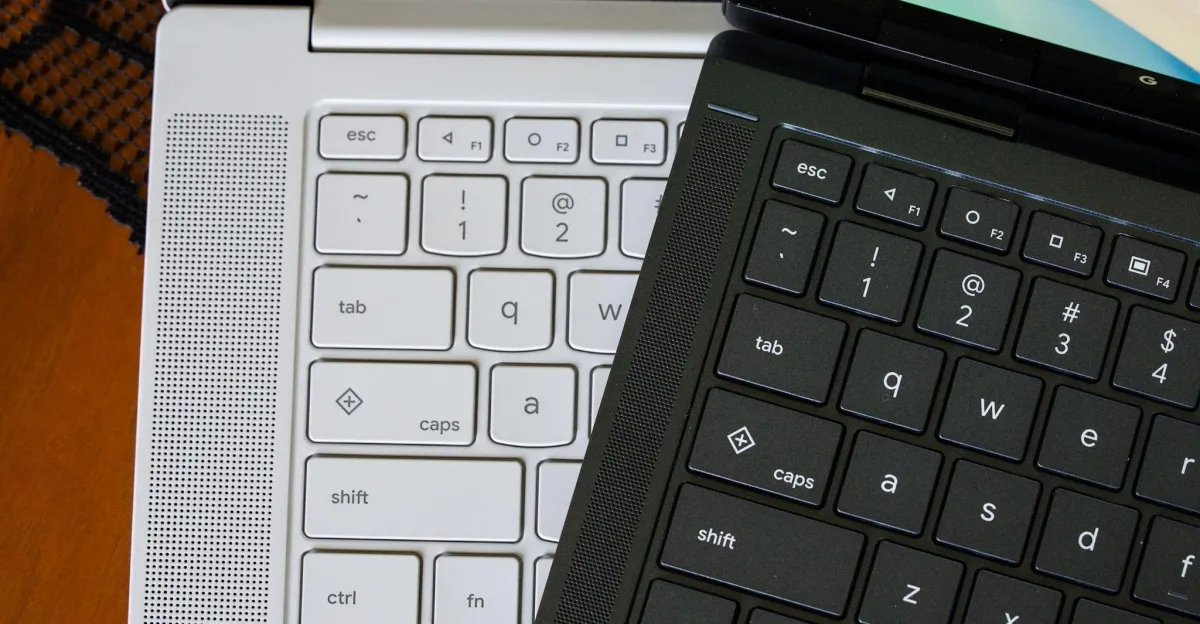
    A common misconception I’ve seen with Googlebooks is that the Quick Insert and Google logo keys are new. They’re not, as they first debuted a couple of years ago on some Chromebooks. But there is something new for Googlebooks that’s ripped straight from Android phones circa 2014.

    On every Googlebook keyboard, the F1, F2, and F3 keys are the old triangle, circle, and square navigation icons that first debuted on Android 5.0 Lollipop. These were the back, home, and app switcher buttons long before everything went to gesture-based navigation, and they’re still built into phones on Android 17 as an alternative. On Googlebook OS, these keys do what you expect: the left-pointing triangle goes back, the circle goes “home” by minimizing all open apps, and the square tiles your open apps like Mission Control on macOS / Task View on Windows.

    It’s useful to have these buttons, and to have them matched across all Googlebooks. The back button seems sometimes necessary when using Android apps that aren’t really optimized for a desktop interface or mouse controls. I just wish a second press of the home button brought all your apps back to where they were, but that’s another feature called desktop peeking that uses a different keyboard shortcut.

    If you’re an Android nerd of yore, it’s kind of fun to see these buttons live on. But they’re also a reminder that you sometimes need a fallback when Android gets all Android on you.


    Source link

    Androids buttons Googlebooks Navigation Physical
    Share. Facebook Twitter Pinterest LinkedIn Tumblr Email
    Previous ArticleMike Rousselle, Chief AI Officer at OptimizeRx – Interview Series – Unite.AI
    Next Article Was Fahrgäste jetzt wissen müssen
    Republisher
    • Website

    Related Posts

    Laptops

    Acer HL6810ATV Review – Trusted Reviews

    October 8, 2026
    Laptops

    ChatGPT can imitate a cartoonist. Now it’s signing their name, too

    October 8, 2026
    Laptops

    Surface Laptop Ultra Preorders: Everything Announced at Microsoft’s Windows and Surface Event

    October 8, 2026
    Add A Comment
    Leave A Reply Cancel Reply

    Top Posts

    Best antivirus software for Windows PCs 2026: Reviews and top picks

    October 8, 2026

    AMD is apparently gearing up to raise GPU prices right after Nvidia’s steep hike

    August 1, 2026

    LanceDB Vector Database Guide: Features anndPython Demo

    August 1, 2026
    Stay In Touch
    • Facebook
    • YouTube
    • TikTok
    • WhatsApp
    • Twitter
    • Instagram
    Latest Reviews

    Subscribe to Updates

    Get the latest tech news from FooBar about tech, design and biz.

    Latest Post

    Best antivirus software for Windows PCs 2026: Reviews and top picks

    October 8, 2026

    AMD is apparently gearing up to raise GPU prices right after Nvidia’s steep hike

    August 1, 2026

    LanceDB Vector Database Guide: Features anndPython Demo

    August 1, 2026
    Recent Posts
    • Best antivirus software for Windows PCs 2026: Reviews and top picks
    • GTA V Ported To Run Locally In Browser: How A Modder Brought The Game To WebGPU
    • Was Fahrgäste jetzt wissen müssen
    • Android’s physical navigation buttons are back on Googlebooks, but not the way you think
    • Mike Rousselle, Chief AI Officer at OptimizeRx – Interview Series – Unite.AI

    Subscribe to Updates

    Get the latest creative news from FooBar about art, design and business.

    Facebook X (Twitter) Instagram Pinterest YouTube LinkedIn TikTok
    • About Us
    • Contact Us
    • Privacy Policy
    • Terms & Conditions
    • Disclaimer
    © 2026 techy101. Designed by Pro.

    Type above and press Enter to search. Press Esc to cancel.