


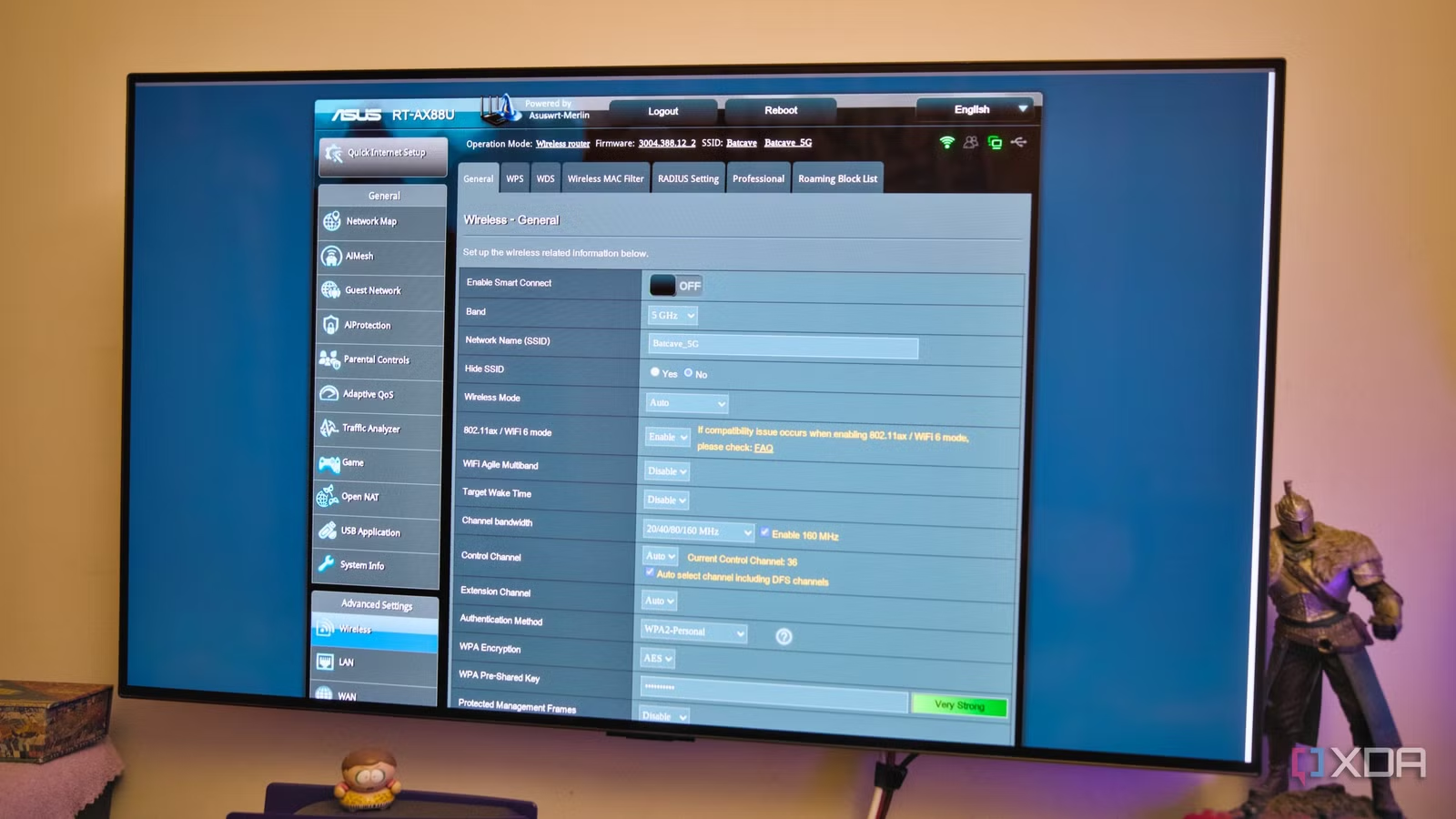
I often tweak my router settings on an ASUS RT-AX88U, and that’s how I kept running into network snags. So I factory reset the router and walked through the setup wizard, keeping most settings at default. For once, I wanted to know if the default settings manage the network and whether my overzealous tweaks caused the problems.
I left the router to auto-pick the Wi-Fi channels and every other setting, except DNS. I let those settings sit for a month, so I could properly track the network’s behavior. To measure the changes, I used NetSpot as the Wi-Fi survey tool, checking several times daily and cross-referencing it with a Wi-Fi analyzer app on my phone. I found that my router kept auto-picking some of the busiest Wi-Fi channels by default, and that was enough for me to stop trusting the “Auto” setting.
Related
Your neighbors’ Wi-Fi is slowing yours down, and one simple setting can fix it
Your router’s default wireless channel may not be the most optimal
My router scanned the network only once and not often
Bad timing affected more than picking quieter hours
I used the setup wizard for my RT-AX88U and let it pick the Wi-Fi channel automatically. When I went through it again, I learned that a router’s auto-channel selection is really a one-time event. The router got locked onto channel 6 (sometimes 7) for 2.4GHz and channel 36 for 5GHz bands.
My mistake was running everything late at night, which led it to auto-pick a channel that looked quiet only because it was past midnight. Most of my neighbors weren’t actively using their wireless devices that late, so the router had the band to itself. That’s why I’ve always scheduled backups between 1 am and 4 am.
Unlike what I had assumed, auto-channel selection doesn’t run constantly in the background. The only way I found to force a fresh scan was to reboot the router, and even then there was no guarantee that it would pick a better Wi-Fi channel.
Related
Your router’s auto channel selection is quietly tanking your Wi-Fi performance
This doesn’t work how you expect it would
My router only counted networks, not how busy they were
Many quiet neighbors’ networks would beat a busy one
Once I realized the timing of setting up the router was skewing things, I ran into a second problem baked into the logic itself. By default, the router seems to judge a channel by how many other networks are broadcasting on it, rather than checking if they’re actually in use. NetSpot backed this up over the month, and I’m guessing most of my neighbors let their routers auto-pick a channel too. NetSpot showed channel 6 on the 2.4GHz band as the most crowded, with several neighboring networks operating on it.
What I found odd was that even with just a single neighbor parked on channel 11, it was pushing noticeably more real traffic through that one channel than channels 6 and 11 put together, and my router still didn’t pick it. I’d seen other people run into similar details when they dug into how auto-channel selection works, and watching it play out on my network for a month made it click.
So headcount is not the same thing as congestion. A router that only counts networks will get this wrong regularly.
The 2.4GHz band kept landing between channels
An overlap would mess up my channel planning
On the 2.4GHz band, channels 1, 6, and 11 don’t overlap with each other in most regions. I assumed the router’s auto-channel selection algorithm would know that too. It didn’t seem to. Over the month, I kept finding the router auto-picking channel 5 or 7, mostly after a reboot-triggered scan. Each time I checked, that channel sat right in the overlap zone between two of my neighbors’ networks parked on channel 6.
Instead of avoiding interference, the router was adding another source of it on top. When I force-set the band to channel 1, since there was hardly any competition, my devices stayed noticeably more stable on the connection. Like every other router nerd, I now stick to one of the non-overlapping channels 1, 6, or 11, instead of leaving it to auto.
The router kept picking wide, shaky channels for the 5GHz band
160MHz unlocked fast speeds until random drops started
On the 5GHz band, the router kept picking the widest channel width by default, as if that made it the best option. Admittedly, channel 36 delivered great throughput, but it came at a cost. Wider channels stitch several smaller channels together, which exposes them to more interference, and some of those stitched-together channels overlap with frequencies used by weather radar. So the moment the router detects something that looks like radar on that channel, it jumps to another.
My colleague Shivansh Raj Srivastav tested different channel widths on his router to see which ones held up. He ended up turning off the widest 160MHz channel for more stability. Taking a cue from his results, I turned off the automatic channel bandwidth setting and forced an 80MHz channel instead of chasing the 160MHz. This one tweak stopped the 4K streams from dropping randomly or losing quality.
I also turned off Smart Connect (band steering) because it kept merging the 2.4GHz and 5GHz bands under a single SSID. Splitting them made it easier to see which network name belonged to which band. With Smart Connect on, I’d had a tough time telling whether a dead spot was a band problem or my phone switching bands on its own.
Related
5 router settings most people never touch that fixed my network problems
Lesser-known fixes for well-known problems
I’m not leaving the channel setting on auto
My experience doesn’t mean automatic channel selection is useless. It’s a reasonable default for folks who’d never bother to open their router’s admin panel. But after a month of watching it work, my view of “auto” changed. Each band on my router now sits on a channel I picked only after a proper site survey, and not the setup wizard running at 1 am.
If your Wi-Fi has randomly gotten worse for no clear reason, it’s worth checking whether you’ve left the channel selection on auto. You can run a Wi-Fi survey tool yourself to see which channel is best for your network before letting the router pick one for you.