


It has been a little more than a month since WSL 3.0.1 came out, and it’s already changing the way I run my Linux containers. One of the most distinctive features that interested me is the fact that it adds the wslc command that can pull images, run containers, map ports, and even build images from a Containerfile straight from PowerShell or CMD.
What’s funny is that Microsoft itself used to recommend using Docker Desktop in its WSL container tutorial in the past, but has now taken to teaching wslc on the same Microsoft Learn page. Following those instructions, I set it up on my main PC with a Ryzen 5 7600X and an RTX 4070 Ti Super. To my absolute delight, I had my first container running in under a minute after starting the update, and now I’m convinced there’s no simpler way to run containers if you’re on Windows 11. Here’s why, and how it’s done.
The whole installation process is one command
Type in wsl –update, and you’re nearly done
The setup is remarkably easy and possibly as straightforward as it gets. If you follow Microsoft’s official guidance, the setup will begin and end in PowerShell. The first thing you’d want to do is check if you already have WSL version 3.0.1 or later through wsl –version, which is possible if you’ve updated it recently. If not, wsl –update pulls the latest release, and that one command is the entire installation process.
If your PC doesn’t have WSL or if it’s a fresh Windows 11 install, you’ll have to use wsl –install to set it up first. Everything that happens after is just post-setup verification. You can run wslc version to confirm the new command is live, and thereafter run wslc run –rm hello-world to pull a small test image and print a greeting from inside the Linux container. Believe it or not, that’s literally it.
On my PC, the first container printed the greeting in less than 10 seconds after I hit Enter, and that’s including the image download. Absolutely nowhere was I asked to sign in, reboot my PC, or accept some license, which is as smooth as containerization has ever been on Windows 11.
Related
WSL containers are about to make Docker on Windows obsolete
You don’t need Docker anymore on Windows
My RTX 4070 Ti Super works inside the container like a dream
The Windows driver I already had did all the work
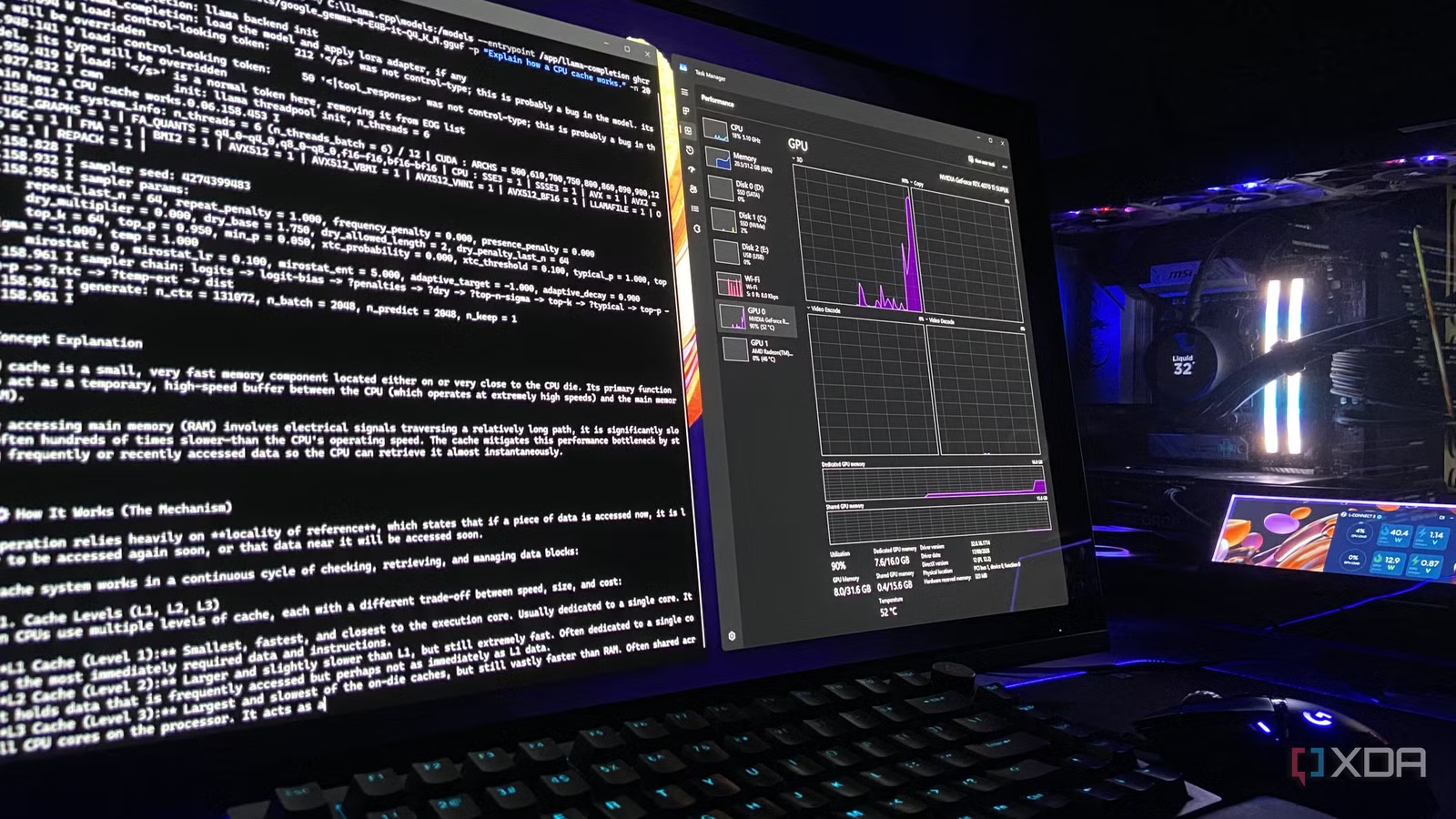
My workflow involves working a lot with local LLMs through llama.cpp, and llama.cpp publishes official CUDA container images. The catch is that an inference server in a container is worth running only if it can reach the GPU, because without it, the inference falls back to the CPU, and on a 7600X processor, that turns a quick response from the model into something you’d have to wait three business days to finish. Obviously, that’s not the experience anyone into local AI inference wants.
The good news about it all is that WSL has been handing Nvidia GPUs to Linux for years through the same driver Windows already uses, so there’s no additional Linux driver I have to hunt down. If you’ve ever used Docker like I have, you’ll already know how to point it to your GPU, because wslc accepts the same –gpus all flag. To make sure it was working as expected, I ran Nvidia’s small CUDA base image with:
wslc run –rm –gpus all nvidia/cuda:12.9.1-base-ubuntu24.04 nvidia-smi
Sure enough, it confirmed that the container saw my RTX 4070 Ti Super with its 16GB of VRAM and driver version 617.14, which is the same version Windows 11 reports. On a regular Linux machine, this would involve installing Nvidia’s Container Toolkit and configuring Docker to use it. Here, I never had to install anything.
When I confirmed that it works, the only thing left to confirm was how well it works. I pointed llama.cpp’s official CUDA image at my Gemma 4 E4B model file that I use on Windows, mounted directly from my models folder. Both runs used the same Q4_K_M quantization with full GPU offload at 128K context, with the same prompt, and a 256-token reply. Native llama.cpp generated between 128 and 132 tokens/second across two runs, whereas the container produced 124 tokens/second both times. Suffice it to say, that’s a gap I’ll never notice.
Related
Microsoft is baking Linux containers into Windows, and it might end my reliance on Docker Desktop
Linux containerization is now a default feature
WLSC doesn’t replace Docker Desktop for me, and it doesn’t have to
Compose is missing, and Microsoft’s working on it
I’m not going to talk about how wslc is better than Docker Desktop, or if I prefer one over another, especially not at this time, when compose is clearly missing from the picture. Since wslc is still relatively new, it’s missing a built-in compose runtime and, as such, a comparison like that wouldn’t be fair.
It helps to know that Microsoft has already acknowledged compose as the most requested wslc feature and said that it’s what the team is working on next, with the goal of running existing compose files without changes. Besides that, Docker Desktop also has a couple of other things going for it. It can switch to Windows containers while wslc only runs Linux ones. It’s also free for users like myself, and the paid plans are only required for larger organizations.
It has never been easier to launch a Linux container
For single containers, GPU workloads, and tests in a jiffy, wslc offers a path to spin up Linux containers in a second, and that’s something many users like myself have come to appreciate. If you don’t rely on compose, you can’t go wrong with either of the two.
It is worth knowing though that setting up Linux containers is a lot easier and wslc takes a lot of the initial friction out of the loop. If you need compose today but would rather skip Docker Desktop, Podman Desktop and Rancher Desktop are other free, open-source alternatives that handle compose files on top of WSL.