


I don’t think my professors would be particularly thrilled to learn just how much AI is involved in my study routine, but if there’s one thing I’ve learned in the last two years, it’s that AI can be an invaluable tool for learning when used the right way. Pay attention to the last bit of the sentence. It’s super important.
I’m in no way an advocate for using AI to do your assignments for you, blindly copying whatever a chatbot spits out, or relying on it to the point where you stop thinking for yourself. However, when it comes to breaking down complicated concepts you just couldn’t grasp in class, making sense of lecture slides that never seem to end, or preparing for exams, I think AI can make a world of difference.
NotebookLM, particularly its Audio Overviews feature that lets you turn your lecture notes, textbooks, and other study material into podcast-style conversations between two AI hosts, has been my go-to study tool for quite some time now. After experimenting with ChatGPT Dots, though, I think my favorite way to study might finally have some competition.
Dots is ChatGPT’s answer to a personal AI assistant
An assistant that doesn’t wait to be asked
A typical ChatGPT conversation basically goes this way: you give it a prompt, it responds, and you continue going back and forth until you get what you’re looking for. ChatGPT Dots, which OpenAI launched at its annual DevDay conference in September, takes a slightly different approach.
Dots are always-on AI agents powered by GPT-6 Astra, and they’re designed to do more than simply respond to your prompts. They can proactively look for ways to help you, keep track of ongoing tasks, and even get work done on your behalf without you having to constantly tell them what to do.
It’s more akin to OpenClaw and Perplexity Computer, and is designed to be an always-on AI agent that can proactively look for ways to help you, keep track of ongoing tasks, and even get work done on your behalf without you having to constantly tell it what to do. I’ve talked more about what Dots can do and the different ways I’ve been using mine in a separate article, so I won’t go into too much detail about all of that here.
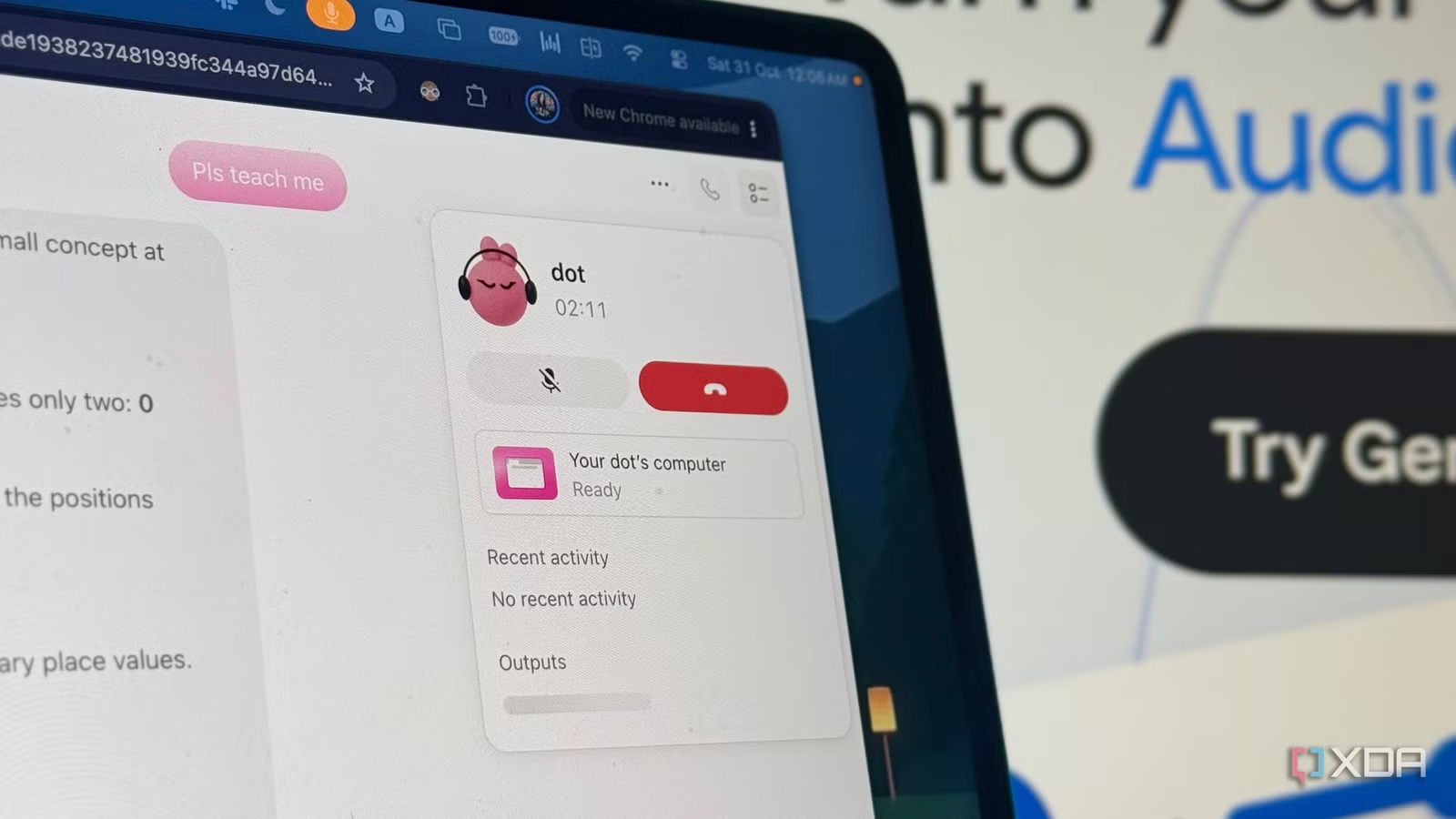
Instead, I want to focus on one particular feature that I didn’t expect to find nearly as useful as I did, especially as a student: the ability to actually hop on a call with my Dot and have a full-blown conversation.
Dots does what NotebookLM’s Voice Chat does, and then some
More than just another AI study buddy
One thing I’ve always appreciated about NotebookLM’s Audio Overviews is just how natural they sound. The AI hosts laugh, crack jokes, and somehow manage to make even the most boring course material sound interesting. I’ve tried quite a few alternatives, including ElevenLabs and Open Notebook, but none quite managed to replicate the experience. Plus, after listening to countless Audio Overviews, you do eventually start picking up on certain patterns, and the conversations can begin to feel a little monotonous.
A few weeks ago, Google introduced Voice Chat to NotebookLM, which lets you have a full-blown conversation with the AI rather than simply listening to two hosts discuss your material. I’ve always been the kind of student who learns best by teaching someone else. In fact, when I was younger, I’d literally line up my soft toys and pretend I was teaching them whatever I’d learned that day. The Feynman Technique has been my go-to study method for as long as I can remember, and Voice Chat fits right into that.
Dots takes this a step further. Like NotebookLM’s Voice Chat, I can have a natural, back-and-forth conversation with my Dot, interrupt it, ask follow-up questions, and clarify concepts as I go. My Dot even laughs along with me, cracks the weirdest jokes, and goes along with my bits. It’s almost eerily realistic at times!
Related
4 features in NotebookLM that changed how I study
At this point, I might just owe NotebookLM my degree.
However, unlike NotebookLM, which is designed to stick to the sources you’ve uploaded, Dots can go beyond them and actually get work done while you’re talking. For instance, when I was preparing for my database exam, I uploaded my lecture slides and asked my Dot to condense them, research additional information online, and put together a condensed study guide and practice quizzes. Since my professor tends to combine information from different sources when setting exams, this was particularly useful.
With NotebookLM, I could technically generate a study guide and practice quizzes grounded in my sources, too. However, I couldn’t do all of that through Voice Chat alone. I’d have to switch to the regular chat or use the Studio panel to generate them. With Dots, I can simply ask for whatever I need during our call, and it gets to work in the background. Once it’s done, I get a notification, and everything is available right within our ChatGPT conversation.
Dots knows me better than NotebookLM ever could
My study buddy knows me a little too well
Like I mentioned earlier, there’s a certain level of friction that comes with studying in NotebookLM, particularly when it comes to generating study material through Voice Chat. However, that’s not the only kind of friction Dots eliminates. Another thing I’ve come to appreciate is just how much context my Dot already has about me, my study habits, and everything else I have going on.
Since I’ve connected my Dot to Google Calendar and a bunch of other apps I rely on, it already knows about my upcoming exams, deadlines, and other commitments. With NotebookLM, I’d typically have to explain what exam I’m preparing for, when it’s scheduled, and what I need help with. With Dots, I can simply hop on a call and tell it I want to start studying, and it already has much of that context.
For instance, after my database exam, my Dot actually followed up with me on its own to ask how it went. It also knew that my Computer Organization and Assembly Language (COAL) exam was coming up next, and that I’d already taken the lab exam for the same course a few days earlier. So, rather than treating the subject as something completely new, it could build on the practical concepts I’d already covered and help me prepare for the theory exam.
Then there’s the personalization aspect. I’ve noticed that I tend to grasp practical concepts much quicker than theory-heavy material that requires memorization. Since my Dot had already picked up on this, we could focus on getting the concepts out of the way first before moving on to active recall and memorization.
With NotebookLM, every new notebook feels like starting from scratch. Dots, on the other hand, feels more like continuing a conversation with someone who already knows how I learn, what I’ve covered, and what I still need to work on.
The usage limits are super generous…for now
Enjoy it while it lasts
Another thing I’ve really appreciated about Dots is just how generous the usage limits are. Google recently changed how NotebookLM’s limits work, moving away from fixed daily quotas to compute-based limits (like Claude, ChatGPT, Gemini, and other chatbots) that refresh every five hours, up to a weekly cap. As someone who relies on NotebookLM heavily when studying, I’ve found the new limits really frustrating.
Dots, on the other hand, has been a pleasant surprise. According to OpenAI, conversations with your Dot don’t count toward your regular ChatGPT usage limits. There’s a catch, though. If your Dot spins up a separate task in ChatGPT Work or Codex, that counts toward your usage allowance as usual.
Related
I don’t ‘watch’ YouTube videos anymore, I consume them using NotebookLM
NotebookLM just changed the way I YouTube.
The company also offered extended usage limits during Dots’ first month after launch, and it’s not entirely clear how generous the limits will be going forward. I can’t help but wonder whether this is a deliberate way to get users hooked on Dots before introducing tighter limits or offering additional capacity for a fee. OpenAI has already confirmed plans to let users pay to increase how much work their Dots can handle each month, so it’s something worth keeping an eye on!
That said, I’ve certainly been able to get a lot more out of Dots during my study sessions than NotebookLM, at least when it comes to usage limits. However, it’s also a lot more expensive to even access. You can give NotebookLM a try for completely free without paying a penny, whereas Dots currently requires an eligible paid ChatGPT plan. For individual users, that means ChatGPT Pro, which starts at a whopping $100 per month.
NotebookLM isn’t going anywhere
All that said, I don’t think Dots, or any other AI tool for that matter, could replace NotebookLM entirely. It’s carved out a permanent place in my study routine, and the sheer number of features it offers is still unmatched. More importantly, the fact that it sticks to my uploaded sources is incredibly useful for most of my courses.