


Many modern PC gaming handhelds pack impressive specs, like the Steam Deck with its Zen 2 and RDNA architecture, but they often bottleneck on modern game sizes, forcing users to juggle microSD cards or pay forexpensive internal 2230 SSD swaps. Standard desktop-style docking stations provide power pass-through and video out, but then they leave your portable device stranded with limited internal storage speeds and separate peripheral clutter.
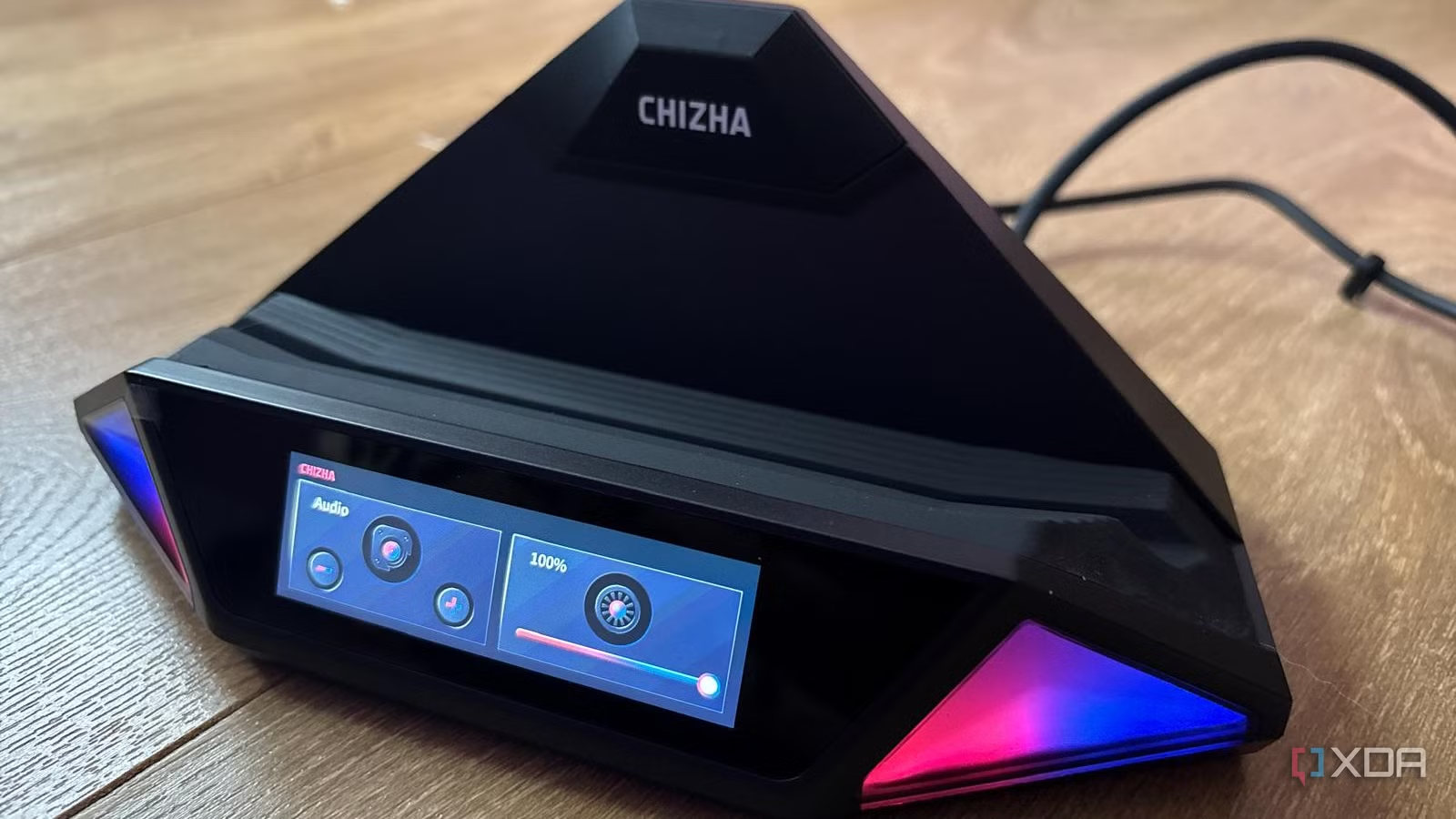
I finally came across a hardware solution in the form of the Chizha Mount Ling 2 Pro, which combines a full-featured I/O hub, an actively cooled M.2 NVMe storage bay, and an onboard video capture card into a single desktop footprint. Bridging the gap between mobile convenience and desktop workstation capability takes more than basic port expansion, and this dock delivered high-speed storage and on-device telemetry management in one.
Related
4 reasons a Steam Deck shouldn’t replace your dedicated gaming PC
We’re evaluating why Valve’s Steam Deck isn’t a worthwhile replacement for a dedicated gaming PC
What to look out for in a gaming handheld dock
The I/O and PD are fundamental
When looking for a multi-use dock that can turn your gaming handheld into what feels like a desktop-class workstation, the hardware architecture and port layout matter most. With the Chizha Mount Ling 2 Pro, you can connect to your handheld via a single USB-C link running at USB 3.2 Gen 2 speeds (up to 10 Gbps and up to 100 W of power delivery, but keep in mind everything shares this one 10 Gbps connection). You don’t have to worry about your device not charging correctly because your other ports are using power.
Alongside this, you get a comprehensive peripheral array with integrated I/O, including Gigabit Ethernet, an HDMI 2.0 port supporting up to 4K 60Hz video output, two USB 3.2 Gen 2 Type-A ports, a USB 2.0 port, an optical audio output, and a secondary USB-C port that serves as the capture output, but keep in mind there’s no capture or video software built into the dock, so you need to ensure that you have external software like OBS.
The physical build and desktop footprint itself are quite good, as it measures in at 8.4 x 7 x 3.5 inches, making it small enough to sit at the edge of your desk without taking up too much space. It’s compatible with Steam Deck, ROG Ally, the Switch, and the Switch 2; however, the external M.2 storage is locked out on Nintendo OS and strictly limited to PC-adjacent handhelds like the Steam Deck or Windows handheld devices. Also, the Switch 2 requires a specific connection order, which is stated in the manual. You have to unlock the Switch before connecting it to the dock, and Nintendo system updates can cause capture issues, but I personally haven’t experienced any of this.
The chassis is made mostly of plastic, and since it’s not custom-designed for a specific handheld, it has a thick silicone support layer designed to cradle various handheld geometries. It doesn’t feel 100% snug like custom-built options do, but it is secure enough that I feel fine with my handheld sitting in it on my desk.
Storage and thermals sets this dock apart
You get a built-in fan
The integrated NVMe storage and active thermal management are what really make this dock stand out and deliver PC-like performance. The dock houses an internal M.2 slot supporting up to 4TB of storage and 2280, 2242, and 2230 drives, giving users a massive secondary game library directly attached to the stand. This has consistently been one of my main pain points with my handhelds: constantly upgrading my microSD card storage, which never feels fast enough, is frustrating.
By leveraging this M.2 slot, you get speeds that are significantly quicker than a microSD slot. The dock does have a bandwidth ceiling. A high-end PCIe 4.0 SSD can read at over 5,000 MB/s when installed directly in a PC, but the dock connects to your handheld over a 10 Gbps USB 3.2 Gen 2 link, which holds it back slightly.
In my time with the dock, I found that sequential speeds landed at around 820 MB/s, with random performance far lower—something I was able to keep an eye on thanks to the built-in SSD performance monitor on the dock’s screen itself. While that’s significantly faster than a microSD card, it’s well below what the drive can do on its own, so it behaves a little bit more like a fast portable external SSD than an internal NVMe drive. However, this may depend on the drive you’re using.
You also need to consider thermals, as there is a bit of a constraint when it comes to heat sinks. An integrated 40 mm fan runs up to 5,000 RPM to actively cool the M.2 compartment, which helps. However, the tight clearance leaves virtually no room for any aftermarket SSD heatsinks, so you are relying entirely on the dock’s internal airflow. I’ve found no issues so far, but it could become a problem if your device and SSD start to overheat.
You get hardware monitoring
Be wary of some teething issues
You get onboard telemetry with the Chizha Mount Ling 2 Pro. It has an interactive touchscreen and built-in power control, giving you real-time diagnostics. You get a small front-facing display panel that outputs live metrics on HDMI pass-through resolution, SSD SMART health data, USB link states, and active Power Delivery profiles.
This means you don’t need to install extra bloatware if you don’t want to, since you have all the information right in front of you. You also get fan and power adjustments, letting you adjust the cooling fan profile and configure RGB lighting accents (limited to red, blue, or gradients), as well as roll back power delivery handshakes if you run into compatibility issues.
Much of the dock’s control lives on the dock itself, which saves you from downloading external software and makes it much easier to manage. That dedicated display removes the guesswork of troubleshooting broken display handshakes or failing power negotiations without digging through software submenus. Hardware-level monitoring is always an invaluable diagnostic tool for me.
There are some platform compatibility nuances with Linux-based platforms like the Steam Deck. You will have to make a quick trip to desktop mode in order to partition and mount the internal SSD for game libraries. Once that is done, I’ve found the dock works reliably as an all-in-one desktop hub beyond that initial configuration, which can be a bit of friction.
Alongside this, there are some power negotiation and data handshake issues that can be sensitive during initial plug-in sequences. I’ve just found that the easiest way to avoid this is to establish stable power delivery before hot-swapping high-bandwidth peripherals.
You can get desktop-level power from your handheld
Just ensure you invest in the right dock
A high-quality dock can turn your gaming handheld into a desktop-like workstation by adding storage, capture, and I/O in a single footprint. If you’re finding that you’re regularly docking your gaming handheld (whether that’s a Steam Deck right down to a Switch 2) for desktop gaming, content creation, or to use as a workstation, then an all-in-one hub with integrated storage can streamline your cable management. Just make sure you account for any data-speed ceilings and the lack of space for a heatsink.