


If you have ever tried downloading a local LLM, you have probably seen model names that look like this:
Qwen3.8-27B-A3B-It-2507-gguf-q2ks-mixed-AutoRound
At first, it looks like meaningless technical shorthand.
It isn’t!
Every part of that name tells you something about the model: how large it is, how it is built, how much of it is used at a time, how its weights are stored, and what format the file uses.
Once you understand those pieces, choosing a local model becomes much easier.
1. 7B, 14B, 35B… How Large Is the Model?
The first number you usually see is the model’s parameter count.
The B means billion.
So:
- 7B = 7 billion parameters
- 14B = 14 billion parameters
- 35B = 35 billion parameters
- 70B = 70 billion parameters
Parameters are the learned values that make up the model.
For local AI, parameter count matters because a larger model generally requires more memory to run.
Note
Proprietary models like Gemini 3 Pro, Claude Opus 5 etc. can have parameter counts in trillions.
But there is an important complication.
A model with 35B parameters does not necessarily use all 35 billion every time it generates a token.
That brings us to MoE models.
2. MoE: Does the Model Use Everything at Once?
There are two broad types of models you’ll encounter:
Dense models and Mixture-of-Experts (MoE) models.
A dense model uses essentially its entire parameter set for each token. So, a 35B dense model uses roughly all 35B parameters during inference.
An MoE model works differently.
It contains a much larger pool of parameters, divided into different experts. A routing mechanism decides which experts should be used for a particular token.
This means an MoE model can have a large total parameter count without using all those parameters at once.
And that is where the next part of the name comes in.
3. A3B: How Many Parameters Are Active?
You might see a model called:
35B-A3B
The first number still means:
35B = 35 billion total parameters
The A3B tells you approximately how many parameters are active for each token.
So:
35B-A3B
means roughly:
35B total parameters → 3B active parameters per token
The A refers to the activated parameter count.
This is why an MoE model can have a large total parameter count without requiring the same amount of computation as a dense model of the same size.
For example:
35B dense
→ 35B parameters active
35B-A3B MoE
→ 35B parameters available
→ ~3B active for each token
The model still has 35B parameters. A3B does not mean the model is a 3B model.
4. Base vs Instruct: How Was the Model Tuned?
You may see two versions of the same model labelled something like:
Qwen3.5-35B-A3B-Base
and
Qwen3.5-35B-A3B-Instruct
The difference is how the model was trained after its initial pretraining.
A base model is the raw pretrained version. It has learned patterns from its training data, but it hasn’t been specifically tuned to behave like a helpful assistant that follows user instructions.
An instruct model has gone through additional training, commonly called instruction tuning or instruction fine-tuning, to make it better at following commands, answering questions and carrying out tasks in a conversational format.
So, broadly:
- Base model → learns to predict and generate text
- Instruct model → further tuned to follow instructions and interact with users
This means the two versions can have the same architecture, parameter count and quantization, while behaving quite differently.
For example:
35B-A3B-Base-Q4
and
35B-A3B-Instruct-Q4
can both be 4-bit versions of the same underlying model, but the Instruct version is generally the one you’d want for a chatbot or general interactive use.
The important thing to remember is that Base vs Instruct has nothing to do with model size or quantization.
It describes how the model was trained to behave.
5. FP16, BF16: How Precisely Are Those Parameters Stored?
Now we have established how many parameters the model contains.
The next question is:
How much information is stored for each parameter?
This is where you’ll see terms such as:
FP16 and BF16
Both use 16 bits per value, but they represent those values differently.
FP16
BF16
Bits
16-bit
16-bit
Exponent bits
5
8
Fraction bits
10
7
Precision
Higher
Lower
Numeric range
Smaller
Much larger
Common use
Inference/training
Training + modern AI workloads
For example, a model with 35 billion parameters stored at 16 bits requires roughly:
35B × 16 bits ≈ 70 GB
just for its weights.
That is far too much for many consumer machines. So people compress the weights.
6. Q4, Q5, Q6, Q8: Quantization
This is where Q4, Q5, Q6 and Q8 come in.
These are different levels of quantization.
Instead of storing model weights using 16 bits, quantization stores them using fewer bits.
You will commonly see:
Q8 → roughly 8-bit
Q6 → roughly 6-bit
Q5 → roughly 5-bit
Q4 → roughly 4-bit
Q3 → roughly 3-bit
The lower the number, the smaller the model generally becomes.
That can make an enormous difference.
A 35B model at 16-bit precision is roughly:
70 GB
At roughly 4 bits per weight, the same model is closer to:
18 GB
The exact size varies because real quantization schemes have additional metadata and don’t always use exactly the nominal number of bits for every value.
But the principle is simple:
Lower-bit quantization reduces memory requirements, usually at the cost of some model quality.
You may now encounter something like:
Q4_K_M
You already know what Q4 means: it is a 4-bit-class quantization.
But what are K and M?
They identify the specific quantization scheme.
Modern quantization methods don’t necessarily store every weight in exactly the same way. They can use different groupings, scales and precisions to achieve a better balance between model size and quality.
That is why you’ll encounter names such as:
- Q4_K_M
- q2ks (Same thing just with underscores removed)
- Q6_K_s
- Q8_0
You don’t need to memorize the implementation details of every variant.
For most users, the useful information is:
Q4_K_M = a commonly used 4-bit-class quantization designed to balance size and quality.
So when comparing two versions of the same model, Q4_K_M and Q6_K, you’re primarily comparing different quantization levels and schemes.
8. GGUF: What Is the File?
Finally, you may see:
GGUF
This is different from everything we’ve discussed so far.
GGUF is a model file format.
It tells the software how the model is packaged and stored.
That means a filename like:
Qwen3-30B-A3B-Instruct-2507-q2ks-mixed-AutoRound-gguf
Can be read as:
Qwen3 → which model
30B → how many parameters exist
A3B → how many are active per token
Instruct → how it was tuned
2507 → version/date identifier
gguf → container/file format
q2ks → quantization format
mixed → not every layer gets the same bit width
AutoRound → quantization algorithm
That’s the entire “alphabet soup.”
Putting It All Together
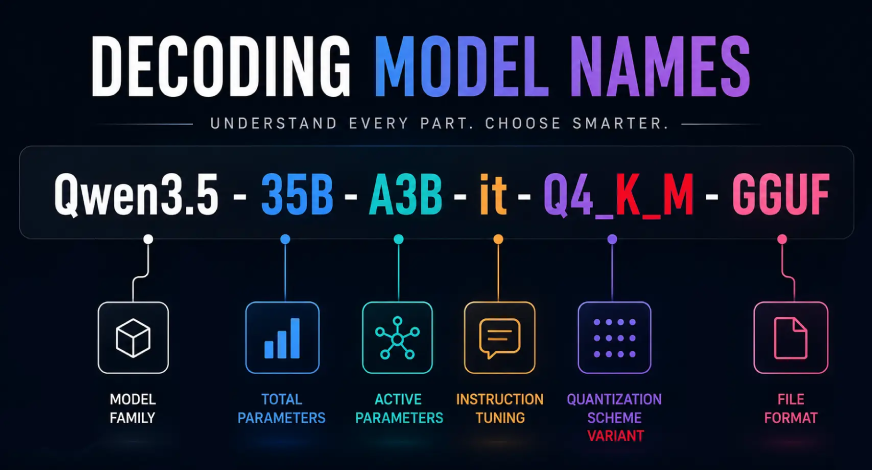
Now take the scary-looking filename again:
Qwen3.5-35B-A3B-Q4_K_M-GGUF
Read it from left to right. It is basically a spec sheet compressed into one line.
The Cheat Sheet
Term
What it means
7B / 35B / 70B
Total number of parameters
MoE
Mixture-of-Experts architecture
A3B
Approximate active parameters per token
FP16
16-bit floating-point representation
BF16
16-bit bfloat representation
Q4 / Q5 / Q6 / Q8
Quantization level
Q4_K_M
Specific quantization scheme
it / be
Instruction-tuned model or base model
GGUF
Model file format
Frequently Asked Questions
Q1. What do 7B, 35B, and 70B mean in LLM model names?
A. They indicate the model’s total number of parameters, with B representing billions.
Q2. What does A3B mean in an MoE model?
A. A3B indicates the approximate number of parameters active for each token during inference.
Q3. What does Q4_K_M mean in an LLM?
A. Q4_K_M is a 4-bit-class quantization scheme designed to balance model size and quality.
Studying, evaluating, and explaining AI systems for over 6 years.
“𝘖𝘯𝘤𝘦 𝘮𝘦𝘯 𝘵𝘶𝘳𝘯𝘦𝘥 𝘵𝘩𝘦𝘪𝘳 𝘵𝘩𝘪𝘯𝘬𝘪𝘯𝘨 𝘰𝘷𝘦𝘳 𝘵𝘰 𝘮𝘢𝘤𝘩𝘪𝘯𝘦𝘴 𝘪𝘯 𝘵𝘩𝘦 𝘩𝘰𝘱𝘦 𝘵𝘩𝘢𝘵 𝘵𝘩𝘪𝘴 𝘸𝘰𝘶𝘭𝘥 𝘴𝘦𝘵 𝘵𝘩𝘦𝘮 𝘧𝘳𝘦𝘦. 𝘉𝘶𝘵 𝘵𝘩𝘢𝘵 𝘰𝘯𝘭𝘺 𝘱𝘦𝘳𝘮𝘪𝘵𝘵𝘦𝘥 𝘰𝘵𝘩𝘦𝘳 𝘮𝘦𝘯 𝘸𝘪𝘵𝘩 𝘮𝘢𝘤𝘩𝘪𝘯𝘦𝘴 𝘵𝘰 𝘦𝘯𝘴𝘭𝘢𝘷𝘦 𝘵𝘩𝘦𝘮.” — 𝖥𝗋𝖺𝗇𝗄 𝖧𝖾𝗋𝖻𝖾𝗋𝗍, 𝖣𝗎𝗇𝖾
Login to continue reading and enjoy expert-curated content.
Keep Reading for Free