


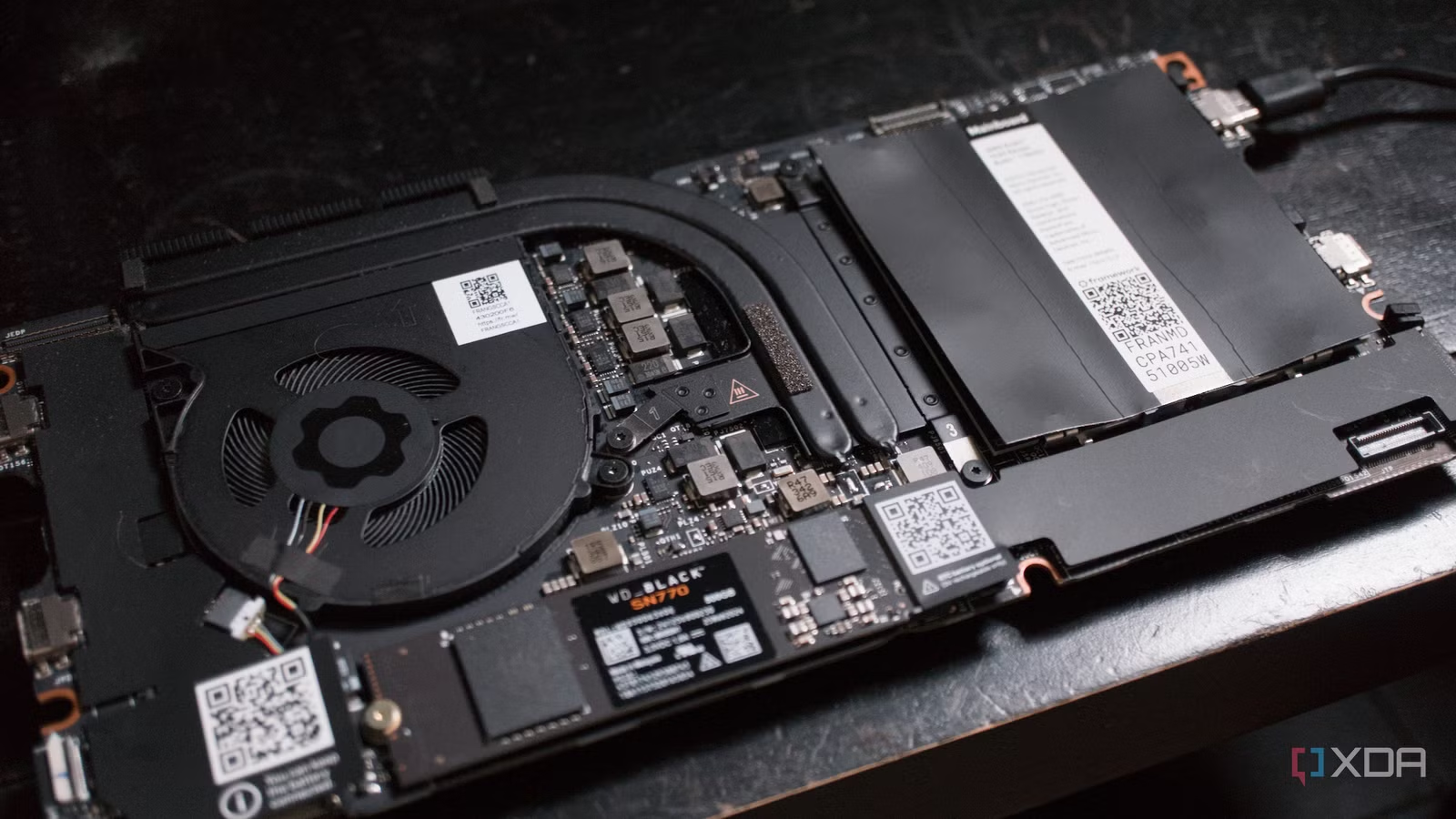
Framework makes some solid laptops that are excellent if you’re all about serviceability. Being able to take apart your laptop and actually make meaningful changes to it is nothing short of liberating. If my Framework Laptop 13 happens to suffer a hardware fault, I can order a new part straight from the manufacturer with zero fuss. I take the laptop apart, remove the old component, and install the replacement, and we’re once again up and running. But I thought, “How about taking that modularity to the home lab?”
Why use a Framework Laptop mainboard as a home server?
What would prompt someone to use a laptop in the home lab?
There’s a reason why so many appreciate the low-power capabilities of a mini PC. Sure, a used enterprise server in a 5U chassis looks the part and certainly makes one believe they’re running a home-based data center, but it’s not quite as simple as that. These old servers usually have less efficient parts because data centers aren’t particularly fussed when it comes to power draw. No one is sitting in the same room as the server for hours on end.
Even 1U servers with seemingly efficient Intel Xeon chips can pump out a lot of heat and noise. Those fans spin fast and take a fair amount of power to handle the load placed on the server with self-hosting and then some. That’s why people opt to consolidate from enterprise gear or switch things up and go with small form-factor systems and mini PCs. I went with the latter to begin with. A single Threadripper 9980X undervolted sounded like a great idea to run the entire home lab, replacing three 1U servers.
Turn out, it’s not saving me any power at all. Parts are just as expensive for workstations such as the AMD Threadripper platform. Granted, components are more readily available and standard, but this is what led me to a mini PC doing the job. It takes a fraction of the power input and yet manages to achieve some reasonable results. The same goes for a Framework Laptop mainboard, which is essentially just a fancy mini PC that fits inside a laptop chassis. Framework even sells a desktop chassis for the board.
The Laptop 13 I have at hand generally pulls anywhere between 5 and 8 watts at idle running Arch Linux. Running as a headless server, I would hazard a guess it would be even lower. That’s quite the baseline and a much more manageable amount than 120W or so with the Threadripper server build. When pushed hard, one can see around 30 watts pulled from the power brick, but even that’s a substantial saving compared to used servers and workstation consolidation projects.
Related
I spent less than $150 to build a Proxmox home server with an SBC
No, it’s not the Raspberry Pi
Transforming the laptop into a home server
Who needs a chassis to protect internal components?
The first port of call was to extract the mainboard from the Laptop 13. This isn’t terribly challenging at all, and Framework has some excellent guides available in true iFixit fashion if you get stuck along the way. Once disconnected from the keyboard, screen, battery, and then some, we have a simple yet capable single-board computer (SBC). Everything is present and ready to roll. The CPU, GPU, RAM, and storage are all soldered or installed on the primary PCB, so once removed, a single USB-C power input will see this thing boot up.
Framework even includes a dedicated power switch on the PCB. If you have a 3D printer at hand, it would be possible to create some extravagant case for this thing, incorporating a means to boot it up into the design. With the mainboard powered on, I booted into my favorite multi-OS tool to select Proxmox and start the familiar home server installation process. 16 GB of DDR5 RAM is presently installed, which is ample for running a few services. (If you have a gold mine, more can be added.)
The AMD Ryzen 7 7840U is a decent enough CPU with plenty of power on tap. It has eight physical cores with 16 threads available for various processes. It won’t win any awards for the mightiest workstation or gaming chip, but it will be perfect for running some Linux containers (LXCs) and virtual machines (VMs). A total of 96GB is supported, which would put this right up there with some of the best platforms for running Proxmox and some services.
Thermal performance is actually rather brilliant, thanks to not being enclosed inside a tightly packed package with other components producing heat. Having plenty of space around the SBC makes it possible to enjoy better sustained performance under load compared to the laptop form factor, though the Framework 13 is certainly no slouch. It’s just that AMD’s Ryzen chips simply don’t come close to Snapdragon in terms of efficiency.
Related
I turned a nearly 10-year-old laptop into the most useful machine in my home lab
I can’t imagine my home lab without it
Should everyone do this?
No. I don’t recommend you go and buy a Framework Laptop 13 or even just the mainboards and use them as a home server. Actually, I do if you can source one at a steep enough discount, but for most people, used PC parts, a mini PC, or some other form factor would be a better option. If you do, however, have a spare Framework laptop at hand or fancy yourself a small project on the side, it’s quite the compelling setup, being able to extract the board and power it up like it’s an SBC.
Operating System
None, Windows 11 Home, Windows 11 Pro
CPU
Intel 13th-gen P-series, AMD Ryzen 7040 series
GPU
Intel UHD or Iris Xe graphics, Radeon 700M Graphics
Storage
Up to 4TB PCIe 4.0 SSD
Battery
55Wh or 61Wh
Display (Size, Resolution)
13.5-inch IPS 3:2, 2256×1504 resolution, 100% sRGB, 400 nits
The Framework Laptop 13 is one of the most modular laptops you can buy in 2023. You can swap out all the components right down to the mainboard. New on this year’s model is the option for 13th-generation Intel CPUs, along with AMD Ryzen processors for the first time.