

Close Menu
Techy101 –

    Subscribe to Updates

    Get the latest creative news from FooBar about art, design and business.

    What's Hot

    Dell Is Back With Another MacBook Neo Challenger: I Tested the New Dell 14S Laptop

    October 16, 2026

    Grand Theft Auto 6 launch trailer suddenly drops, showing a saucy shower scene, a tense police chase, and high-flying heists

    October 16, 2026

    Relive Tesla’s Ridiculous(ly Fun) Roadster Stunt Show

    October 16, 2026
    Facebook X (Twitter) Instagram
    Trending
    • Dell Is Back With Another MacBook Neo Challenger: I Tested the New Dell 14S Laptop
    • Grand Theft Auto 6 launch trailer suddenly drops, showing a saucy shower scene, a tense police chase, and high-flying heists
    • Relive Tesla’s Ridiculous(ly Fun) Roadster Stunt Show
    • Faraday Future Unveils $2,490 Nova and $299 Nova Mini Humanoid Robots – Unite.AI
    • ‘Tenzing’ premieres on Apple TV, starring Tom Hiddleston and Willem Dafoe
    • AI model decodes the language cells use to communicate | MIT News
    • Welp, all of you RuneScape folks who hate Reignited have gotten your wish, as the controversial MMO rejig has been cancelled
    • Did AI Just Erase an Entire Swedish TV Show?
    Facebook X (Twitter) Instagram Pinterest YouTube LinkedIn TikTok
    Techy101 –Techy101 –
    • Home
    • Laptops
    • Mobiles
    • Gaming
    • Gadgets
    • Apps
    • AI
    • How To
    • Reviews
    Techy101 –
    Home»How To»Como assistir a várias LIVES na mesma guia do navegador
    How To

    Como assistir a várias LIVES na mesma guia do navegador

    By RepublisherAugust 7, 2026No Comments2 Mins Read
    Share Facebook Twitter Pinterest LinkedIn Tumblr Reddit Telegram Email
    Como assistir a várias LIVES na mesma guia do navegador
    Share
    Facebook Twitter LinkedIn Pinterest Email


    Como usar Streamlink Web Player para assistir várias livestream ao mesmo tempo na mesma janela do navegador

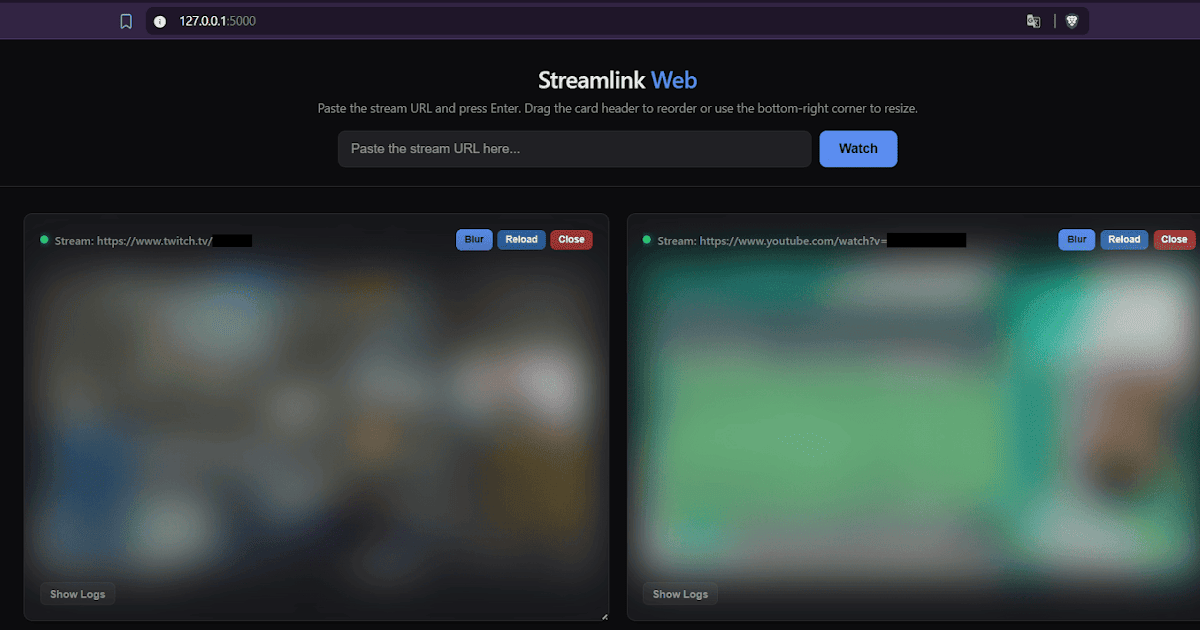
    O Streamlink Web Player é uma interface web local para o Streamlink. Simples de usar, apenas cole a URL de uma transmissão (como Twitch, YouTube, entre outras) e assista no navegador via HLS sem necessidade do VLC. Reproduza várias transmissões simultaneamente em uma grade redimensionável, com organização por arrastar e soltar. 

    Abaixo, veja um mini tutorial prático de como configurar e utilizar essa ferramenta.

    Pré-requisitos

    Antes de instalar o projeto do repositório limontec/Streamlink-Web-Player, certifique-se de ter em seu sistema:

    1. Python instalado.
    2. Streamlink instalado e configurado no PATH do sistema.
    3. Git (opcional, para clonar o repositório).
    4. ffmpeg no caminho C:\ffmpeg\bin\ffmpeg.exe

    Passo a Passo

    1. Abra o seu terminal e clone o repositório do GitHub ou baixe-o como arquivo ZIP:

    [git clone https://github.com/limontec/Streamlink-Web-Player.git

    cd Streamlink-Web-Player]

    2. Inicialize o ambiente Python conforme seu ambiente:

    [python -m venv venv

    venv\Scripts\Activate.ps1]

    3. Instale as dependências:

    [pip install -r requirements.txt]

    4. Abra o arquivo app.py e aponte o caminho do ffmpeg:

    [FFMPEG_PATH = r”C:\ffmpeg\bin\ffmpeg.exe”]

    5. (Opcional) Caso use plugins que não existem oficialmente para Streamlink, coloque eles na pasta `custom_plugin/`, ao lado de `app.py` (criada automaticamente na primeira execução).

    6. Execute a aplicação e abra o endereço http://localhost:5000 no seu navegador.

    Como usar:

    1. Cole a URL do stream no campo de entrada e pressione Enter (ou clique em “Assistir”).
    2. O servidor inicia o streamlink direcionando a saída para o ffmpeg, que faz a transcodificação para HLS; o vídeo começa a reproduzir automaticamente assim que o primeiro segmento está pronto.
    3. Cada stream tem seu próprio cartão:
      1. Arraste o cabeçalho para reordenar os cartões.
      2. Arraste o canto inferior direito para redimensionar um cartão.
      3. “Recarregar” reinicia o player daquele stream.
      4. “Fechar” interrompe o stream e libera o espaço.
      5. “Mostrar logs” exibe um registro de eventos específico para o stream (estado da conexão, carregamento/buffering, erros).
    4. O ponto de status ao lado do título de cada stream indica seu estado: 
      1. amarelo (iniciando/carregando)
      2. verde (reproduzindo)
      3. vermelho (desconectado/erro).
    5. Os streams abertos são salvos no navegador (localStorage) e restaurados automaticamente na próxima vez que você carregar a página.

    Para mais informações de personalização, confira o readme.


    Source link

    assistir Como guia Lives mesma navegador várias
    Share. Facebook Twitter Pinterest LinkedIn Tumblr Email
    Previous ArticleTop rings for tracking your health and fitness tested and ranked
    Next Article 5 New Steam Games to Play the Weekend of August 7
    Republisher
    • Website

    Related Posts

    Gaming

    10 Years Later, Critical Role’S Most Heartbreaking Quote Still Lives in My Mind Rent-Free

    September 26, 2026
    How To

    5 Best iPhone 18 Pro Cases You Can Buy Right Now!

    September 23, 2026
    How To

    5 beginner-friendly ESP32 projects that pay for themselves

    September 23, 2026
    Add A Comment
    Leave A Reply Cancel Reply

    Top Posts

    Dell Is Back With Another MacBook Neo Challenger: I Tested the New Dell 14S Laptop

    October 16, 2026

    AMD is apparently gearing up to raise GPU prices right after Nvidia’s steep hike

    August 1, 2026

    LanceDB Vector Database Guide: Features anndPython Demo

    August 1, 2026
    Stay In Touch
    • Facebook
    • YouTube
    • TikTok
    • WhatsApp
    • Twitter
    • Instagram
    Latest Reviews

    Subscribe to Updates

    Get the latest tech news from FooBar about tech, design and biz.

    Latest Post

    Dell Is Back With Another MacBook Neo Challenger: I Tested the New Dell 14S Laptop

    October 16, 2026

    AMD is apparently gearing up to raise GPU prices right after Nvidia’s steep hike

    August 1, 2026

    LanceDB Vector Database Guide: Features anndPython Demo

    August 1, 2026
    Recent Posts
    • Dell Is Back With Another MacBook Neo Challenger: I Tested the New Dell 14S Laptop
    • Grand Theft Auto 6 launch trailer suddenly drops, showing a saucy shower scene, a tense police chase, and high-flying heists
    • Relive Tesla’s Ridiculous(ly Fun) Roadster Stunt Show
    • Faraday Future Unveils $2,490 Nova and $299 Nova Mini Humanoid Robots – Unite.AI
    • ‘Tenzing’ premieres on Apple TV, starring Tom Hiddleston and Willem Dafoe

    Subscribe to Updates

    Get the latest creative news from FooBar about art, design and business.

    Facebook X (Twitter) Instagram Pinterest YouTube LinkedIn TikTok
    • About Us
    • Contact Us
    • Privacy Policy
    • Terms & Conditions
    • Disclaimer
    © 2026 techy101. Designed by Pro.

    Type above and press Enter to search. Press Esc to cancel.