


Pros & Cons
-
Costs less than MacBook Neo or XPS 13 -
Roomy, 14-inch display -
Lightweight at just 2.5 pounds
-
Build quality not on the level of MacBook Neo or XPS 13 -
8GB of RAM and 256GB of storage are restricting -
Keyboard backlighting and facial recognition webcam cost extra
Dell was the first of the Windows laptop makers to respond to Apple’s MacBook Neo when it released the XPS 13, giving students and other budget buyers a fantastic Windows alternative to the low-cost Neo. And before other Neo competitors like the HP OmniBook 5 or Lenovo IdeaPad Vibe arrive, Dell has issued a second laptop, an updated Dell 14S that is squarely focused on wooing students eyeing the colorful and affordable Neo.
Before we get into the details, I need to clear up some potential confusion. This new Dell 14S may share the same name and look similar to the mainstream Dell 14S I reviewed last month, but it’s a different laptop altogether. It’s significantly cheaper and lighter than the previous Dell 14S and is based on a different Intel processor family that delivers lower performance.
The XPS 13 is still the best Windows approximation of the MacBook Neo, but the Dell 14S deserves consideration for its low starting price and an all-aluminum design that’s available in four fun Neo-like colors. It has two advantages over both the XPS 13 and MacBook Neo: It has the largest display and the lowest price of the three. As with any budget laptop, however, it’s not without its drawbacks.
Dell 14S (DS14270)
Price as reviewed$650Display size/resolution14-inch 1,920×1,200 IPSCPUIntel Core 5 320Memory8GB LPDDR5-7467GraphicsIntel GraphicsStorage256GB SSDNetworkingWi-Fi 6E and Bluetooth 5.3Ports2x USB-C 3.2 Gen 2 (10 Gbps), HDMI 1.4, combo audioOperating systemWindows 11 Home
The Dell 14S (model DS14270) is based on Intel Wildcat Lake processors, whereas the previous Dell 14S used higher-performance Panther Lake chips. Wildcat Lake has become a popular choice in budget laptops, including Dell’s XPS 13.
My Dell 14S test system is the baseline model that costs $650 ($550 for students) and features an Intel Core 5 320 CPU, 8GB of RAM and a 256GB SSD. The baseline XPS 13 with those same specs costs $700. Meanwhile, the entry-level MacBook Neo costs $699.
So, why does the baseline Dell 14S cost $50 less than the XPS 13 and Neo even though it has a similar all-metal design with a roomier display? While it’s true that the Dell 14S’s 14-inch display is larger than the 13.4-inch display on the XPS 13 or the 13-inch display on the MacBook Neo, it has a lower resolution. It’s a more run-of-the-mill 1,920x,1,200-pixel, non-touch IPS panel that doesn’t offer the crisp text and images of the higher-res displays of the XPS 13 or Neo. Text and images are reasonably sharp, so it’s not a deal breaker for the Dell 14S.
Dell offers upgrades for the Dell 14S, letting you outfit the laptop with 16GB of RAM and a 512GB SSD, but the price jumps to $950. RAMageddon strikes again. There is also a 2.8K display upgrade and the option to swap out the Core 5 processor for a Core 7 350 chip. With the CPU and display upgrades (and 16GB of RAM and 512GB of storage), the Dell 14S is no longer a student special but priced solidly in the mainstream at $1,300, where it becomes less appealing.
Larger yet lighter than the MacBook Neo
Impressively, the Dell 14S weighs just 2.5 pounds despite its 14-inch display and is appreciably lighter than the 2.7-pound MacBook Neo but not as portable as the 2.3-pound XPS 13. And it’s nearly a full pound lighter than the previous Dell 14S I looked at, which weighs 3.3 pounds.
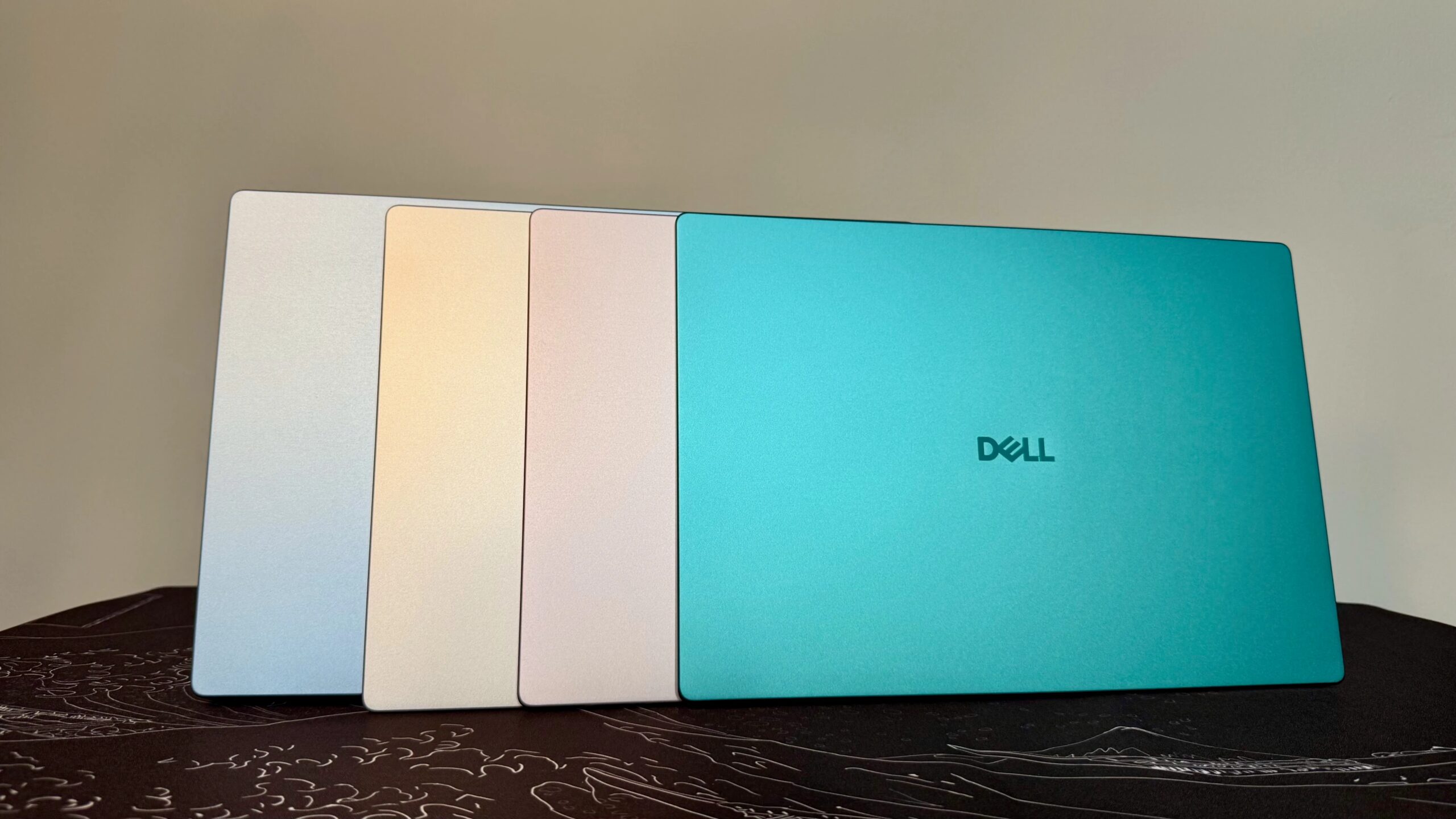
Like the Neo, it comes in four bright colors. The least interesting of the four colors, linen (a sand-like tan), is available now, and the other three colors — dusty rose (the palest of pinks), washed denim (a standard light blue) and velvet green (a bold green) — will be available starting on Monday.
The Dell 14S may have an all-aluminum design available in four different colors, but its build quality can’t match the Neo’s solid feel. The thin aluminum Dell uses for the 14S doesn’t feel nearly as rigid as the Neo’s shell or that of the XPS 13. I actually clicked the touchpad with the laptop closed by accident when I picked it up — and I wasn’t squeezing that hard. It’s just that the aluminum lid flexed so much that the pressure from my grip caused a mouse click. That’s a first for me.
The display has the minimum resolution of pretty much any laptop display these days, and it’s rated for only 300 nits, which is just about the lowest brightness rating you’ll find. In testing with a Spyder X colorimeter, it punched above its weight, reaching a maximum of 403 nits. Color performance, however, was predictably underwhelming, with 100% of the sRGB gamut and 74% of the P3 and AdobeRGB spaces. That’s no worse than the Neo’s color coverage and probably not all too important on such a low-end laptop that doesn’t have the muscle for serious creative work anyway. For enjoying streaming video and general use, though, it’s perfectly fine.
If you like tapping and swiping on your laptop’s display, then you’ll be disappointed to learn there’s no option for a touchscreen on the Dell 14S. It’s the same situation with the MacBook Neo, leaving the XPS 13 as the only one of the three with a touch display.
As with the Neo, my Dell 14S test system lacks keyboard backlighting. But unlike the Neo, the Dell 14S has traditional black keys, making them harder to see in low light than the Neo’s lighter, color-matched keyboard. You can add keyboard backlighting to the Dell 14S, but the cost of this upgrade wasn’t available at the time of my review.
In addition to the lack of keyboard backlighting, another aspect of the keyboard gives away the laptop’s budget status. The keys have a textured, matte finish that feels cheap. I much preferred typing on the MacBook Neo’s plushier keys, which also have a smooth finish. The XPS 13’s keyboard is also superior to the Dell 14S’s.
You can upgrade to an IR webcam on the Dell 14S, but it’s not available on the baseline model. This means no secure logins using facial recognition. And without a fingerprint reader, the laptop is devoid of biometric features, so you’ll need to key in a password for every login. That’s a similar spot MacBook Neo buyers face: needing to spend $100 to add Touch ID (and get more storage).
Ports are minimal with just two slow 10Gbps USB-C ports and an HDMI 1.4 port, but at least you also get a headphone jack, which goes missing on the XPS 13. You’ll need to bring your own adapter for any USB-A peripherals, such as older storage drives or a mouse.
Dell 14S performance
In testing, the Dell 14S performed on par with the XPS 13 that also had 8GB of RAM, which is to say it’s fast enough for basic tasks like browsing the web, writing term papers and light photo editing. I was able to run my usual mix of Google Docs and Sheets with a couple of dozen other tabs opened across two or three windows in Chrome without any hiccups, and casual photo editing using Affinity didn’t cause any problems.
Gamers will obviously want to look elsewhere, and students studying graphic arts or STEM will benefit from the added overhead that 16GB of RAM provides. Graphics workloads and complex scientific calculations will max out the 8GB of RAM pretty fast, at which point you’ll experience freezes and lags as the laptop must access data from the slower SSD. A laptop with only 8GB of RAM is also a poor choice for local AI inferencing.
The Dell 14S outlasted both the XPS 13 and MacBook Neo in battery testing. It lasted for more than 16.5 hours on our YouTube battery drain test, which should be enough uptime to let you traipse across campus all day without needing to stop and recharge the laptop.
Is the Dell 14S better than the MacBook Neo?
The only reason to choose the Dell 14S over the MacBook Neo or Dell’s own XPS 13 is if you find those laptops’ smaller screens too constricting. The MacBook Neo remains my pick for students, and the XPS 13 is still the best Windows laptop for school. Their superior build quality and higher-resolution displays set them apart from the Dell 14S and justify their marginally higher prices.
How we test computers
The review process for laptops, desktops, tablets and other computer-like devices consists of two parts: performance testing under controlled conditions in the CNET Labs and extensive hands-on use by our expert reviewers. This includes evaluating a device’s aesthetics, ergonomics and features. A final review verdict is a combination of both objective and subjective judgments. The list of benchmarking software we use changes over time as the devices we test evolve. The most important core tests we’re currently running on every compatible computer include Primate Labs Geekbench 6, Cinebench R24, PCMark 10 and 3DMark Fire Strike Ultra. A more detailed description of each benchmark and how we use it can be found on our How We Test Computers page.
System configurations
Dell 14S (8GB)Microsoft Windows 11 Home; Intel Core 5 320; 8GB DDR5 RAM; Intel Graphics; 256GB SSDDell 14S (16GB)Microsoft Windows 11 Home; Intel Core Ultra 7 355; 16GB DDR5 RAM; Intel Graphics; 512GB SSDDell XPS 13 (8GB)Microsoft Windows 11 Home; Intel Core 5 320; 8GB DDR5 RAM; Intel Graphics; 512GB SSDDell XPS 13 (16GB)Microsoft Windows 11 Home; Intel Core 5 320; 16GB DDR5 RAM; Intel Graphics; 512GB SSDAcer Aspire 14 AIMicrosoft Windows 11 Home; Intel Core Ultra 5 226V; 16GB DDR5 RAM; Intel Arc 130V Graphics; 1TB SSDHP OmniBook 5 14Microsoft Windows 11 Home; Qualcomm Snapdragon X Plus X1P-42-100; 32GB DDR5 RAM; Qualcomm Adreno Graphics; 1TB SSDMicrosoft Surface Laptop (13-inch)Microsoft Windows 11 Home; Qualcomm Snapdragon X Plus X1-P42-100; 16GB DDR5 RAM; Qualcomm Adreno Graphics; 512GB SSDM5 MacBook AirApple MacOS Tahoe 26.3.1; Apple M5 (10‑core CPU, 10‑core GPU); 16GB LPDDR5; 1TB SSDApple MacBook NeoApple MacOS Tahoe 26.3.1; Apple A18 Pro (6‑core CPU, 5‑core GPU); 8GB LPDDR5; 256GB SSD
Matt Elliott
See full bio