


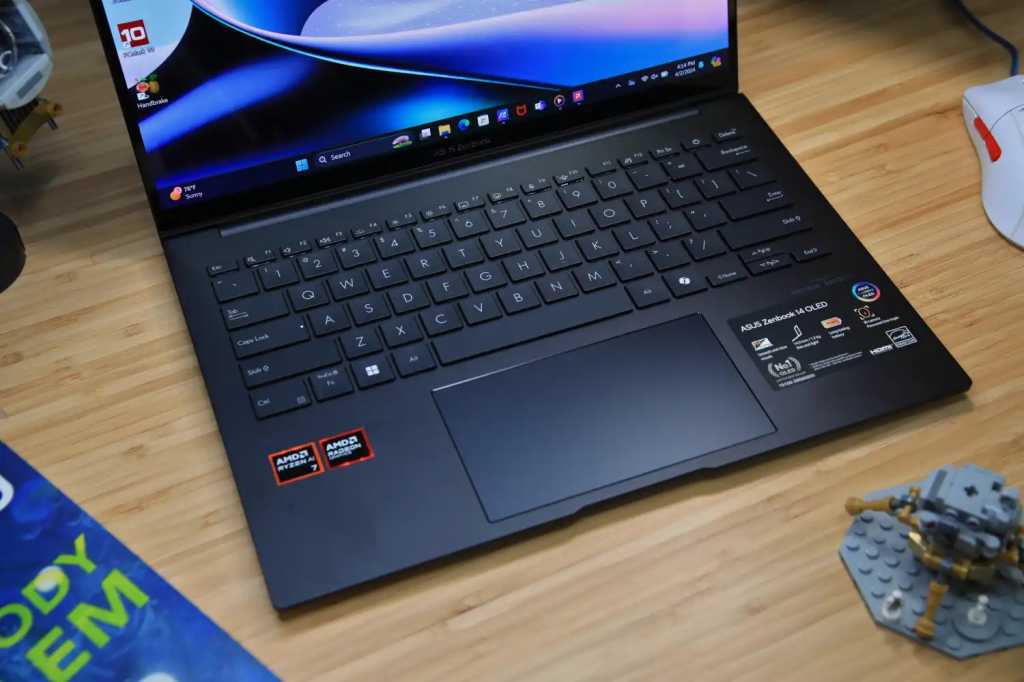
Asus Zenbook 14 OLED – Best overall
Pros
- Robust build quality
- Attractive OLED touchscreen
- Good CPU and integrated GPU performance
- Outstanding battery life
Cons
- Design is dull
- Keyboard isn’t memorable
- Mediocre connectivity
Price When Reviewed:
£1,099
Best Prices Today:
36% off original price£699
Who should buy the Asus Zenbook 14 OLED?
The Asus Zenbook 14 OLED tops our list because of the brilliant combination of power, portability, and battery life. The AMD Ryzen 7 chip is designed to run heavier programs like CAD without slowing down, even if you’ve got a bunch of tabs open on the side. The 14-inch 1920×1200 OLED touchscreen also looks fantastic and will make your diagrams and other projects really pop.
The one thing that really sticks out is the battery, though. Seriously, it went for over 16 hours in our test, which kind of blew my mind. You can definitely survive a whole day of classes, especially with conservative use and the brightness turned down. The audio is also quite good, offering you good volume and clarity during remote lectures.
Asus Zenbook 14 OLED: Further considerations
The build quality’s pretty good, especially considering it’s just $699 as of this writing. It’s also thin (0.59 inches) and light (2.82 pounds), which is great if you’re running from class to class. While the keyboard isn’t the best we’ve ever used because of the undersized keys, it’s totally fine for day-to-day use.
Read our full
Asus Zenbook 14 OLED review
Dell 14S – Best battery life
Pros
- Class-leading battery life
- Slick build
- Colorful and accurate display
- Good port selection
Cons
- Dismal 3D performance
- Display isn’t very bright
- So-so performance for the money
Best Prices Today:
Who should buy the Dell 14S?
The Dell 14S is a great fit for engineering students who want a laptop that can easily last through a long day of classes. It actually delivered some of the longest runtimes we’ve seen (nearly 36 hours in our video playback test!), thanks in part to its efficient Intel Core Ultra 7 355 processor and 69 watt-hour battery.
It’s also just a solid day-to-day machine. The aluminum design feels nice and sturdy, the keyboard is comfortable to type on for long periods of time, and the laptop remains easy to carry at just 3.28 pounds. For students who mainly use office apps, the Dell 14S has more than enough power for that kind of thing.
Dell 14S: Further considerations
This isn’t the laptop to buy if you need raw performance. The Dell 14S relies on Intel integrated graphics rather than a dedicated GPU, so it’s not the best choice for running demanding CAD projects.
Ultimately, the Dell 14S is a portable, reliable machine for students who spend most of their day away from a desk. It puts efficiency first.
Read our full
Dell 14S review
Acer Nitro V 16 AI – Best for work and gaming on a budget
Pros
- Large touchpad compared to alternatives
- 16-inch 1200p display at a low price
- Lots of physical connectivity
- Good battery life for a budget gaming laptop
Cons
- Sub-par CPU performance
- Terrible audio quality from built-in speakers
- Wireless connectivity stuck on the Wi-Fi 6 standards
- Slightly more expensive laptops offer better value
Best Prices Today:
£1,704.31
Who should buy the Acer Nitro V 16 AI?
If you’re an engineering student who likes to game after class, the Acer Nitro V 16 AI is worth considering. The RTX 5050 tucked inside delivers smooth 1080p gaming, hitting a respectable 72 FPS in Cyberpunk 2077 on Ultra settings. It also gives extra firepower for CAD modeling and rendering tasks. The 16-inch 1920×1200 IPS display is slightly taller than the typical 15.6-inch 1080p screens, so you’re getting more vertical workspace here–this is useful for coding, spreadsheets, and so on. At a price hovering between $800 and $900 it’s a budget-friendly option for students.
Acer Nitro V 16 AI: Further considerations
The AMD Ryzen 5 240 isn’t the fastest CPU around, and the speakers aren’t impressive, but despite these trade-offs, the Acer Nitro V 16 AI avoids common pitfalls most budget gaming laptops fall into. It lasted 12 hours on a single charge in testing, which is impressive for a gaming machine. The keyboard and touchpad are also spacious, making it comfortable to work on for long periods.
Read our full
Acer Nitro V 16 AI review
Microsoft Surface Pro – Best ultraportable
Pros
- Compact and well-built
- Good office performance
- All Copilot Plus features available
- Good battery life
Cons
- Narrow screen to work on
- No HDR support
- No charger included
Price When Reviewed:
£799
Best Prices Today:
£949
£1,299
Who should buy the Microsoft Surface Pro?
If you’re an engineering student with a jam-packed schedule, often needing to run from class to class, the Surface Pro is so lightweight (just a little over a pound) you’ll hardly notice its presence. Inside this laptop you’ll find a Snapdragon X Plus chip, so you can expect it to deliver a quiet, fanless experience (perfect for working in libraries and lecture halls), and it should handle basic coding and homework just fine.
Note: Snapdragon X Plus / Arm models are fine for lighter coding and notes, but if your coursework is heavy on SolidWorks, Autodesk apps, or older MATLAB workflows an x86 Windows laptop is a safer bet for performance and app compatibility first.
The 12-inch 2196×1464 screen offers sharp colors and touchscreen capabilities, allowing you to draw and take notes with the (optical) Slim Pen.
Microsoft Surface Pro: Further considerations
Though we really vibe with the high-resolution display, it’s a bit small if you’re the kind of person that has many windows open at once. Battery life is all over the place, ranging from two to three hours under heavy loads to 19 hours with light usage. You’re also limited to just two USB-C ports, so you’ll probably want to pick up a dock or hub.
Read our full
Microsoft Surface Pro 2025 review
Other notable laptops we’ve tested
- Framework Laptop 13 Pro: Framework’s Laptop 13 Pro DIY Edition is a pleasure to assemble and use, meeting all my requirements for a solid productivity laptop. But market forces are blowing hard against it.
- Asus Zenbook A16: A solid productivity laptop, with top-notch office performance, an outstanding multimedia experience, and excellent battery life
- MSI Prestige 16 Flip AI+: The MSI Prestige 16 Flip AI+ is a great laptop with a quality build, zippy speeds in everyday operation, and a wonderful display for work and play.
How we test laptops
The PCWorld team puts each and every Windows laptop through a series of benchmarks that test GPU and CPU performance, battery life, and so on. The idea is to push the laptop to its limits and then compare it against others we’ve tested. Chromebooks, on the other hand, go through a series of web-based tests.
For a much deeper look at our review methodology, check out how PCWorld tests laptops.
Who curated this article?
Hi, I’m Ashley Biancuzzo, and I oversee all laptop and Chromebook coverage at PCWorld. While you’ll see me review Chromebooks on occasion, I’m also really into the broader world of consumer tech. I spend a lot of time writing and thinking about where laptops are headed–from AI and sustainable designs to long-term trends. When I’m not deep in the world of tech, you’ll probably find me gaming, getting lost in a good book, or chilling with my rescue greyhound, Allen.
How to choose the best laptop for engineering students
The following are important questions to ask before making a purchase.
How much power do you need?
You’ll need a good amount of power. Engineering classes usually have you running some pretty heavy stuff like CAD, MATLAB, SolidWorks, and simulations. That stuff can slow your laptop down if it’s not up to the task, especially if you’ve got a bunch of apps open. A Core i5 or Ryzen 5 will get you through most of it, but if you want things to run smoother, a Core i7 or Ryzen 7 is where it’s at (so long as your wallet agrees).
Is RAM important?
For sure! You’ll be using code editors, compilers, simulation tools, sometimes all at once. RAM keeps your laptop from freezing up when you’ve got a ton going on. And with RAM prices being a bit volatile nowadays, it’s worth future-proofing if you can. 8GB might work if you’re just starting out, but 16GB is way better, especially later on when your classes get more intense.
How much storage should you get?
You’ll collect a ton of files–project folders, software installs, maybe some video editing or game dev work depending on your focus. We’d say go for at least 512GB SSD so you’re not constantly clearing space. If you can get 1TB, do it. It’s faster and gives you more breathing room for whatever your classes (or side hobbies) throw at you.
FAQ
1.
What is the best laptop for engineering students?
If you’re an engineering student who needs something light, fast, and reliable for coding or writing papers (plus a great screen and battery), the Asus Zenbook 14 OLED is a dang fine pick.
2.
What is the best budget laptop for engineering students?
If you’re on a tight budget and just need a straightforward for lighter coding programs, the Acer Aspire Go 15 gets the job done for just under $500.
3.
Is battery life important for engineering students?
Heck yeah! Long battery life means you can power through those long nights at the school library.
4.
What’s the ideal screen size for an engineering laptop?
We’d say the best screen size is anywhere from 13- to 15-inches. It can’t be too cumbersome otherwise it’ll get difficult to carry around.