

Close Menu
Techy101 –

    Subscribe to Updates

    Get the latest creative news from FooBar about art, design and business.

    What's Hot

    Hertz to Pilot Decagon Gateway for Muse Reservation Changes – Unite.AI

    November 15, 2026

    Bessent Gives Nvidia 10 Days to Address Export-Control Questions – Unite.AI

    November 15, 2026

    Top Trending GitHub Repositories: October 2026 AI Edition

    November 15, 2026
    Facebook X (Twitter) Instagram
    Trending
    • Hertz to Pilot Decagon Gateway for Muse Reservation Changes – Unite.AI
    • Bessent Gives Nvidia 10 Days to Address Export-Control Questions – Unite.AI
    • Top Trending GitHub Repositories: October 2026 AI Edition
    • Why AI Inference Now Drives Energy, Water, and Carbon Costs – Unite.AI
    • Megaspeed Retains Counsel to Probe Reports on Its AI Cloud Business – Unite.AI
    • NVIDIA Says Permanent CEO Search Remains at Search-Firm Stage – Unite.AI
    • Eufy Bottle Washer S1 Pro Review
    • Gemini can now help you fix your bad spending habits if you use Google Wallet
    Facebook X (Twitter) Instagram Pinterest YouTube LinkedIn TikTok
    Techy101 –Techy101 –
    • Home
    • Laptops
    • Mobiles
    • Gaming
    • Gadgets
    • Apps
    • AI
    • How To
    • Reviews
    Techy101 –
    Home»How To»How To Reset Samsung Phone Without Password
    How To

    How To Reset Samsung Phone Without Password

    By RepublisherSeptember 13, 2026No Comments2 Mins Read
    Share Facebook Twitter Pinterest LinkedIn Tumblr Reddit Telegram Email
    How To Reset Samsung Phone Without Password
    Share
    Facebook Twitter LinkedIn Pinterest Email


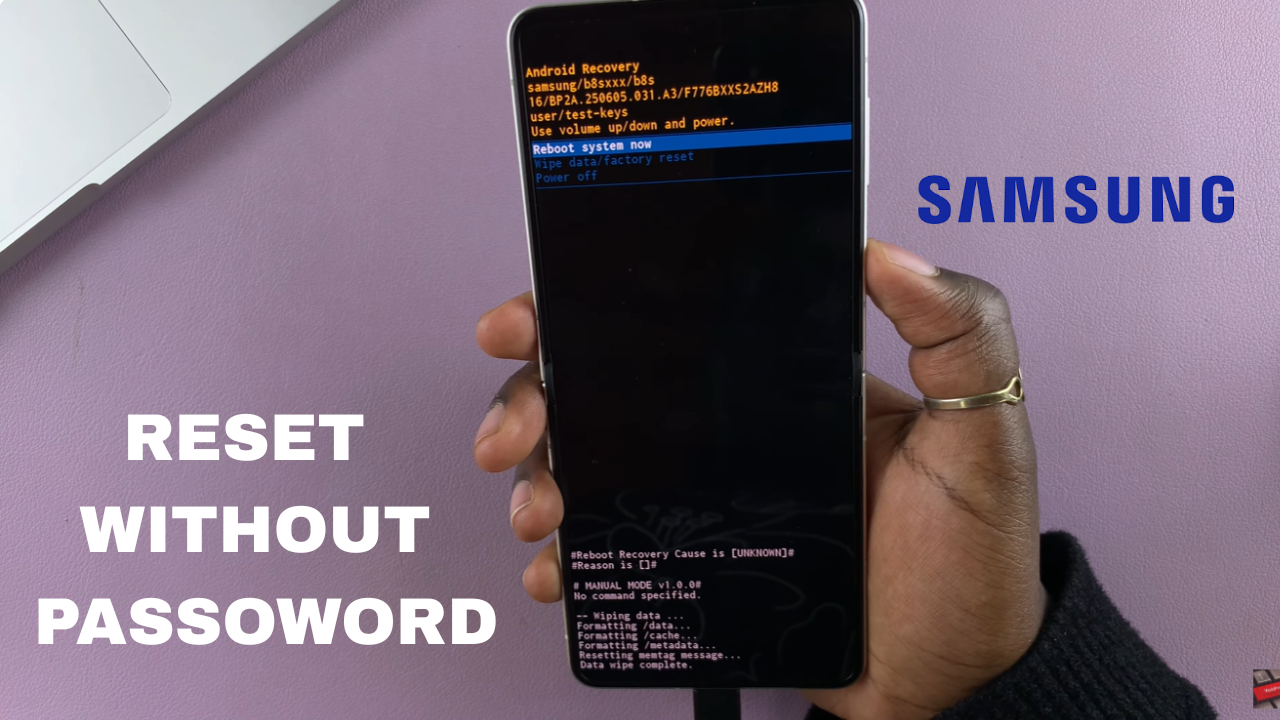
    Forgot your Samsung password and can’t unlock the device? You can still reset the phone using the Android Recovery menu. This process removes the screen lock along with the data stored on the phone.

    A factory reset is useful when you cannot access the phone normally. However, it permanently erases your apps, photos, files, accounts and other personal data stored on the device. If possible, make sure you have a backup before proceeding.

    Once the reset is complete, you can set up your Samsung gain as a new device. Follow the steps below to reset your Samsung device without entering the password.

    Read: How To Connect AirPods To Samsung Phone

    Reset Samsung Phone Without Password

    Before you begin, connect your Samsung phone to any laptop using a USB cable. Keep the phone connected to the laptop throughout the process. Press and hold the Side button and Volume Down buttons simultaneously. When the power menu appears, ignore it and continue holding both buttons.

    When the Samsung logo appears on the screen, release the Side button and Volume Down buttons. Immediately press and hold the Side button and Volume Up buttons together. Continue holding the Side button and Volume Up buttons while the phone remains connected to the laptop. Keep holding them until the Android Recovery menu appears.

    Once the Android Recovery menu opens, use the Volume buttons to navigate to Wipe data/factory reset. Press the Side button to select it. On the confirmation screen, select Factory data reset and press the Side button to confirm. The phone will erase its stored data and remove the existing screen lock.

    After the reset is complete, select Reboot system now and press the Side button. Your Samsung phone will restart and display the initial setup screen. You can now set up the phone again. If prompted, you may need to sign in with the Google account that was previously associated with the device.

    Watch: Samsung Galaxy Z Flip 8 Unboxing


    Source link

    Password Phone reset Samsung
    Share. Facebook Twitter Pinterest LinkedIn Tumblr Email
    Previous ArticleLidl verkauft Blitzerwarner mit 49 Prozent Rabatt
    Next Article Diablo 4 Season 15 Belial, Mephisto, Diablo, Baal and Moophisto Gameplay
    Republisher
    • Website

    Related Posts

    Apps

    One UI 9 fixed my routines, but Samsung still won’t sync them

    November 11, 2026
    Apps

    Your old Android phone can run a real Linux desktop, and Termux is all it takes to get started

    November 11, 2026
    Apps

    Samsung Galaxy S27 Ultra and Pro dummy phones show off what’s coming next

    November 10, 2026
    Add A Comment
    Leave A Reply Cancel Reply

    Top Posts

    Hertz to Pilot Decagon Gateway for Muse Reservation Changes – Unite.AI

    November 15, 2026

    AMD is apparently gearing up to raise GPU prices right after Nvidia’s steep hike

    August 1, 2026

    LanceDB Vector Database Guide: Features anndPython Demo

    August 1, 2026
    Stay In Touch
    • Facebook
    • YouTube
    • TikTok
    • WhatsApp
    • Twitter
    • Instagram
    Latest Reviews

    Subscribe to Updates

    Get the latest tech news from FooBar about tech, design and biz.

    Latest Post

    Hertz to Pilot Decagon Gateway for Muse Reservation Changes – Unite.AI

    November 15, 2026

    AMD is apparently gearing up to raise GPU prices right after Nvidia’s steep hike

    August 1, 2026

    LanceDB Vector Database Guide: Features anndPython Demo

    August 1, 2026
    Recent Posts
    • Hertz to Pilot Decagon Gateway for Muse Reservation Changes – Unite.AI
    • Bessent Gives Nvidia 10 Days to Address Export-Control Questions – Unite.AI
    • Top Trending GitHub Repositories: October 2026 AI Edition
    • Why AI Inference Now Drives Energy, Water, and Carbon Costs – Unite.AI
    • Megaspeed Retains Counsel to Probe Reports on Its AI Cloud Business – Unite.AI

    Subscribe to Updates

    Get the latest creative news from FooBar about art, design and business.

    Facebook X (Twitter) Instagram Pinterest YouTube LinkedIn TikTok
    • About Us
    • Contact Us
    • Privacy Policy
    • Terms & Conditions
    • Disclaimer
    © 2026 techy101. Designed by Pro.

    Type above and press Enter to search. Press Esc to cancel.