

Close Menu
Techy101 –

    Subscribe to Updates

    Get the latest creative news from FooBar about art, design and business.

    What's Hot

    Sony Spotlights 7 Startups at CEATEC 2026, From AI Characters to Microsurgery Robots

    October 16, 2026

    This Asus Vivobook is one of the best cheap laptop deals we’ve seen in a while

    October 16, 2026

    Android Developers Blog is moving

    October 16, 2026
    Facebook X (Twitter) Instagram
    Trending
    • Sony Spotlights 7 Startups at CEATEC 2026, From AI Characters to Microsurgery Robots
    • This Asus Vivobook is one of the best cheap laptop deals we’ve seen in a while
    • Android Developers Blog is moving
    • Withings Wants New Users To Pay $100 A Year To Sync With Apple Health
    • Microsoft’s October Windows 11 update fixes mouse stutter in some games
    • OpenAI Brings Computer Use to Chrome With ChatGPT Tab Controls – Unite.AI
    • US lawmaker calls videogame purchases rentals disguised as sales: ‘When you pay for a game, you should own it’
    • State of Supply Chain Sustainability Report finds corporate commitment at record high, but governance lags behind | MIT News
    Facebook X (Twitter) Instagram Pinterest YouTube LinkedIn TikTok
    Techy101 –Techy101 –
    • Home
    • Laptops
    • Mobiles
    • Gaming
    • Gadgets
    • Apps
    • AI
    • How To
    • Reviews
    Techy101 –
    Home»Gadgets»Which Major Chatbot Apps Work With CarPlay?
    Gadgets

    Which Major Chatbot Apps Work With CarPlay?

    By RepublisherSeptember 21, 2026No Comments4 Mins Read
    Share Facebook Twitter Pinterest LinkedIn Tumblr Reddit Telegram Email
    Which Major Chatbot Apps Work With CarPlay?
    Share
    Facebook Twitter LinkedIn Pinterest Email


    You can now talk with ChatGPT, Claude and more while you’re on the road.


    PixieMe/Shutterstock

    If you love using AI chatbots like ChatGPT on your phone, you’ll be pleased to know that accessing them in your car is also easy — if you have a car with Apple CarPlay. That’s thanks to an API that arrived with iOS 26.4 allowing developers to bring AI chatbots into CarPlay, with a few already available. You just need to make sure you have the latest versions of their apps installed. 

    For safety while driving, AI tools compatible with CarPlay only work through voice commands. Most of them let you jump back into an existing conversation from another device, at least. Before you continue, make sure your iPhone is running iOS 26.4 or later by visiting Settings > General > Software Update. If an update is available, follow the steps to install it. 

    After that, open the App Store, tap your profile icon at the top-right, choose App Updates, swipe down to refresh, then choose Update All to make sure you have the latest versions of installed AI apps.

    Using AI chatbots in CarPlay


    Filipe Espósito for Engadget

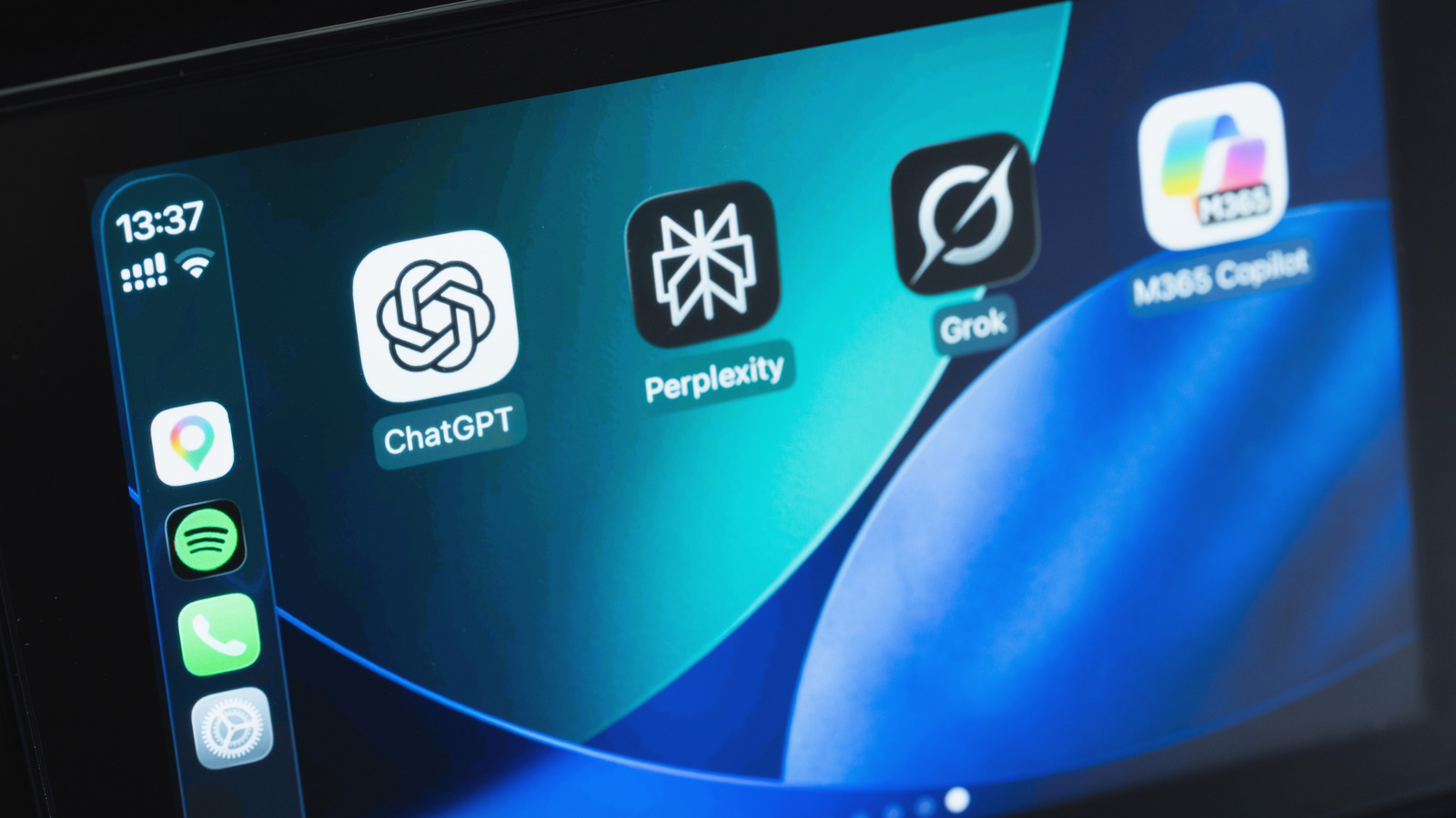
    As the most popular AI bot, it’s no surprise that ChatGPT is CarPlay-ready. If you already have it on your iPhone, you’ll find it on your CarPlay Home Screen. If you don’t have it yet, download ChatGPT for free from the App Store (the same goes for the other apps discussed). With your iPhone connected to your car, tap the ChatGPT icon on CarPlay and select New Voice Chat. Then speak naturally when the app indicates it’s listening.

    If you’re not a fan of ChatGPT, several other options are available. Perplexity is one, with Meta AI and xAI’s Grok also supported. More recently, Anthropic’s Claude has also joined the list of chatbots available on CarPlay. Plus, if you’ve updated your iPhone to iOS 27, Siri AI is available too — though this requires an iPhone 15 Pro or later for Apple Intelligence.

    When you open any of the apps in CarPlay, start a new chat or pick up where you left off before (all with your voice). For Siri AI, try using the “Hey Siri” command if it’s available in your car. You can ask about anything, like suggestions on what to do at your destination. If you’re driving alone, these chatbots can be a fun way to keep you entertained. Of course, remember that AI isn’t perfect and the answers aren’t always correct, so it’s always a good idea to double-check. Also, some conversations can be distracting and are better left for when you’re at home.

    By default, newly-compatible CarPlay apps get added to the end of your home screen, so it’s worth customizing your CarPlay display to make your most-used AI tools easier to reach. On your iPhone, go to Settings > General > CarPlay. Select your car, then choose Apps. Here you can drag them to rearrange and use the red minus icon to remove any you don’t use.

    Why AI chatbots might not work in your car


    DenPhotos/Shutterstock

    AI chatbots in CarPlay have some inconvenient limitations. For one, you can’t access them with a wake word like you can with Siri; you’ll need to open their apps to start talking with them. The bots also can’t control anything in your car or inside other apps.

    Also, how well they understand voice commands depends on the quality of your car’s microphones. If there’s too much noise and/or the microphones are poor, chatbots might not understand what you’re saying. Try closing the windows to reduce outside noise, or use the apps while parked. If you continue to have trouble, try using the chatbot in another vehicle to see if the problem is specific to one car.

    These chatbots shouldn’t be used for navigation, since they don’t have access to your real-time location or a mapping service. You can ask for suggestions on places to visit, but they won’t be able to guide you there. The only chatbot that can do this is Siri AI, since it integrates with Apple Maps. You also need an internet connection to use these apps. A weak signal, or lack of one, is the main they’ll stop working as you drive.


    Source link

    Apps CarPlay chatbot major Work
    Share. Facebook Twitter Pinterest LinkedIn Tumblr Email
    Previous ArticleSilent Hill: Townfall review – an often inspired, if slightly lumbering trek into the fog
    Next Article Double Fine’s New Game Project Raises Half a Million Before Hitting Controversy
    Republisher
    • Website

    Related Posts

    Gadgets

    Sony Spotlights 7 Startups at CEATEC 2026, From AI Characters to Microsurgery Robots

    October 16, 2026
    Gadgets

    Withings Wants New Users To Pay $100 A Year To Sync With Apple Health

    October 16, 2026
    Gadgets

    World Timekeepers Decide to Kill the Leap Second

    October 15, 2026
    Add A Comment
    Leave A Reply Cancel Reply

    Top Posts

    Sony Spotlights 7 Startups at CEATEC 2026, From AI Characters to Microsurgery Robots

    October 16, 2026

    AMD is apparently gearing up to raise GPU prices right after Nvidia’s steep hike

    August 1, 2026

    LanceDB Vector Database Guide: Features anndPython Demo

    August 1, 2026
    Stay In Touch
    • Facebook
    • YouTube
    • TikTok
    • WhatsApp
    • Twitter
    • Instagram
    Latest Reviews

    Subscribe to Updates

    Get the latest tech news from FooBar about tech, design and biz.

    Latest Post

    Sony Spotlights 7 Startups at CEATEC 2026, From AI Characters to Microsurgery Robots

    October 16, 2026

    AMD is apparently gearing up to raise GPU prices right after Nvidia’s steep hike

    August 1, 2026

    LanceDB Vector Database Guide: Features anndPython Demo

    August 1, 2026
    Recent Posts
    • Sony Spotlights 7 Startups at CEATEC 2026, From AI Characters to Microsurgery Robots
    • This Asus Vivobook is one of the best cheap laptop deals we’ve seen in a while
    • Android Developers Blog is moving
    • Withings Wants New Users To Pay $100 A Year To Sync With Apple Health
    • Microsoft’s October Windows 11 update fixes mouse stutter in some games

    Subscribe to Updates

    Get the latest creative news from FooBar about art, design and business.

    Facebook X (Twitter) Instagram Pinterest YouTube LinkedIn TikTok
    • About Us
    • Contact Us
    • Privacy Policy
    • Terms & Conditions
    • Disclaimer
    © 2026 techy101. Designed by Pro.

    Type above and press Enter to search. Press Esc to cancel.