


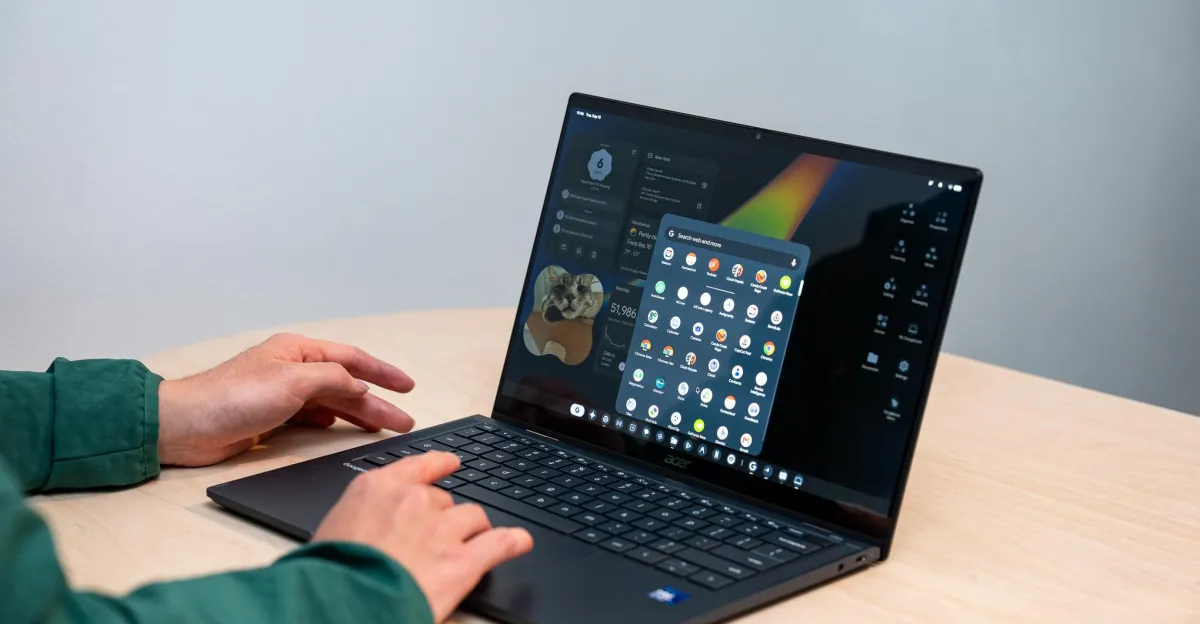
There are a few things about using a Googlebook that immediately feel just right. The hardware is polished (since it’s based on current laptops). The OS is familiar (if you’ve ever used a Chromebook). But most impressive, it integrates your Android phone with your PC so they feel more like one device. It’s the culmination of a series of new ideas that blur the two devices together. After my first look, I went from doubtful to excited by the prospect of Google pulling it all off.
After an initial bare-bones announcement in May, Google is finally launching Googlebooks — its new line of Android-based laptops. The initial five Googlebook models from Dell, Lenovo, HP, Acer, and Asus all launch October 4th, with preorders available now and starting prices ranging from $899 to $1,299.
In a nutshell, they’re laptops running a new operating system that’s a blend of Chromebooks and Android — with a whole lot of Gemini AI stuff built in. They look quite like Chromebooks, but with Android’s Material Three Expressive UI stylings on the software side and higher-end materials for hardware. There doesn’t seem to be a baseline spec for Googlebooks, but at launch they’re all thin-and-light laptops ranging from 13 inches to 15 inches with 16GB of RAM or more, touchscreen displays (most of them OLED), metal chassis, backlit keyboards, either fingerprint or facial recognition unlocking (or both), and a Google-y Glowbar light strip on their lids.
The launch lineup for Googlebooks. Image: Google
Powering the initial lineup of Googlebooks are Intel Core Ultra Series 3 “Panther Lake” and Qualcomm Snapdragon X Elite chips, with MediaTek options expected to come later. While the first wave of Googlebooks are similarly sized and all have “Googlebook” in their name, there are some variations: haptic or mechanical trackpads, port offerings, even a 2-in-1 convertible. Check out our roundup of all the hardware here.
I spent a bit of time prodding all the Googlebooks during my demos, and each one felt pretty nice. They each have their own unique qualities: The Asus was incredibly lightweight; the Lenovo has plenty of ports and an optional mouse with a matching Glowbar light; the Acer’s convertible form factor allows some tablet-like use (and it’s pretty affordable for a Panther Lake laptop). The HP had a great-looking screen and a latticeless keyboard I surprisingly didn’t hate, and the Dell is basically a gold XPS 13 (which is excellent) but with a different chip.
1/5The Asus Googlebook 14.
But everything really special about Googlebooks comes down to software. They run Googlebook OS, which is built with the native Android stack atop a Linux kernel and supports both x86 and Arm architectures (as implied by the chip offerings). It’s an Android desktop interface that runs Android apps and feels much like ChromeOS, but it’s got some handy features when paired with an Android phone.
You can cast apps from an Android phone directly to a Googlebook, even without touching your phone. Googlebooks essentially have two app drawers: a G-logo start menu for installed Googlebook apps and a second one beside it that pulls up mobile apps from your phone. Click a phone app and you can fully use that app with the mouse and keyboard or the Googlebook’s touchscreen. It’s a bit like iPhone Mirroring on macOS, but the apps are individually extracted to the desktop OS instead of showing your whole phone interface.
PreviousNext
1/2You can cast any app from your phone via a second app drawer on Googlebook OS. Here you see both drawers open.
Googlebooks also have a nifty feature called Continue On where the icons of apps you’re currently using on your phone appear in the bottom bar — allowing you to click it on the laptop and hand it off to the Googlebook. These app handoffs can transition to a native app or a web app, depending on how developers have programmed it. A Google rep informed me at my in-person briefing that Continue On is fairly simple for Android developers to add to their apps, and casting apps to a Googlebook doesn’t require anything extra.
The other big way Googlebooks interact with an Android phone is Quick Access, allowing you to see and access all the files stored on your phone right in the desktop Files app. The paired Android phone is listed in the sidebar of a Googlebook’s Files window, just like any other drive or home folder, and you can directly search it and share files from it without physically picking up your phone. This is pretty handy stuff, but of course it all requires you running an Android phone. If you have an iPhone then you’re limited to a Link to iOS app that just does some message syncing and replying.
PreviousNext
1/2Quick Access treats your paired phone like another local drive. Image: Google
As Google first showed in May, the Googlebook mouse cursor is called a Magic Pointer — allowing you to wiggle it to summon Gemini. Doing so allows you to ask Gemini questions or have it look at things on your screen to get further info. One of Google’s live demos was asking Gemini “Is this legit?” on a Spotify account authentication email, or adding a multi-week exercise routine for marathon training to a Google Calendar. Some tasks run locally, while many will go up to Gemini in the cloud — and it wasn’t clear when that was happening during any of Google’s demos. Googlebooks also have recent Android features like Create My Widget (for creating custom widgets from natural-language prompts) and Rambler (speech transcription that can parse stream-of-consciousness-like wordiness).
And while thin-and-light laptops aren’t really built for gaming, since Googlebooks run Android they work with 20,000 games at launch. Many of these are free-to-play mobile games with microtransactions, of course, but the Play Store does have many indie titles that should play fine on a laptop. I briefly demoed a Googlebook running Dead Cells and Balatro — indie staples that are well worth playing on any platform. But it was also jarring to see a demo of Asphalt Legends offer me the option to watch a post-race ad for an in-game currency reward. That felt icky and weird on a laptop. But when it comes to mainline gaming, Nvidia’s GeForce Now service is also coming to Googlebooks, and the first year is free with one of Google’s new laptops.
Love me some Dead Cells.
Seeing ads after a race in a mobile game? Don’t love that.
A big draw of Googlebooks is that by being Android-based they can follow software developments that move at a much quicker pace than ChromeOS. Chromebooks will continue on, especially for education use where they’re widely adopted, but it’s pretty easy to feel like their days are numbered as the focus shifts to Googlebooks. Just like Chromebooks, Google is promising Googlebooks will get 10 years of OS support.
I kept asking who Googlebooks are for during Google’s media briefing, and Android president Sameer Samat told me they’re aimed at users who own a phone like a Samsung Galaxy Z Fold 8 who don’t particularly want to use Windows or a Mac. Googlebooks’ initial prices completely overlook direct competition with the MacBook Neo (at least for now), but considering the state of Windows 11 and frequently voiced frustrations with Microsoft (I see you, Verge commenters), another competitor in the space could help mix things up.
PreviousNext
1/2It’s not the Lightroom I want, but it’s a Lightroom and it’s “Optimized for desktop.”
One thing I found comforting was the work Google put into flagging apps as desktop-compatible in the Play Store. Kind of like how Valve verifies games for Steam Deck and Steam Machine compatibility, Google has three designations for Play Store apps on Googlebooks: Made for desktop, Optimized for desktop, or Better on the website. It’s cool to see an “Optimized for desktop” version of Lightroom I can install on a Google laptop, though I know it’s the mobile version and not the Lightroom Classic I regularly use on Windows and macOS.
But while that hints at Google taking this initiative pretty seriously, and all the Android integration tricks seem cool, there are many open questions for Google and its new OS that remain to be answered.
- Even if Chromebooks continue on strictly for education, what will happen as that software ages with the development attention turned to Googlebooks?
- Do people want to trust Google with their whole computer these days?
- Do people want a laptop built with Gemini in mind? There’s an ongoing AI backlash, and Googlebooks puts Gemini at the forefront — even in the cursor.
- Will developers like Adobe further optimize their mobile creative apps for desktop use? Or bring desktop-only apps like Lightroom Classic to Android? (Please?)
- Are these laptops ready for showtime? Not to get too inside baseball, but Google isn’t sending out review units ahead of the launch. And some OEM reps told me they just got the hardware shortly before our briefing — deferring all software questions to Google. Maybe that’s no big deal, but it doesn’t instill much confidence.
- What will future cheaper Googlebooks look and feel like? And just how cheap (or expensive) might they get — especially in the age of RAMageddon?
After seeing what Googlebooks can do, I went from having no idea why they even exist to feeling at least adequately whelmed and looking forward to seeing some new ideas and competition in the laptop space (even if it might be just another Trojan horse for Gemini). It’s not every day we get a new player in the desktop operating system and laptop spaces. There seems to be a higher ceiling of potential with Googlebooks than there was with Chromebooks, along with some cool features, but Google has a lot to prove at higher prices than people are used to paying for its laptops.
Photography by Antonio G. Di Benedetto / The Verge
Follow topics and authors from this story to see more like this in your personalized homepage feed and to receive email updates.
- AndroidClose
Android
Posts from this topic will be added to your daily email digest and your homepage feed.
FollowFollow
See All Android
- AsusClose
Asus
Posts from this topic will be added to your daily email digest and your homepage feed.
FollowFollow
See All Asus
- ChromebookClose
Chromebook
Posts from this topic will be added to your daily email digest and your homepage feed.
FollowFollow
See All Chromebook
- DellClose
Dell
Posts from this topic will be added to your daily email digest and your homepage feed.
FollowFollow
See All Dell
- GadgetsClose
Gadgets
Posts from this topic will be added to your daily email digest and your homepage feed.
FollowFollow
See All Gadgets
- GoogleClose
Google
Posts from this topic will be added to your daily email digest and your homepage feed.
FollowFollow
See All Google
- HPClose
HP
Posts from this topic will be added to your daily email digest and your homepage feed.
FollowFollow
See All HP
- LaptopsClose
Laptops
Posts from this topic will be added to your daily email digest and your homepage feed.
FollowFollow
See All Laptops
- LenovoClose
Lenovo
Posts from this topic will be added to your daily email digest and your homepage feed.
FollowFollow
See All Lenovo
- NewsClose
News
Posts from this topic will be added to your daily email digest and your homepage feed.
FollowFollow
See All News
- TechClose
Tech
Posts from this topic will be added to your daily email digest and your homepage feed.
FollowFollow
See All Tech