


Image: Nintendo Life
With the price of consoles, controllers, games, groceries — everything — shooting up over the last few years, you’re likely keen to save pennies where you can. It’s one thing to push the boat out for a new Switch 2, but add-ons and accessories can stretch budgets to breaking point. Is a $90 / £75 Pro Controller 2 really an essential purchase when your old Switch 1 Pro Controller is working just fine?
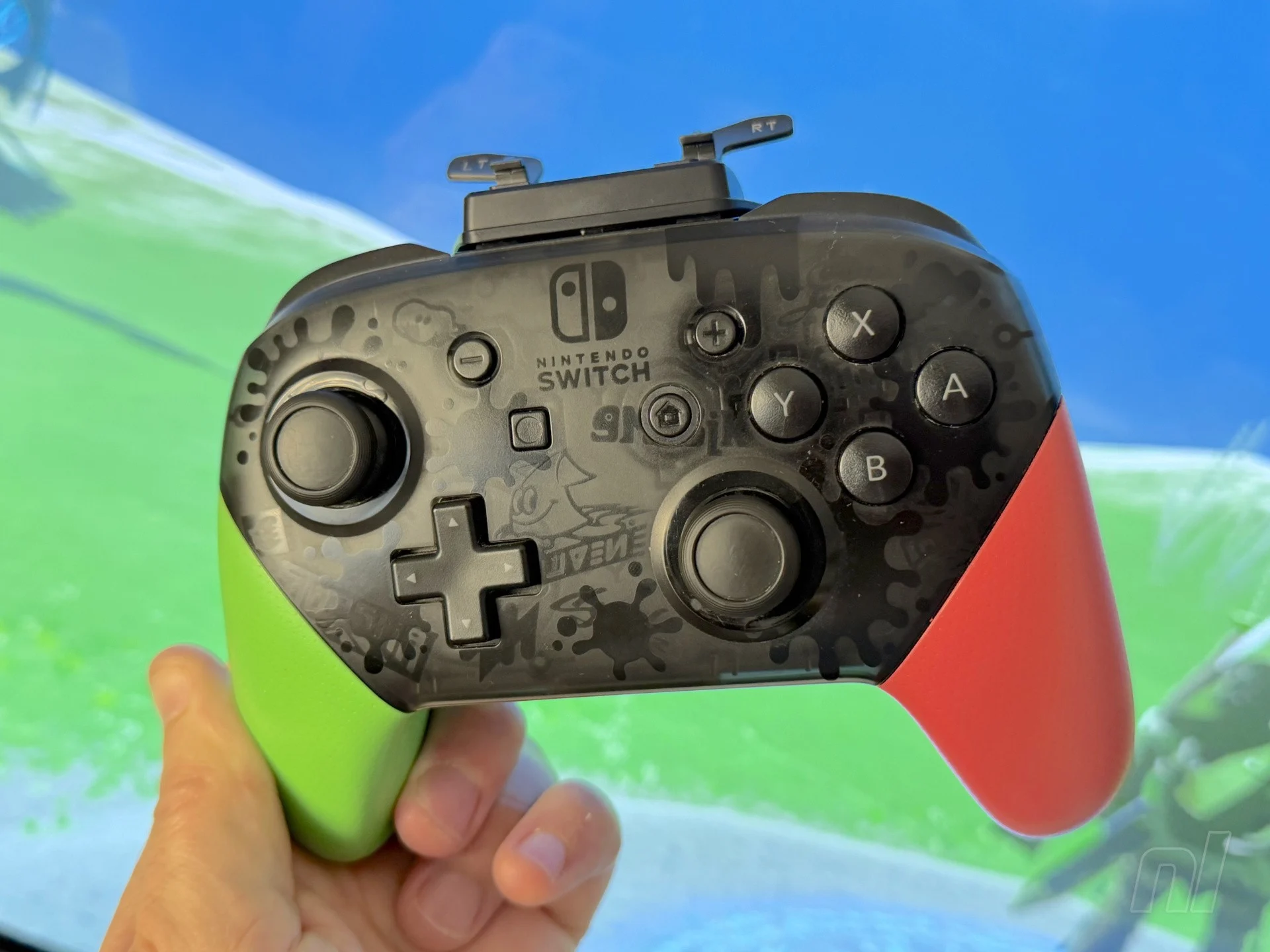
Justifying that sort of money (or more if you want that fancy new Zelda one) might be tough, but what if you could upgrade your old Pro Controller with back buttons and broader functionality, and throw some analogue triggers into the bargain? That’s what JSAUX is proposing with the Voidjoy Elite Extender, an add-on which attempts to give your old Pro a glow-up into something resembling other premium pads.
The question is if this unit gets anywhere near the comfort and utility of pricier pads or if you’re better off saving up and avoiding this halfway-house solution. Ultimately, it’s closer to the latter from my experience: a slightly clunky solution to a single problem, and probably not the problem you’re looking to address in the first place – the analogue triggers don’t work with Switch games.
Images: Nintendo Life
I’ll come back to the triggers in a moment, but first let’s look at the value proposition. For the sum of $39.99 USD + shipping (sorry Europeans, it looks like the EU’s new user-serviceable battery regulations mean this won’t be sold in the region), you get a gadget that includes back buttons and optional extra triggers, plus turbo and 42-step macro options, and a 1800mAh battery adds extra juice to your old pad. Switch 2 wake-up is advertised, although I couldn’t get that working on the latest update (1.12).
The Extender also plays nicely with Windows, iOS, Android (including touch-only games), and Raspberry Pi, and you can test sensitivity, load presets, remap buttons, create macros, calibrate deadzones and analogue triggers, and all that game, as you’d expect, via a ‘KeyLinker’ app which functions well enough. You can also swap the colours of the little LED windows on the back.
Connecting to your Switch 1 Pro Controller via the USB-C port, it fits fairly flushly around the top and rear of the pad, giving it little bunny ears if you have the removable metal triggers attached. It reminded me of Floyd, the little floating guy from Jet Force Gemini, so that’s a point in the ‘pros’ column.
Images: Nintendo Life
The device attaches solidly enough. You can still see a little gap along the top, but I had zero issues with it coming loose. Once paired, your Switch recognises it as a different pad and, due to having its own battery, you can charge your Pro Controller as you play.
The two back buttons — labelled ‘P1’ and ‘P2’ — function as advertised, although you’ll need fairly long fingers to reach them. Using the app, you can map these to whatever you like. Testing the Extender over many hours with Tears of the Kingdom, I mapped ‘sprint’ to the back buttons for easier run-jump manoeuvres. They’re not as elegant as ‘GR and ‘GL’ on the Switch 2 Pro due to their clickiness and the Extender’s chunkier form (they stick out quite a bit), but they work well enough.
Moving on to those cute metal analogue triggers. The lack of optical triggers is one of the Switch 2 Pro Controller’s few disappointments. For racing games, in particular, the subtle control triggers like these afford feels transformative. The Extender’s thin little levers feature 1280-step sampling and are decently responsive. In TOTK, I simply duped the regular trigger functions for shield and bows, but you can map them to anything you wish. If you’ve got shorter fingers, reaching them may be an issue – my spindly digits rested on the ends of the removable prongs, though.
Images: Nintendo Life
Yes, removable. With a little jiggle, the triggers can be ‘unhooked’ and even turned and reattached via magnets. It’s neat (because magnets) and fairly tidy, although it feels like a solution to a non-problem. The space saved by inverting and ‘storing’ the triggers is minimal given their petiteness. It’s a cute but odd design decision.
The major issue for Switch gamers here, however, is that the small handful of games with analogue trigger support unfortunately don’t recognise this pad’s triggers. While Nintendo’s GameCube pad does support analogue inputs in its NSO library (for instance, to vary the pressure of FLUDD’s flow in Mario Sunshine) and select Switch games, that’s not the case here. If you purchase this hoping to finally feather the throttle in GRID Autosport or Trials Rising, you’re out of luck.
It’s a different story if you’re playing on PC. Switching to X-input mode, I was able to play GRID on Steam with the analogue triggers working beautifully. But PC players will already own a more comfortable, platform-friendly pad than a nine-year-old Switch Pro Controller, surely? If it doesn’t add analogue precision to your Switch games, it’s difficult to see exactly who this accessory is aimed at.
Images: Nintendo Life
The buttons on the top let you switch modes and program macros, although good luck pressing them with sausage fingers. One ‘button’ pokes through to the Pro Controller’s own sync button beneath, enabling a form of ‘passthrough’ play if you want to use the pad as normal (without the Extender’s functions) but don’t want to remove the accessory for some reason.
Weight-wise, you’re adding 68g with this attached, so while it’s a little cumbersome, it doesn’t suddenly make your pad outrageously clunky or heavy.
The problem is the benefits don’t outweigh the negatives – not for $40, which you could put towards a game or a controller that has all this functionality built in. Even as someone reluctant to splash $90 (or your regional equivalent) on a pad, it’s hard to recommend the GA-10 unless you need back buttons and you’ve got an unbreakable emotional attachment to your old Pro Controller.
Image: Nintendo Life
Conclusion
The VoidJoy Elite Extender isn’t bad; it’s just a little cumbersome and ends up making you pine for a more comfortable, ergonomic pad that really solves your modern input issues with style. The GA-10 has all the macro recording abilities and turbo functions you’d expect, and you may find its additional back buttons and alternative triggers useful. However, the incompatibility of those analogue triggers with Switch games is a real kicker.
As it is, unless you’re desperate to use your old Switch 1 pad on other platforms and enjoy the precision triggers there, you’re better off saving up and investing in either the GameCube NSO pad (for its triggers) or a bespoke Switch 2 controller that has similar functionality in a more attractive package.
- Adds back buttons and potentially useful functionality to your old pad
- Also gives it cute little magnetic bunny ears
- Finally, analogue triggers!…
- …which don’t work on Switch
- An admirable but awkward solution
- Back buttons and triggers aren’t in the most natural position
- Function buttons on the top are tiny
Average 5/10
The sample used in this review was provided by JSAUX.
Please note that some external links on this page are affiliate links, which means if you click them and make a purchase we may receive a small percentage of the sale. Please read our FTC Disclosure for more information.
Gavin first wrote for Nintendo Life in 2018 before joining the site full-time the following year, rising through the ranks to become Editor. He can currently be found squashed beneath a Switch backlog the size of Normandy.