


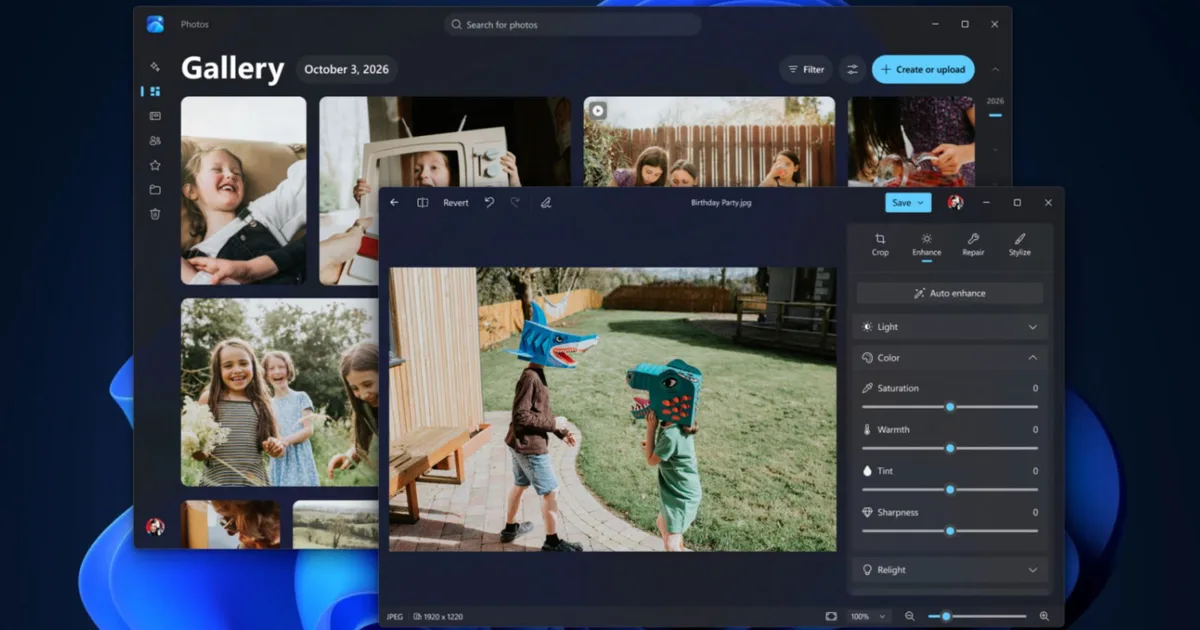
If you’ve ever spent several minutes digging through folders on your PC trying to find one particular photo, Microsoft might have something you’ll appreciate. The company has announced a major overhaul of the Photos app on Windows 11, and it’s more than a visual refresh. Nearly every part of the experience is getting attention, from how you find your pictures to what you can do once you open them.
The update introduces a completely redesigned Gallery, a rebuilt photo editor, and a faster image viewer. It also adds useful AI-powered features, including searching for photos using everyday language and removing unwanted objects from images. Microsoft is rolling out these changes to Windows Insiders starting today, with a wider release planned for later this year.
Finding that one photo shouldn’t take forever
Perhaps the biggest improvement is the new Gallery, which brings photos and videos stored on your PC, OneDrive, and Apple’s iCloud into one place. So, whether you took a picture on your iPhone, backed it up to OneDrive, or saved it directly to your computer, you won’t have to jump between different apps to find it. Microsoft is also making it easier to track down specific pictures. Instead of remembering when you took something or what you named the file, you can describe what you’re looking for. Searching for something like “sunset at the beach” should help you find matching photos without endless scrolling.
Microsoft
A new People feature lets you browse pictures featuring specific friends or family members. You can even combine filters to narrow your search by who’s in the photo and where it’s stored. Another addition is Moments, which automatically groups related pictures from your OneDrive collection into memories. Of course, you can still create albums, mark your favorite pictures, and browse locally stored photos without an internet connection. And importantly, you won’t need a OneDrive account to use the app with pictures stored locally or in iCloud.
Editing photos is getting faster and a lot more interesting
Finding your pictures is only half the experience. Microsoft has also rebuilt the Photos editor using WinUI 3, promising a 25% faster launch. The editing tools are now divided into four sections: Crop, Enhance, Repair, and Stylize. That should make it easier to find what you need, whether you’re straightening a picture, adjusting its colors, or giving it a completely different look. One particularly useful addition is an improved object-removal tool. If someone accidentally walked into the background of an otherwise great picture, you can brush over or circle the unwanted object and let AI handle the cleanup. Microsoft says its updated model produces better results while processing edits faster.
Microsoft
Relight is also expanding to all Windows 11 devices. It lets you add up to three virtual light sources to a picture, adjust their color and brightness, and choose where they point. You can even use presets like golden hour if you’d rather not adjust everything manually. The editor now supports HDR images while preserving color and contrast, and it can edit and save HEIC and WebP files in their original formats. New social media crop presets should also come in handy when preparing pictures for Instagram or other platforms. Finally, the image viewer is getting some much-needed attention. Microsoft claims it now launches 15% faster on average, with HEIC images opening up to 30% faster. It has a cleaner interface, better HDR viewing, SVG support, and a more detailed information panel that shows everything from camera settings to a photo’s location, when available. For now, you’ll need to join the Windows Insider program to try the redesigned experience. Everyone else can expect it to arrive sometime before the end of 2026.