


Verdict
The Liene PixCut S1 delivers all-in-one photo and sticker printing in a compact setup. I am not looking for much shelf space for this, but it’s certainly worth keeping around. Its limitations are noticeable: clearance requirements, restricted paper sizes, and hindered multitasking on phone; lastly, the price point may give some buyers pause. The overall experience, convenience and print quality still make it a strong, reliable option without a complicated setup.
-
Intuitive app and user interface
-
Clean, precise cutting
-
Professional grade print quality
-
Compact, unobtrusive design
-
Cannot exit the app during printing/cutting
-
Paper feed requires large clearance on both sides
-
Paper sizing is limited
Key Features
Introduction
Every graphic designer, or human with a keen eye, knows that image quality makes or breaks the viewing experience. If the images are pixelated and the colors bleed, there is no reason for a second look.
The Liene PixCut S1 ensures that never happens thanks to its thermal dye sublimation and 300 DPI resolution.
With its AI auto-cutting precision and intuitive phone app, the entire process from proof to print is smooth enough to design, print and cut high-quality images seamlessly.
But just how good is this photo and sticker printer?
Advertisement
Design
- Small and compact
- Magnetic cover
- Easy cartridge installation
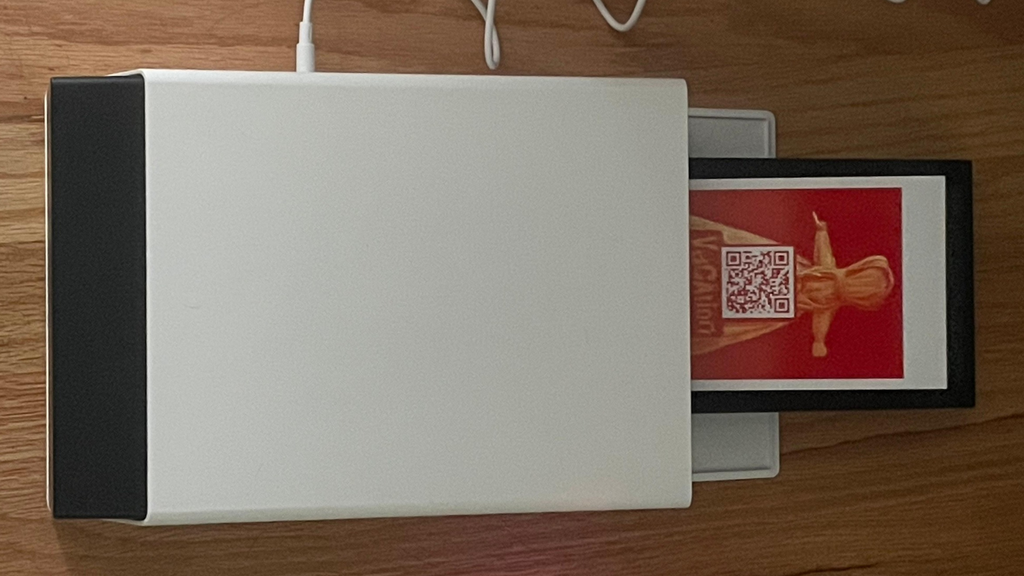
The design might be my favorite part. It lies flat like any printer but takes up far less space. About the size of a shoe box, a compact rectangle.
The paper cassette that holds the photo paper is stored inside on one end, hidden by a sleek plastic door. You pull out the cassette and load the paper in. You open the cassette and place the 4” x 6” for photo and 4” x7” for stickers, a small extendable plastic latch in the corner locks the 4×6 paper in place and retracts for 4×7.
Rollers inside the device feed the paper into the machine, back and forth each until printing is complete.
Image Credit (Trusted Reviews)
Advertisement
On the cutting side, there is a magnetic protective cover encasing the sharp, pre-installed blades encased in the machine.
The ink cartridge slides into place on the side opposite the power button with a lift and lock latch to keep it secure. This hatch is situated next to the power socket and USB Type-C port. A large, color-coded button with a status indicator also enables the device to pair with Bluetooth for app use.
Image Credit (Trusted Reviews)
Features
- No need for a computer
- All done through the mobile app
- Detailed, vibrant images
The device removes the need for a computer entirely. Your phone becomes your design studio, easing the workflow for sticker making or photo enhancement.
Upload photos into the Liene Photo App, where the AI can create vivid concepts thanks to an AI color palate that adds up to tens of millions of options.
Advertisement
Image Credit (Trusted Reviews)
On the printing side, the convenience level is incredible. For photos, they print and drop out on the same side as the cassette.
For stickers, which require the blade to do its work, they are released on the same side as the cutter and require extra clearance as a result. Edges are flawlessly clean, and the die cutting is done with total precision. The paper cassette requires about 8” of clearance to feed into the machine, and the cutter side is the same.
Image Credit (Trusted Reviews)
The paper itself goes back and forth into the machine four times. After preparing and parsing the photo for identifiable data, it begins printing with the four core ink colors: magenta, cyan, yellow and black.
The four-layer thermal dye-sublimation means the paper is automatically laminated during printing, making it waterproof and scratch resistant.
Advertisement
The result is a detailed, vibrant image of the highest quality. User-friendly to the point that creators as well as logical, left-brain thinkers can navigate the clean UX. If you exit the app at any time and quickly return to it before the printing stops, the colors will bleed while printing and really damage the image quality.
When cutting, the AI analyzes the shape of the image, then generates a cut path around it. The blades then trace the perimeter of each sticker with pinpoint accuracy as they follow the AI-generated contour map.
Image Credit (Trusted Reviews)
This all occurs without any manual calibration or alignment whatsoever. The device will stop cutting the moment the app is closed, which I learned the hard way as I backtracked through the queue to finish the job later.
Final Thoughts
When it comes to crafting, it isn’t my strong suit. DIY can feel more like a chore than a creative outlet for me.
The Liene PixCut S1 flips the script, regardless of skill level. Workflow becomes fast, simple, and professional, allowing a higher level of production.
From label-making to other small batches of custom designs, the process is fun and engaging. The final product makes a person feel skilled at design, resourceful for the low cost per print, and relaxed from the comfort of their own home.
The device really enhances what a casual creator can accomplish.
Advertisement