


Jess Kinghorn
Hardware writer
This month I’ve been: veering between cable management heaven and hell with the Corsair Frame 4000X. The highly customisable PC case itself is lovely, but the thick braided cables I was limited to using became my nemesis.
The observation that building a PC enjoys a similar appeal to clicking Lego bricks together is far from an original thought; when handed a big ol’ box of PC case faceplates, side panels, and internal brackets, few could resist having a play. So, when I was left unattended with a box o’ bits for the Corsair Frame 4000X, I set to work on building my dream PC case.
First, it’s worth noting that a lot of the parts I’m about to talk about are compatible with the Corsair Frame 4000D PC case our Jacob reviewed. Second, let’s talk about the all-important aesthetics: there’s a range of options for faceplates and, as they’re largely tool-free, you can swap them out to your heart’s content. However, the RGB Flow front panel features an additional cable that you’ll need to feed behind the modular front panel I/O every time.
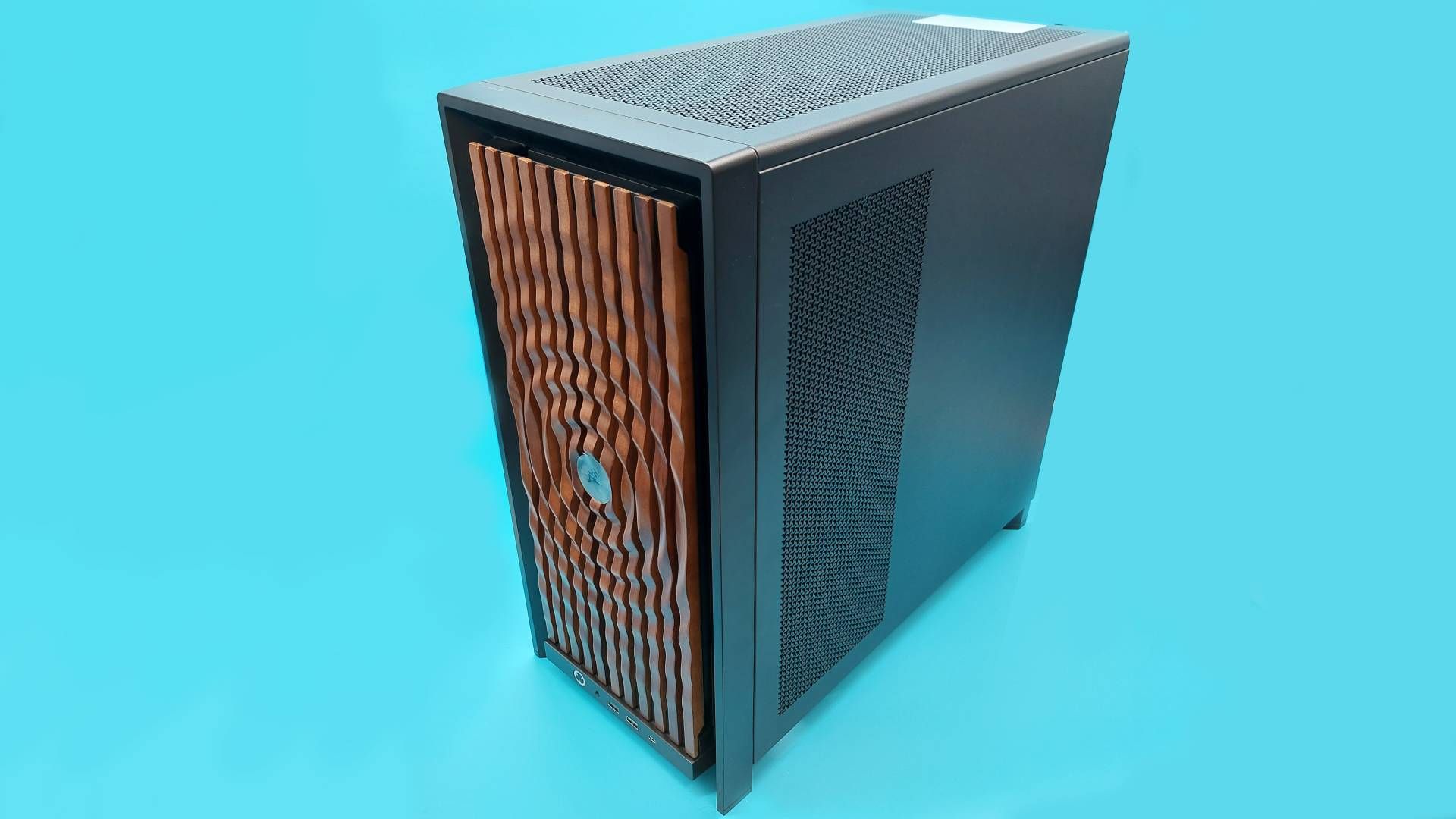
The faff of threading this wire behind the I/O module, plus the fact I thought the RGB Flow looks a bit like a Cylon, meant I swapped it out for some tasteful wood panelling pretty sharpish. Mounting the radiator in the front of the case also meant I wasn’t going to get the most out of the 4000X’s full glass front panel, or ‘pixel glass’ face plate either.
Latest Videos FromPC Gamer
I aimed to build something that was business in the front, with the dark walnut face plate, and something of a party in the back, with at least some of my many Miku Hatsune figurines. To be honest, “But where will Miku sit?” dictates a number of my PC building decisions, and this build was no different. For example, internally you can choose between a full-size PSU shroud, or a compact version that proved the perfect perch for Miss Hatsune.
To rewind a bit, let’s talk about that modular I/O front panel. You can customise this and entirely swap it out. The MX-style green mechanical switch under the power button can be replaced for something more to your liking, and you’ve got a choice between a front panel with an audio jack, two USB Type-A ports, and one USB Type-C port—or an I/O module with only USB Type-C ports. I’m an old head, so I held on to my USB-A front ports.
You may like
(Image credit: Future)
Returning to the bigger picture, both the front and side panels can also be swapped out to dramatically change the look of the case too. Unlike the face plate, these aren’t completely tool free panels. Instead, the top and side panels are held in place with a number of thumb screws. That’s a fine compromise that balances both a secure attachment with easy-enough-detachment, though I do miss being able to pop off panels like I can on my Hyte Y40 at home.
But while we’re on the subject of disassembling this customisable PC case, allow me one complaint: I hate reading digital manuals. My big box o’ bits came with many smaller boxes, one of which featured a QR code on the underside of the lid. This takes you to a clearly labelled, nicely laid-out digital manual that I still hated scrolling through on my phone.
The rub is this: to check my understanding, it’s way easier to flip back and forth through a physical booklet rather than scrolling up and down on a screen. Also, if I lose the physical manual, then that’s my own fault—but if the digital manual disappears one day, that’s out of my hands in every sense.
You could opt for a flat steel side panel, thereby rendering your PC yet another boring black (or white) box, but where’s the fun in that?
Anyway, manual gripes aside, the side panels also only come in black and white, making for limited colourways with other build possibilities. You could opt for a flat steel side panel, thereby rendering your PC yet another boring black (or white) box, but where’s the fun in that? Another panel design lets you mount the Corsair Xeneon Edge LCD Touchscreen inside. While that would offer one more stage for my favourite Vocaloid, I wasn’t about to drop another 200 bucks on this accessory—even if it does come in a fetching ‘Atomic Purple’. Instead, I went for a typical fishtank look with a tempered glass side panel.
The Frame 4000X offers plenty of other options for laying out hardware, though it’s less of a switch up inside compared to outside. Even Frankenstein’s monster still needs a heart, lungs, and a digestive system, after all. Still, the case supports Mini-ITX, Micro-ATX, ATX, and E-ATX motherboards. You’ve also got multiple Motherboard tray options—this includes both the very sturdy, very premium Elite motherboard tray, plus the RapidRoute 2.0, a holey-moley design that makes it easier to zip tie your cables wherever you need. The back of the case features plenty of velcro cable management straps, so I stuck with the standard steel tray.
What to read next
(Image credit: Future)
(Image credit: Future)
(Image credit: Future)
The inside of the case is pretty spacious, with room to support both a 360mm radiator installed up top, as well as one in the front of the case. The Infinirail system also makes it easy to customise the internal support brackets to fit whatever cooling system you’re working with.
Speaking of support, this case also features a height-adjustable anti-sag bracket for your GPU. Unfortunately, I only had a small form factor graphics card to hand for this build, so I wasn’t able to make the most of this feature. Not to worry though, because Miku was able to pick up the slack from her perch upon the PSU shroud.
(Image credit: Future)
Vocaloid brain rot aside, does any of that mean I was able to manifest my dream PC case with the Corsair Frame 4000X? Firstly, all of the bits I picked, including the case, totted up to about $170. So, it’s definitely not the most affordable option, but that’s the price of going all in on an ecosystem offering plenty of options.
You can push the price down by building on top of 4000D instead, but then you’ll have to pay for parts that come with the newer case as standard, like that lovely full-tempered glass side panel. If that still sounds worth a go, you can configure your own Corsair Frame case here. Speaking of the 4000D, you can pick up a Corsair Vault version of this case in metallic purple for $130, so maybe I’ve found my dream PC case after all…
(Image credit: Future)
(Image credit: Future)
(Image credit: Future)
(Image credit: Future)
There’s a lot to like about the newer 4000X’s space, ease of access, and customisability. Much like the 4000D, you can strip the 4000X to the bare frame and then build it back up to be a PC case your way. But with so many removable parts, such a breadth of customisability options nearly became a bit of a nightmare for a scatter-brained PC builder like me.
In my infinite wisdom, I decided to remove the entire PCI backplate—despite the backplate’s modular design encouraging you to unscrew only the select slats you need to secure your GPU. I realised my snafu way too late, and had to unscrew both the PSU shroud and the motherboard to get it back in place. Don’t ask me why I took it out to begin with—just learn from my mistakes.
(Image credit: Future)
That embarrassing episode aside, I did enjoy my time building with this case. I’m also definitely intrigued by whatever Corsair has lined up for its customisable PC case ecosystem—what’s holding me back from loving it right now, though, are the limited selection of colourways, and the pricing. But perhaps one day, sweet dreams will be made of this.
Best PC cases 2026
All our current recommendations