


At the Samsung Galaxy S26 series unveiling, my eyes glazed over at several points.
I’m not won over by the AI features Samsung has been pushing for ages. Specs-wise, each model is similar to its S25 counterpart, and I don’t want a Google Pixel-inspired scam detection mode because bad scam messages are a constant source of joy.
There are some neat tweaks: Privacy Display has won over some early users, and camera-mode upgrades are always appreciated, especially with the linked aperture upgrades.
But one feature piqued my interest during the announcement event and when I went hands-on with the Galaxy S26 Ultra for testing. It proved itself quickly.
This feature isn’t new, but an existing one that was enhanced, and I’m surprised more people aren’t touting it as one of the coolest new additions to the S26 series.
I’m talking about Audio Eraser, which is ready to join the big leagues. It’s available on all three new Galaxy phones. I’ve been testing the Ultra.
Related
These 5 Samsung-exclusive features have rekindled my love for Android
My Galaxy S24 Ultra made me curious about Android again
What is Audio Eraser?
It’s an audio modifier, but that’s not a catchy name
Audio Eraser has been around in Samsung Galaxy smartphones for several years, and the identical Audio Magic Eraser was on Pixels for a while before that.
This tool works in apps like Gallery or Voice Recorder, and it strips annoying background sounds from audio files you’ve recorded or received.
By “annoying background sounds,” I mean things like crowd chatter, audience chants at a live gig or sports match, and natural sounds like wind or running water.
Not annoying in general, but noises that could make a voice memo you’ve recorded hard to hear, or be distracting in a video you’ve shot.
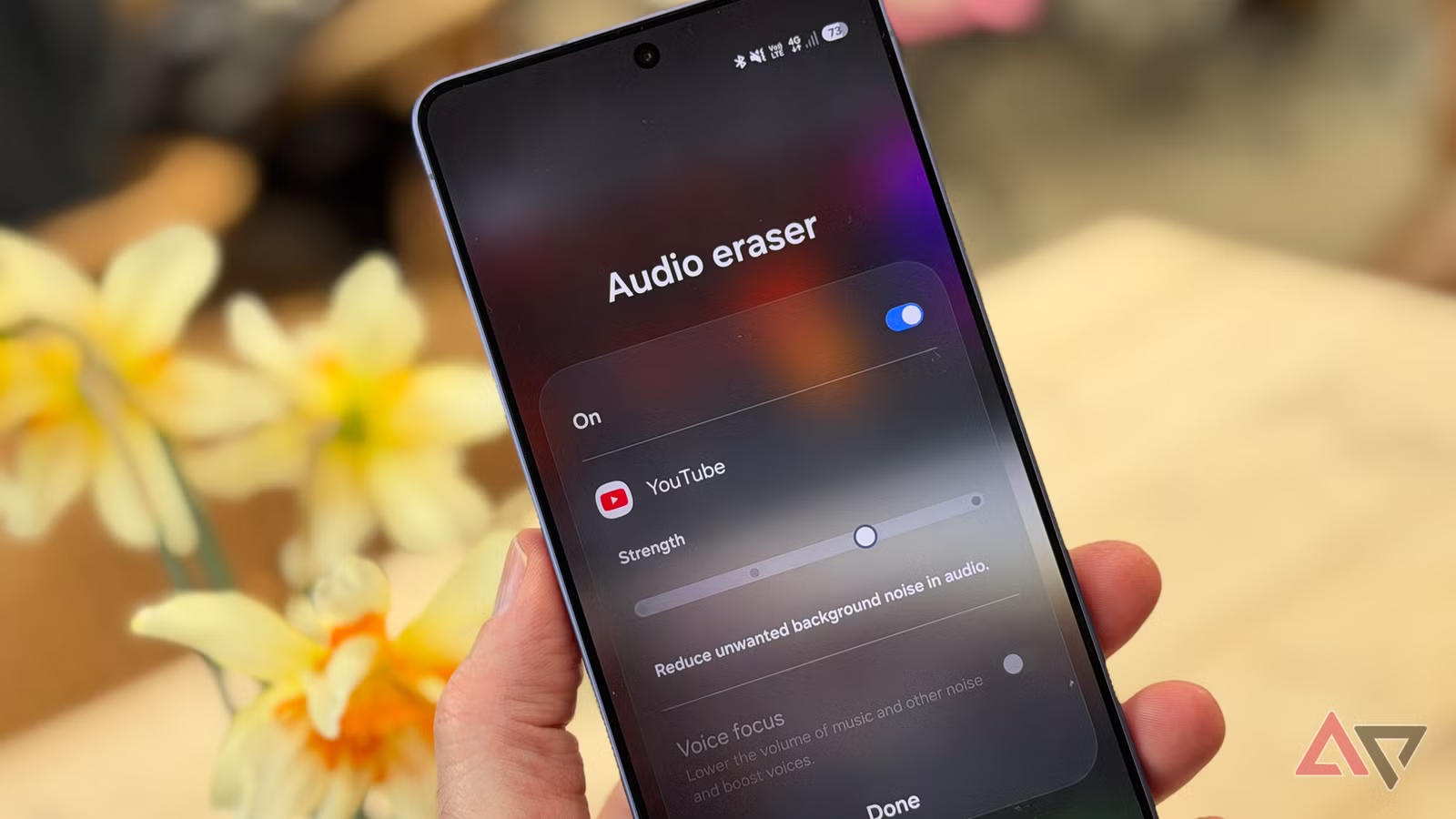
The big upgrade Audio Eraser gets in the Samsung Galaxy S26 series is that it’s no longer limited to Samsung apps, but also works in third-party apps.
The main examples Samsung touted are Instagram, YouTube, and Netflix. Since I have a Galaxy S26, I’ve found it working in other apps, like Prime Video and Tubi.
Related
This Galaxy S26 feature completely changed how I watch videos
A simple toggle that fixes bad audio
How I used Audio Eraser
The audio I wanted to erase first
When I saw the Samsung Galaxy S26, Audio Eraser stood out as a new feature, and I got a live demo at a soccer match.
The crowd cheers and chants were eliminated, so you could only hear the commentator. Anyone who’s been to a footie game in the UK knows the crowds are loud, and that’s part of the attraction.
Samsung organized this demonstration, so when I got to test the S26 Ultra myself, I wanted to test the feature in a use case of my choosing.
So I booted up YouTube and found some sports videos. In this case, some AFL highlights involving my partner’s team, Richmond FC.
Initially, I was shocked by how little the mode did — until I realized that it was turned off by default. To turn it on, swipe down to open the quick settings menu, and if you’re in a compatible app, Audio Eraser’s button will be at the top.
From my testing, it seems that you need to re-enable the mode every time you close the app.
When I tested the feature with AFL, the mode didn’t completely remove the background chants, but it reduced them to just a whimper in the background.
You can choose from four strengths, plus a voice focus toggle on the highest mode. Each reduced crowd noise compared with the commentators and occasional match noise (whistles, ref shouts, and so on).
Later, I tried the mode with a Wimbledon match. The sport generally has a quieter crowd, but you always get noisy people shouting at the players. I thought these irregular loud spikes would be an interesting test.
Again, it worked really well. With the mode on, I couldn’t hear the heckles or shouts. It also stripped out the reverb and murmuring crowd noises almost totally, so all I could hear was the commentators and announcer — and a lot of grunting from Federer and Nadal.
Related
I found the best audio upgrade was one I already own, but forget to use
I’d fallen into the dreaded convenience trap
Other situations where Audio Eraser could help
And some where it couldn’t
Sports aren’t the only potential use case for Audio Eraser. I can see it being useful in other live broadcasts that can’t get the editing or sound engineering that packaged broadcasts do.
Twitch livestreams, Instagram stories, and news footage of breaking events seem like the natural picks.
A benefit I noticed was in commercials. I hate how loud these can be on YouTube or Netflix, compared to the video I’m watching, and Audio Eraser made them a little quieter.
I only did limited testing, and it seems to be a side effect of the tool rather than an intended purpose. Still, I was glad to take the edge off these intrusive adverts.
For all the handy benefits Audio Eraser brings, there’s also a line. Several video streaming services offer the tool. However, I’d never use it on movies or TV shows.
Countless hours go into the audio mix for programming and stories like that, and it’d feel offensive to the talent involved to use a tool to remove Foley or atmospheric sound that’s in there for a reason.
Exceptions perhaps exist in specific accessibility cases for certain listeners, and, for sports, some streaming services have begun dipping their toes in. But I’m not going to jump into A Knight of the Seven Kingdoms and remove the crowd chants.
Related
I stopped blaming my headphones after trying this Android equalizer app
It fixed my audio problem without buying new gear
After 5 minutes, I still think it’s great
I’ve recently started using the Samsung Galaxy S26 Ultra as my day-to-day phone, so I’ll be testing Audio Eraser in a range of settings to see how well it fares.
But even after five minutes, I’m finding it great. As other Android Police writers are loving how Privacy Display works, Audio Eraser is my killer feature.