


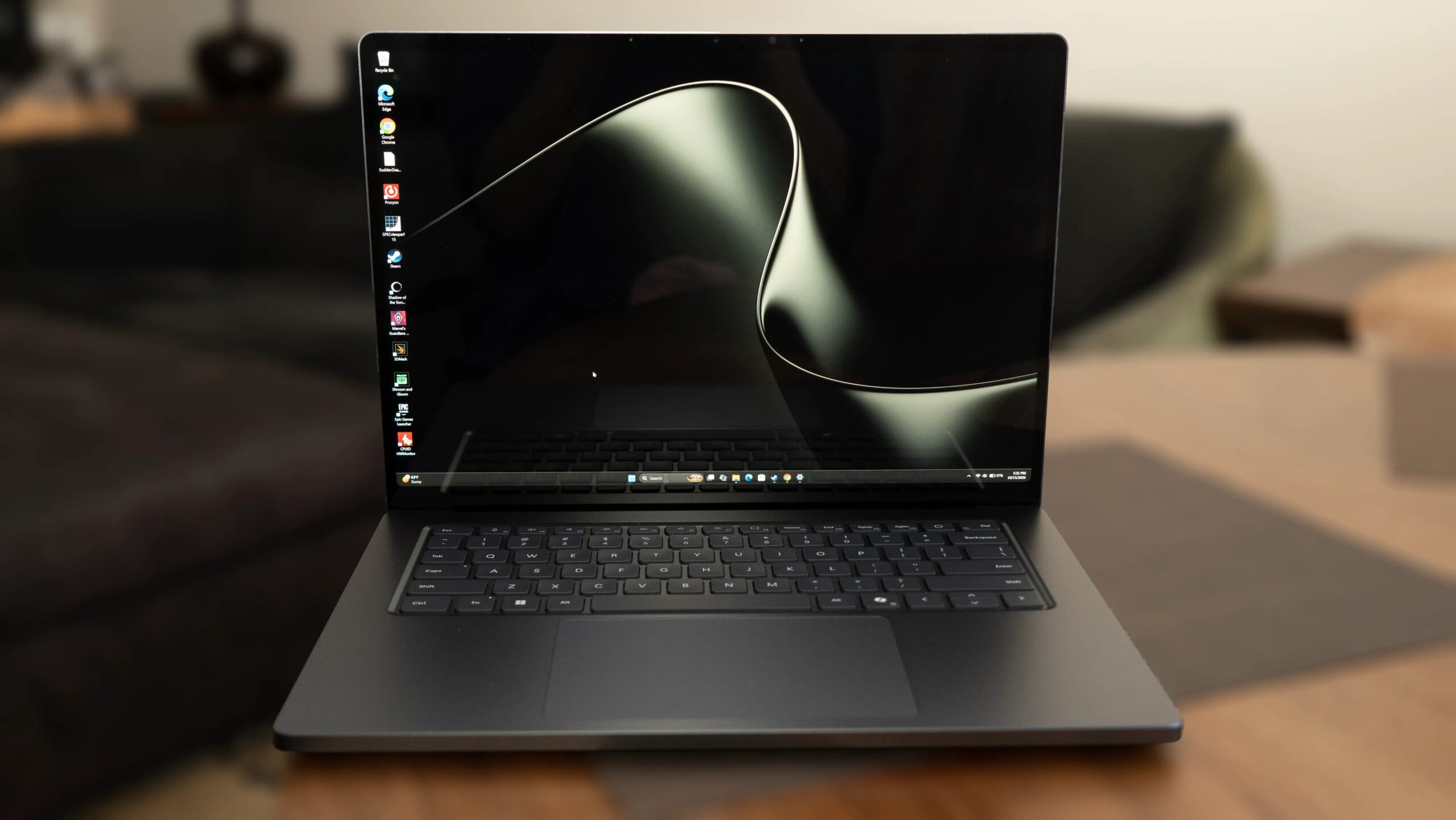
Microsoft Surface Laptop Ultra
Pros & Cons
-
Very accurate display with very high peak brightness and HDR support -
Great build quality -
Good performance
-
Screen is really reflective in some conditions, and suffers from motion blur and HDR blooming -
No display profiles, color management or tools for professional creatives -
Meh battery life -
No lip to grab lid for easy open
Nvidia and its partners have marketed the hell out of its Arm-based RTX Spark N1X chip, and Microsoft has taken the opportunity to highlight updates to Windows that take advantage of it, like its AI developer tools and overhauled Arm support. The company’s showcase device for all that is the new Surface Laptop Ultra, which, like the multitude of competitors launching at the same time, is leaning heavily on AI agents and creative uses to differentiate itself from less powerful or more mainstream laptops.
There is a herd of new RTX Spark laptops, but the Surface Ultra partly stands out for its long-overdue display upgrade.
Unlike most of the Sparks, such as the HP Omnibook Ultra 16 and Lenovo Yoga 9n 2-in-1 16 Gen 11, which incorporate OLED screens, Microsoft opted to continue with its PixelSense, albeit a new screen it dubbed PixelSense Ultra — an LG IPS panel now with a mini-LED backlight. Most notably, Microsoft finally has a screen that supports HDR, which boosts its appeal for all users who simply want to stream entertainment or play games.
My analysis is still in progress, pending some further tests I want to run. I’m comfortable with my conclusions, but there’s more nuance I want to explore and consider, especially in conjunction with the testing of the Asus ProArt P16 I’ve got on deck.
Microsoft Surface Laptop Ultra specs
Price as reviewed$3,700Display15-inch IPS MiniLED HDR touchscreen, 3,270×2,180 120Hz, 2,000 nits, 100% P3CPUNvidia RTX Spark N1X (18C)Memory32GB LPDDR5-9400Graphics5,120-core iGPUStorage1TB SSD, SD card slotPorts3xUSB-C 4, 1xUSB-A, 1x HDMI 2.1b, combo audioNetworkingWi-Fi 7, Bluetooth 5.4 tkOperating systemMicrosoft Windows 11 Pro 26H1Weight4.4 lbs (2.0kg)Ship dateOctober 2026
The laptop comes in a variety of configurations. The lower-end model starts at $2,600, is based around the 18-core CPU and 5,120-core GPU version of the chip, and comes equipped with 24GB RAM and a 512GB SSD. You can only configure that version with up to 32GB RAM and a 1TB SSD. The higher-end 20C/6,144C chip configurations start at $3,700 with 32GB RAM and a 1TB SSD and can be configured with up to 128GB RAM and a 1TB SSD for $5,900.
Oddly, if you want the 2TB SSD you can only get that with 64GB RAM. Maybe Microsoft didn’t want a version that would run more than $6,000, because with 128GB RAM and the 2TB SSD it would cost well north of that.
Design
The Ultra’s design is generally typical for a premium-class laptop, that is to say, sturdy and shiny. It comes in two finishes, Nightfall (a mid-gray) and Platinum.
One of the newsiest aspects is the magnetic USB-C port, which works only with Microsoft’s cable due to the general nature of the technology rather than gack-Microsoft’s-gone-proprietary-again. If you want to use the sizable power brick with other devices, you can flip the cable and use the standard end. The magnetic end is angled, so you’re not likely to confuse them.
The Surface has an extra-large haptic touchpad.Lori Grunin/CNET
On one hand, I like it a lot more than the MagSafe connector on the Mac, simply because it doesn’t detach if you breathe too hard in its direction, like the MagSafe. I also think its tendency to be drawn toward the port will reduce scratches around the connector in the long run, because, yes, I’m that person who plugs things in without looking in the dark.
But there’s only one magnetic-capable port, which means it only works on the right side. If you like to connect a portable monitor on the right, which means power on the left, you’re out of luck.
The Ultra has the essential ports, including three USB-C 4 and an HDMI connector, plus a full-size SD card slot. Because the chip is Arm-based, it doesn’t support Thunderbolt, a potential consideration if you need it for pro accessories.
As with other Surface Laptops, you can replace the SSD.
It’s not the heaviest laptop for its size at 4.4 pounds, but it’s not the lightest either, especially since it’s a 15-inch, not a 16-inch model; in comparison, the 16-inch MacBook Pro weighs 4.7 pounds, and the Asus ProArt P16 runs 3.9 pounds.
There’s one magnetic USB-C connection, on the right side, for charging, though you can connect any USB-C device to it.Lori Grunin/CNET
When running flat out, plugged in, it can get hot under the hinge. Heat has to vent somewhere, and for most people, it’s probably better there than through the keyboard or the sides. But I use laptops resting on my thighs, right at the spot that tends to get the hottest, so it’s something I probably notice more than others do.
Only one thing really annoys me about the design, though. It lacks any sort of lip or place to grab the lid, the surface is fairly slippery, and the hinge is relatively tight, so it takes two hands to open.
A squandered screen
The new display really delivers on brightness in both SDR and HDR: a boggling peak 1,000 nits in SDR and 2,000 in HDR, as tested. In theory, the high SDR brightness should help with visibility in bright environments.
There also seems to be a surprising amount of motion blur, blooming or other sorts of halo-ish artifacts. And with mini LED, or at least this mini LED implementation, you sacrifice blacks and contrast. The Ultra’s screen has comparable contrast to other mainstream IPS screens, but OLED and even the MacBook Pro’s IPS display (which also uses mini LED) deliver true black rather than the Surface’s more washed-out looking version.
The screen also has stellar color and tonal accuracy for P3 and sRGB, which is great. But despite Microsoft’s targeting of creatives as one primary audience for the Ultra, there’s little here for people who do color-critical work.
It’s glossy and really reflective in bright environments, in fact, in any lit environment where there’s something behind you, which is one reason you have to jack up the brightness. In dim or no light, the screen looks fairly matte.
P3 seems to be the native colorspace, given it nails the gamut primaries and D65 white point across the tonal range, but the profile for it is Vivid — an appeal to consumers who just want poppy colors rather than pros. There’s an sRGB profile that clamps to the gamut, but that’s about it. Neither locks to specific brightness levels, like you might want for DCI-P3, there’s no Adobe RGB or equivalent (and the gamut coverage for that is surprisingly bad), and there’s nothing for HDR beyond a generic “HDR” profile; it supports Dolby Vision IQ, but that’s for playback. You can calibrate the display yourself, but some workflows need hardware references. The third profile, Enhanced, is for general productivity work.
It seems like a huge waste of the screen. Then again, I’m not surprised, given it’s brought to you by the company whose operating system’s color management is decades old.
Performance
The Ultra’s performance is a mixed bag from a variety of perspectives. One caveat is that Microsoft’s power settings, at least for my test unit, defaults to the “best power efficiency” setting for its Balanced profile, even when plugged in; common practice is to switch to best performance while connected and best power efficiency when running on battery. Even so, battery life is pretty lackluster at only about 10 and a half hours.
Depending upon what you’re doing, there’s as much as around a 40% difference between the CPU performance on the two settings, which means the performance can look really bad relative to other systems. And the best power efficiency setting while running on battery tanks performance even more.
I’ve asked Microsoft about it, but have yet to hear back.
When running at its best performance, it unsurprisingly comes pretty close to the other RTX Spark systems we’re testing. I didn’t expect the single-core performance of the Nvidia systems to be so meh compared to others, though; the Spark only outperforms the rest on multicore tests because it has more cores.
It also shouldn’t surprise anyone that an Nvidia-based system has solid GPU performance with good gaming performance for integrated graphics; for example, 106fps on Guardians of the Galaxy at 1080p, more notably 93fps on battery.
For Arm-native pro applications like the Unreal Engine and Blender, it seems to do as well as or better than the 8090S graphics in the AMD Ryzen AI Pro 395 Max (using the SpecViewPerf published results, since I don’t yet have my own comparative data), but lags when it has to use x86 emulation.
Companies involved in this launch have stressed that these are not gaming systems: They’re systems that can play games pretty well. And that holds true. But who the Surface Laptop Ultra is for isn’t clear. It’s not more powerful than the Spark competition, nor is it lighter or cheaper. It’s a fine all-around system, and if you need something for heavy local inferencing, you might want to opt for a model with more than 32GB memory — if you can afford it — but if you’re looking for the best one, wait a little longer until there are more for comparison.
Test system configurations
HP OmniBook Ultra 16Microsoft Windows 11 Home 26H1; Nvidia RTX Spark N1X (20-core); 32GB LPDDR5-9400 RAM; integrated 6,144-core GPU; 1TB SSDLenovo Yoga 9n 2-in-1 16 Gen 11Microsoft Windows 11 Home 26H1; Nvidia RTX Spark N1X (20-core); 64GB LPDDR5-9400 RAM; integrated 6,144-core GPU; 1TB SSDMicrosoft Surface Laptop UltraMicrosoft Windows 11 Pro 26H1; Nvidia RTX Spark N1X (20-core); 32GB LPDDR5-9400 RAM; integrated 6,144-core GPU; 1TB SSDAsus Zenbook A16Microsoft Windows 11 Home; Qualcomm Snapdragon X2 Elite Extreme X2-E94-100; 48GB DDR5 RAM; Qualcomm Adreno X2 Graphics; 1TB SSDHP OmniBook Ultra 14 (Qualcomm)Microsoft Windows 11 Home; Qualcomm Snapdragon X2 Elite X2E-90-100; 64GB DDR5 RAM; Qualcomm Adreno X2-90 Graphics; 2TB SSDHP OmniBook Ultra 14 (Intel)Microsoft Windows 11 Home; Intel Core Ultra X9 388H; 64GB DDR5 RAM; Intel Arc B390 Graphics; 2TB SSDAcer Swift 16 AIMicrosoft Windows 11 Home; Intel Core Ultra 7 256V; 16GB DDR5 RAM; Intel Arc 140V; 1TB SSDDell XPS 16Microsoft Windows 11 Home; Intel Core Ultra X7 358H; 32GB DDR5 RAM; Intel Arc B390 Graphics; 1TB SSDLenovo Yoga 7a 16Microsoft Windows 11 Home; AMD Ryzen AI 7 445; 24GB DDR5 RAM; AMD Radeon 840M Graphics; 1TB SSDApple MacBook Pro 16 (M5 Pro)Apple MacOS Tahoe 26.3.1; Apple M5 Pro (18-core CPU, 20-core GPU); 48GB LPDDR5; 2TB SSDApple MacBook Pro 16 (M5 Max)Apple MacOS Tahoe 26.3.1; Apple M5 Max (18-core CPU, 40-core GPU); 128GB LPDDR5; 4TB SSD
How we test computers
The review process for laptops, desktops, tablets and other computer-like devices consists of two parts: performance testing under controlled conditions in the CNET Labs and extensive hands-on use by our expert reviewers. This includes evaluating a device’s aesthetics, ergonomics and features. A final review verdict is a combination of both objective and subjective judgments. The list of benchmarking software we use changes over time as the devices we test evolve. The most important core tests we’re currently running on every compatible computer include Primate Labs Geekbench 6, Cinebench R24, PCMark 10 and 3DMark Fire Strike Ultra. A more detailed description of each benchmark and how we use it can be found on our How We Test Computers page.
Lori Grunin
See full bio